Canva’s AI Design Tool Now Adds Editing Layers
▼ Summary
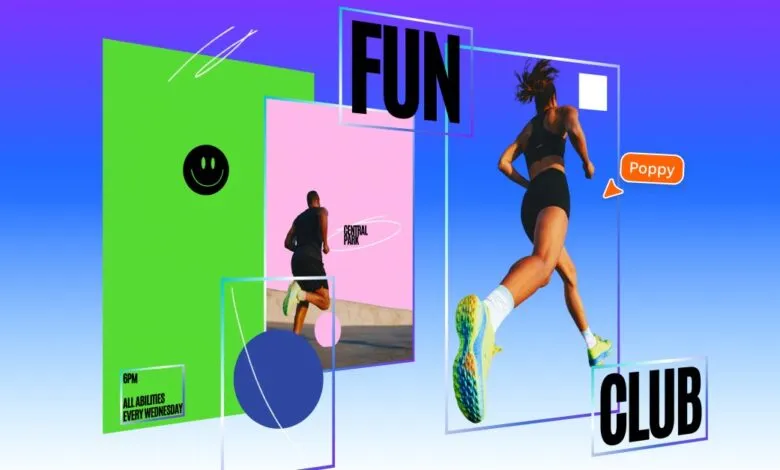
– Canva launched Magic Layers, a public beta tool that converts flat PNG/JPEG images into fully editable, layered designs.
– The feature allows individual components like objects and text to be selected and edited while preserving the original layout.
– It works with both AI-generated images and standard flat files, aiming to eliminate the need to reprompt AI for minor edits.
– Magic Layers offers more advanced functionality than competitors like Adobe, which don’t automatically separate entire images into layers.
– This tool provides greater editing control but may also make it harder to distinguish AI-generated designs from original human-made work.
Canva has unveiled a significant upgrade to its design platform with a new feature that transforms static images into editable, layered compositions. This tool, called Magic Layers, is now available in public beta across the United States, the United Kingdom, Canada, and Australia. It empowers users to deconstruct a single flat image file, whether AI-generated or a standard PNG or JPEG, into individual, selectable components. This means elements like objects, text, and graphics can be manipulated independently without disrupting the original layout, eliminating the need to start a design from scratch or repeatedly adjust AI prompts for minor changes.
The development stems from a recent breakthrough by the company’s AI research team. Canva’s chief product officer, Cameron Adams, emphasized that the tool shifts the focus from mere generation to true creative freedom. “There’s no need to start over, or to figure out the right prompt,” Adams stated. “Generation is just the beginning – real creative freedom comes from being able to edit without losing momentum.” While Magic Layers currently works with any single-page image file, its introduction is closely tied to Canva’s broader push into generative AI, offering a streamlined solution for refining AI-created visuals.
This functionality represents a notable advancement over offerings from other major creative software providers. For instance, while Adobe applications like Photoshop add AI-generated elements to distinct layers, they do not currently provide an automated method to dissect an entire pre-existing image into a fully layered document. Magic Layers provides a level of manual control and editing flexibility that sets it apart in the market.
However, this innovation also introduces a nuanced consideration for digital artists and creators. By making AI-generated designs as editable as those built manually from the ground up, the tool could make it increasingly difficult to distinguish between AI-assisted work and original, hand-crafted design. Currently, the flat output of image generators offers a telltale sign of AI involvement; the ability to showcase complex element layers has been one way artists demonstrate traditional creation. Magic Layers effectively bridges that gap, blending the efficiency of AI with the detailed control of manual editing.
(Source: The Verge)