NotebookLM Upgrades to Gemini 3, Adds Data Tables Feature
▼ Summary
– NotebookLM has been upgraded to the Gemini 3 model, significantly improving its reasoning and multimodal understanding.
– Users can now upload notebooks directly into the Gemini app on the web, with mobile availability coming next year.
– A new “Data Table” feature synthesizes sources into structured tables that can be exported to Google Sheets.
– The Data Table feature is currently for paid subscribers but will be available to free users in the coming weeks.
– Users can export Study Guides, Briefing Docs, or saved Notes to Google Docs or Sheets via an overflow menu.
Google’s NotebookLM has received a significant update, integrating the powerful Gemini 3 model and introducing a versatile new Data Tables feature. This enhancement promises to deliver stronger reasoning and a deeper understanding of multimodal content for users of the AI-powered research and analysis tool. While the specific variant of Gemini 3 wasn’t detailed, the upgrade follows the platform’s pattern of utilizing the Flash versions of Google’s models, with the change happening seamlessly in the background.
In a related move, Google has formalized the ability to upload NotebookLM projects directly into the Gemini app. This integration, live on the web with a mobile version planned for next year, opens up several new possibilities. Users can now merge multiple notebooks, create images or applications inspired by their content, and expand their research by building upon existing notebooks with information gathered from the web.
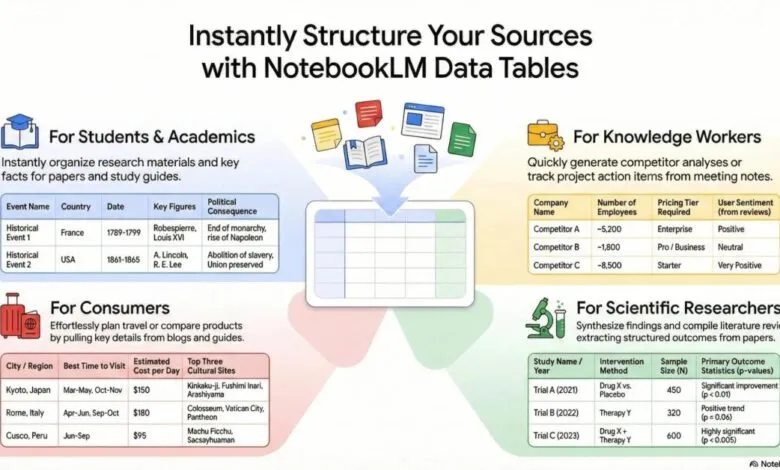
The standout addition is the new Data Table output format. This joins the existing suite of Studio tools like Audio Overviews, Mind Maps, and Study Guides. The feature is designed to transform unstructured source material into organized, actionable tables. Google’s system analyzes your provided documents and extracts key information, structuring it into clean tables that can be easily exported to Google Sheets for further manipulation.
The practical applications for Data Tables are broad and impactful. Professionals can convert lengthy meeting transcripts into a clear action item tracker, complete with assigned owners and priority levels. Researchers might synthesize data from numerous clinical trial papers to compare study years, sample sizes, and outcomes in one consolidated view. Students can prepare for exams by creating chronological tables of historical events, noting key figures and consequences. Even personal projects like vacation planning become easier, allowing for side-by-side comparisons of destinations, ideal travel times, and budget estimates.
Access to the Data Tables feature is currently rolling out, starting with subscribers to the Google AI Pro and Ultra tiers. Google has confirmed that the functionality will become available to all free users in the next few weeks. Additionally, a new export option has been added. By tapping the three-dot menu next to any Study Guide, Briefing Doc, or saved Note, users can now directly export the content to Google Docs or, if the note contains a table, to Google Sheets.
(Source: 9to5 Google)