Android DIY widgets offer vibe-coding fun
▼ Summary
– A senior tech reviewer explores Android’s new AI-powered ‘Create My Widget’ feature, which allows users to generate custom home screen widgets using natural language prompts.
– The author tests the beta feature on a Pixel 11 Pro, creating whimsical widgets like a Jurassic Park quote generator and a rain status display for amusement.
– Practical attempts to use the tool for habit tracking resulted in simple prompt shortcuts rather than complex visual interfaces, revealing the current limitations of the technology.
– Many of the generated widgets function primarily as quick access links to Gemini or other apps, highlighting that the underlying software logic is not yet sophisticated.
– Despite some disappointment regarding the widget’s ability to provide real-time transit information, the reviewer found joy in experimenting with the playful capabilities of the new feature.
A senior reviewer with more than ten years of experience covering consumer technology, including mobile photography and telecommunications, recently explored the potential of Android’s vibe-coded widgets. While the primary goal was to create a tool that could alert her to impending bus departures, the experience highlighted both the novelty and the current limitations of Google’s latest AI integration.
The feature in question is known as Create My Widget, which debuted at Google I/O this spring. It serves as part of the broader Gemini Intelligence suite and has begun rolling out to Pixel phones in beta. The author initially viewed the release with enthusiasm, recognizing its potential to redefine how users interact with their home screens. However, the practical application for real-time transit data proved disappointing, even if the process of building other, less functional widgets provided entertainment.
Experimenting with AI-Generated Widgets
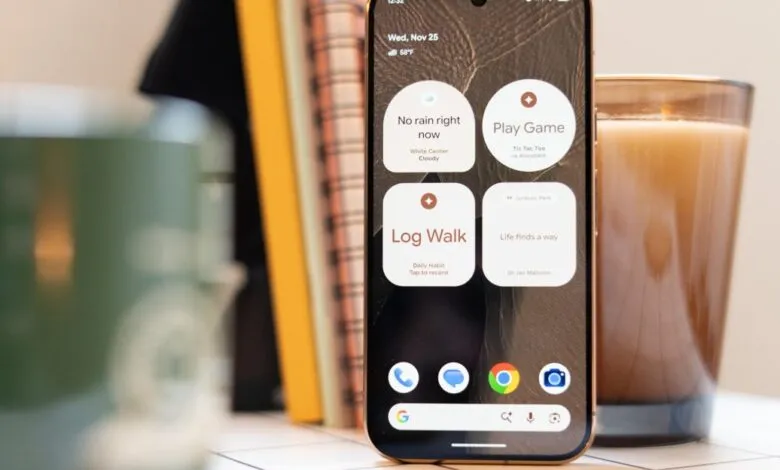
Testing the feature on a Pixel 11 Pro, the reviewer created several distinct widgets to gauge their utility and flexibility. One early creation displayed a rotating quote from the original Jurassic Park film. This widget generated in approximately twenty seconds and linked directly to a Reddit thread when tapped. Although the underlying mechanics were simple, the result provided immediate amusement. Another widget was designed to display the phrase “Tut tut, looks like rain” during precipitation. For non-rainy weather, it defaulted to stating “No rain right now.” Given the reviewer’s location in Seattle, this humorous addition offered consistent engagement despite lacking serious utility.
The interface offers templates for more practical applications, such as habit trackers and recipe generators. Attempting to utilize these, the reviewer requested a widget to track daily mental health walks. Instead of a visual streak tracker, the output was a basic button labeled “Log Walk.” Tapping this button invoked Gemini to add an entry to the calendar. Gemini did suggest creating a checklist to mark off days of the week, but the overall experience fell short of the envisioned visual reinforcement.
Understanding the Underlying Mechanics
The review revealed that many of these widgets function primarily as shortcuts for Gemini prompts. When activated, they open the Gemini interface, process the request, and return results. Common templates include countdowns to specific events or displays for sports scores. For more open-ended requests, the system pulls from Google search results or relies on Gemini to generate content. The reviewer noted that while this approach is consistent, it feels restrictive compared to customizable mini-apps.
This limitation became apparent when attempting to build a widget for real-time bus arrivals. The resulting tile simply read “Bus Arrivals” and used Gemini to search for schedule information. The output was a verbose explanation of bus frequency rather than precise arrival times. While the system failed to provide the desired glanceable data, the reviewer found solace in another widget displaying the iconic line: “Life, uh, finds a way.”
(Source: The Verge)