Microsoft’s New Windows Search: What Windows 11 Needs
▼ Summary
– Microsoft is overhauling Windows Search in Windows 11 to create a faster, more modern experience built on WinUI 3.
– Early testing indicates substantial improvements in performance and memory usage without adding bloat to the operating system.
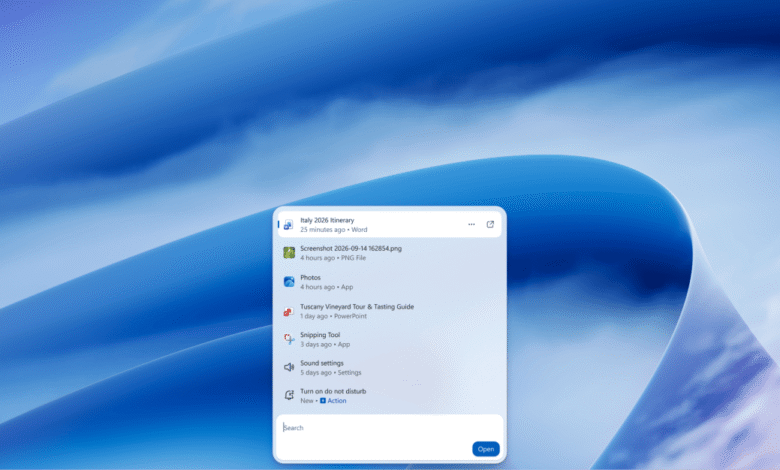
– The new interface features inline previews for files like PowerPoint and photos, mimicking the responsiveness of iOS and Android search.
– Users can utilize search as a launcher for system actions such as toggling Bluetooth or dark mode, and integrating with Phone Link for messaging.
– The redesigned feature is currently being tested by Windows Insiders and is expected to reach the general public in the coming months.
Windows 11 Search Overhaul promises to resolve long-standing usability issues with a significant redesign that prioritizes speed and modern functionality. Microsoft is currently testing this updated interface, which leverages WinUI 3 to deliver a faster, more capable experience without increasing system bloat. Early performance metrics indicate substantial improvements in memory usage, addressing one of the most common complaints among users regarding resource consumption.
A Modernized Interface and Performance Gains
The visual refresh includes speedy animations and a prominent preview pane that significantly enhances the user experience. Inline previews allow results to appear instantly, creating a fluid interaction model similar to those found on iOS and Android. This approach not only accelerates perceived performance but also provides immediate context for files such as PowerPoint presentations and photos.
Beyond aesthetics, the underlying search logic has been refined to better interpret user intent. The system now offers improved matching for typos and synonyms, ensuring that searches yield relevant results even when input is imperfect. This backend optimization works in tandem with the frontend changes to create a cohesive and responsive tool.
Expanded Functionality and Actionable Commands
Perhaps the most transformative aspect of the update is its evolution into a system launcher. Users can now execute commands directly through the search bar, such as toggling Bluetooth or enabling dark mode. The interface supports complex tasks like minimizing windows or arranging applications side-by-side, reducing the need to navigate through menus.
Integration with Phone Link further extends these capabilities to mobile devices. By typing specific commands, users can send text messages from their PC without switching contexts. For example, a user could type “text mom, I’m running late” to initiate a message from their linked smartphone. This level of integration streamlines workflows by bridging the gap between desktop and mobile operations.
Future Roadmap and Insider Testing
Microsoft is currently rolling out these features to Windows Insiders, signaling an imminent release for the broader public. The company aims to integrate the new search experience into the Start menu while ensuring it adapts seamlessly to various taskbar positions and screen configurations.
Anshul Rawat, corporate vice president of the Windows product team at Microsoft, emphasized the strategic importance of this update: “This new Windows Search experience is built for speed,” says Anshul Rawat, corporate vice president of the Windows product team at Microsoft. “It’s built on WinUI 3 and is part of our broader investment in modernizing our core Windows experiences.”
Looking ahead, development efforts will focus on enhancing natural language processing and providing richer contextual information. The ultimate goal is to make Windows Search a central hub for productivity, allowing users to accomplish tasks more efficiently through intuitive voice and text commands.
(Source: The Verge)