Google Find Hub: Locate Items Without a Tracker

▼ Summary
– Google has announced new features for Android devices as part of its monthly feature drop update.
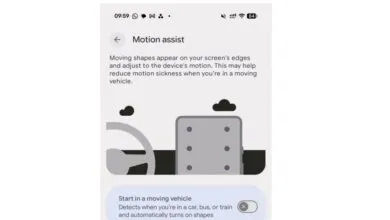
– The update introduces Motion Assist, which reduces motion sickness by overlaying moving dots on the screen during vehicle movement.
– Find Hub is expanding to allow users to remember item locations via Gemini without needing physical trackers.
– Guided Vision uses the camera in Gemini Live to help identify items or read text with voice feedback.
– Google Messages now supports chat themes and collaborative note-taking through Google Keep.
Google has unveiled a suite of new capabilities for Android users through its latest monthly feature drop, with a significant focus on enhancing the Find Hub experience. This update introduces a method to locate essential belongings without the need for dedicated hardware trackers. Alongside this convenience tool, the company is also rolling out Motion Assist, an accessibility feature designed to mitigate motion sickness by overlaying dynamic dots on the screen that react to vehicle movement, mirroring functionality found in iOS.
The core innovation within Find Hub allows users to rely on Gemini to remember the last known location of items they do not use regularly, such as passports or tax documents. According to a Google blog post, the AI assistant will record the item’s position and allow users to attach a reference photo for visual identification. To retrieve this information, users can simply ask Gemini where an object was placed or navigate to the remembered items tab within the Find Hub interface. This service requires devices running Android 16 or newer and is currently limited to regions where both Gemini and Find Hub are officially supported.
Beyond item tracking, the update expands the utility of Guided Vision. This feature leverages the phone’s camera within Gemini Live to assist with reading small text on labels or menus, or identifying specific ingredients in a pantry. It includes voice feedback to help users adjust their camera angle if the framing is incorrect. Guided Vision is compatible with devices operating on Android 9 or later, ensuring broader accessibility across older hardware models.
Social and collaborative features are also receiving attention with the introduction of chat themes for Google Messages. Users can now select custom background images that automatically adapt the appearance of text bubbles for a more personalized messaging experience. Additionally, starting today, participants in any Google Messages chat can create and edit notes via Google Keep. This integration facilitates real-time collaboration on shared tasks, such as compiling grocery lists or planning trips, allowing multiple users to contribute to a single document seamlessly.
(Source: The Verge)