I Tested the Top Smart Glasses: What They Can and Can’t Do
▼ Summary
– Smart glasses vary widely in features, including AI assistants, audio speakers, cameras, displays, and electrochromic lenses, with no universal standard defining the category.
– Audio is the most common feature, with built-in speakers and microphones for music, calls, and voice commands, though sound quality is limited compared to in-ear headphones.
– Cameras enable photo/video capture and AI vision features but raise privacy concerns, and are also used for head-tracking in some display models.
– Displays come in two main types: waveguide (thin, transparent, low-resolution) and prism (bulky, high-resolution, requiring wired connection), serving different use cases like navigation or private screens.
– Smart glasses fall into four categories: AI glasses (audio-focused), waveguide display glasses (with in-lens visuals), prism display glasses (portable monitors), and purpose-built models (e.g., electrochromic-only or budget devices).
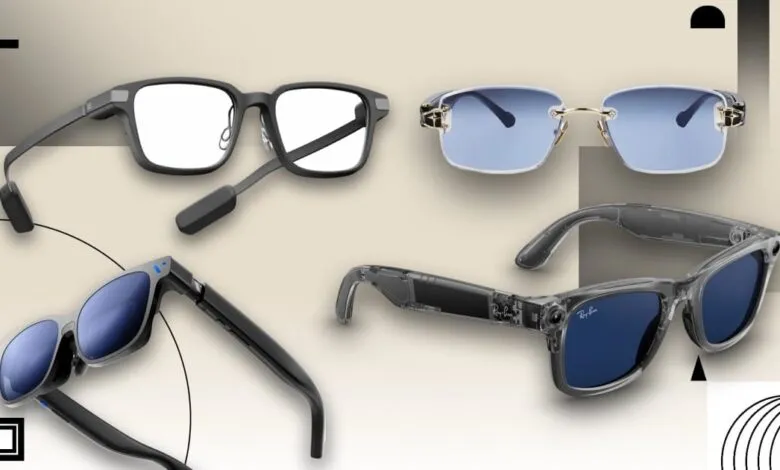
Smart glasses are exactly what the name implies: eyewear embedded with technology that goes far beyond vision correction. The problem is, the term covers an incredibly broad range of devices. Some are built around speakers for audio, others rely on displays or augmented reality, and some include cameras, AI assistants, or a mix of functions. Others have none of these at all.
That wide range of capabilities makes the category hard to pin down. Unlike smartphones or laptops, smart glasses lack a clear set of standards or categories that manufacturers follow. There’s no universal definition of what features a pair should include, so devices with vastly different functions all get lumped under the same label.
I’ve tested every major type of smart glasses currently available, from simple audio-focused frames to more advanced AR-style models. That hands-on experience helps clarify how these products actually differ in daily use, not just how their specs stack up on paper.
It All Comes Down to Features
Smart glasses can include any number of capabilities, and that’s where you should start when identifying or shopping for them. Let’s run through all the different things smart glasses can do before we sort them into categories.
AI: The Core Interface for Most Smart Glasses
AI is the primary way most smart glasses are meant to interact with you. You don’t need to touch your phone or the glasses themselves,just activate the AI assistant with a wake word and talk. Nearly all smart glasses have some form of AI assistant, like Meta AI on Ray-Ban Meta models or Gemini on Samsung’s upcoming Android XR glasses with Warby Parker and Gentle Monster. Some glasses, like the Rokid Glasses, let you choose your own AI assistant model.
If you don’t want to engage with the AI, you usually don’t have to. Between companion apps on your phone and physical controls on the glasses themselves, you can still use most individual functions like playing music, making calls, or taking photos without saying a word. But the AI is there if you need it.
Audio: The Most Common Smart Glasses Feature
This is the most common feature in smart glasses. With only a few exceptions, almost every pair you can buy has speakers built into the temples that work as earphones, letting you hear anything from music to AI-powered translations. They’re almost always paired with pinhole microphones for voice assistants and phone calls.
Speakers on glasses can sound very clear in quiet environments, but they can’t compete with good in-ear earphones. Because there’s open air between the speakers and your ears, they can’t convey lower frequencies well, and anything you’re listening to can be easily heard by anyone nearby.
Cameras: Capture, Context, and Privacy Trade-Offs
Many smart glasses feature built-in cameras for a variety of uses. The most obvious purpose is to take photos and videos without touching your phone. That’s handy for sharing on social media, but it’s a double-edged sword: Some people have used camera-equipped smart glasses to record women without their consent.
Cameras also expand the functionality of any AI assistant built into the glasses. They can use machine vision to analyze whatever you’re looking at, helping you identify a flower or translate a menu. Of course, as with surreptitious snapshots, using AI to scan everything around you raises privacy concerns.
Finally, on certain prism display glasses, cameras enable or enhance head-tracking features, serving a similar purpose as outward-facing cameras on mixed reality headsets like the Apple Vision Pro and Meta Quest 3.
Displays: The Most Confusing Smart Glasses Feature
This is where smart glasses get confusing. Only some models have an in-lens display, and there’s no universally agreed-upon language to distinguish them from models that don’t. Even worse, there are two distinct display types, each representing wildly different use cases.
All smart glasses with a display use micro-projectors built into the frames that project an image through the lens and into your eye. The difference is how the lens redirects that image, which determines the type of display and the type of glasses. There are generally two types: waveguide and prism.
Electrochromic Lenses: Instant Tint and Color Control
Electrochromic lenses are a rare feature on smart glasses, but they can be a lot of fun. They use a special film that can darken, lighten, or even change color when an electric current passes through. Think of them as the push-button version of Transitions and other photochromic lenses, only they dim and clear up instantly instead of over several minutes. Some can even change colors.
The Main Types of Smart Glasses
Now that you know what smart glasses can potentially do, let’s talk about the different kinds. There are no universal terms, but we can safely put them into four buckets, or rather three with one encompassing a smaller subcategory: AI glasses (with waveguide glasses as a subcategory), prism display glasses, and all other smart glasses. That last bucket is largely comprised of generic, single-purpose models meant for audio, fashion, or photography, with no AI.
AI Glasses: Virtual Assistance on Demand
Most smart glasses you hear about and see in the wild today are generally called AI smart glasses. They’re audio-only, offering voice access to an AI assistant. The AI is up to the manufacturer, as is how much control you have over them: Meta smart glasses use Meta AI, Amazon’s Echo Frames use Alexa, Samsung’s upcoming Android XR-powered smart glasses have Gemini, and AI glasses from other companies like Rokid and Solos tend to use ChatGPT, Alibaba’s Qwen, or an in-house combination of multiple LLM models, sometimes with the ability to choose yourself.
Music playback and phone call capabilities are almost always universal features on AI glasses, and built-in cameras for both capturing content and interacting with machine-vision AI are very common.
These glasses connect wirelessly to your phone over Bluetooth. They generally need to be online to provide any information, but you can usually treat them like headphones and listen to downloaded music or podcasts even if your phone isn’t connected to the internet.
Waveguide Display Glasses: Seeing Information in Your Lens
Technically speaking, waveguide display glasses are a subset of AI glasses. In fact, Meta refers to both the Meta Ray-Ban and Meta Ray-Ban Display as “AI glasses.” That’s because they’re basically AI glasses with a waveguide display built into the lenses. They wirelessly connect to your phone and provide voice-based assistance, like audio-only AI glasses, but you can get answers in text, maps, diagrams, and sometimes even photos. The display really is a game-changer, which is why I tend to put them in their own category.
Waveguide displays use etched patterns on flat, transparent lenses to guide projections into your eyes. These lenses are often the only ones built into the frames, which lets smart glasses in this category be almost as thin and light as eyewear without a display. And because you can easily see through the lenses, they’re safe to wear while moving around, offering a completely unimpeded view of your surroundings. The trade-off is that waveguide displays are generally low-resolution, have a relatively narrow field of view, and are often monochrome green rather than full color. The Even Realities G2’s display is all-green, 640 by 350 pixels, and 27.5 degrees, while the Meta Ray-Ban Display is full color and 600 by 600 pixels, but only has a 20-degree field of view.
Whether you’re in another country or simply hard of hearing, live captions and subtitles are incredibly useful. Most waveguide smart glasses can listen to any speech around you and display it as text, even translating it from other languages. Those features are so helpful that Captify Pro is designed exclusively for AI transcription and translation, without providing a full AI assistant.
Depending on the model, waveguide display glasses can also show general information such as weather reports and stock charts, and display notifications so you can identify incoming calls or messages without looking at your phone or smartwatch. I found push notifications for Slack on the Even Realities G2 to be really convenient when I covered CES, and the much more limited third-party app support on the Meta Ray-Ban Display is a big reason I was much less enthused by it.
These glasses can also have navigation features, sometimes even with maps. I’ve always wanted a video game-like mini-map in the corner of my view when walking around, and the Meta Ray-Ban Display’s navigation function is the closest I’ve gotten to it.
Visual feedback adds a lot of additional use cases that audio-only AI glasses simply don’t have, to the point that some, like the Captify Pro and Even Realities G2, don’t even have audio output and only respond to you through the in-lens screen. Those two models also purposefully don’t have cameras.
For all this potential, waveguide display smart glasses are still in their early stages, and every model I’ve reviewed has been too limited, awkward to use, or buggy to recommend without major caveats. I’m optimistic that Android XR will enable future waveguide smart glasses to offer much more consistent and reliable features, but none have been officially announced yet.
Prism Display Glasses: A Portable Private Screen
Now, this is the type of smart glasses that I’ve come to swear by. They’re by far the bulkiest and most cumbersome, but they’re also the simplest to use, and their utility for both entertainment and work can’t be overstated. They’re often (incorrectly) described by their manufacturers as augmented reality (AR) glasses, but the better term is prism display glasses.
Prism display smart glasses use chunky prism lenses mounted behind thinner exterior lenses to bounce the projected image into your eyes. This design enables a sharp, full-color picture with a very wide field of view, comparable with viewing a big-screen TV from a couch or a movie theater screen from a few rows back. The prism display on the Viture Beast is 1,920 by 1,200 pixels with a 58-degree field of view, equivalent to a 174-inch screen viewed from 13 feet away. In other words, you put them on and get your own private large-screen display.
There are some major trade-offs that put prism display smart glasses in a very different camp from waveguide display and audio-only AI smart glasses. They’re significantly bulkier, and the prism lens can obscure your vision even when the display is turned off, so you shouldn’t really be walking across the street with them on.
Prism display glasses also require a wired connection to work. They connect to a phone, tablet, computer, or any other compatible device via DisplayPort over USB-C, delivering all audio, video, and power. They act like a USB monitor, projecting the device’s video output onto your eyes and playing its audio through your ears.
These are wearable displays more than anything else, and since they rely entirely on their connected device, they don’t have any AI features on their own. They usually have a simple interface for adjusting settings, but that’s about it for direct interactivity. This is why these so-called AR glasses aren’t really AR: They don’t actually augment anything based on the world around you, and only serve as private screens for your device.
Basic prism display glasses like the RayNeo Air 4 Pro and Viture Luma simply show a screen in front of your face that moves with you as you turn your head. However, more advanced models like the Viture Beast and the XReal One Pro and 1S incorporate built-in head tracking, enabling multiple picture modes that can make them much more immersive and useful. Those glasses can set the virtual screen in front of you relative to where you’re sitting, so it stays in place even as you move your head. They can also keep the display locked in front of your eyes, but make the picture trail behind slightly and move more smoothly to prevent motion sickness. My favorite head-tracking feature is an ultrawide mode that turns a 16:9 or 16:10 display into a 21:9 or 32:9 ultrawide display when connected to a computer. I need at least two monitors or an ultrawide monitor (at home, I use both) to get much work done, and prism display glasses with an ultrawide mode let me do that anywhere.
High-end prism display smart glasses often also feature electrochromic lenses. Their exterior lenses (not the prisms that redirect the projected display) can darken to block out distractions and greatly improve the contrast and vividness of whatever you’re watching.
The “Other” Category: Purpose-Built Smart Glasses
There are several smart glasses that don’t fit into the typical categories of AI glasses, waveguide display glasses, or prism display glasses.
Some smart glasses, like ones made by Chamelo, focus almost exclusively on electrochromic lenses and eschew most other features. They’re stylish and striking, since you can lighten, dim, or change the colors of the lenses with a tap, but not much else. The Chamelo Dusk and Music Shield can dim at your command and also play music, while the Chamelo Aura is a unique color-changing model with no other functions. The Aura doesn’t even connect to your phone in any way; the lenses are controlled by a touch-sensitive button on the frame.
Also in this “other” category are the many cheap, generic smart glasses online or at discount stores that only play music and/or take photos and videos. Some even have basic AI features, but we haven’t confirmed how well they work, if at all. I don’t really review these, and they should always be approached with the understanding that you get what you pay for. If you see smart glasses for less than $100, expect mediocre sound quality, photos, or videos.
The Future of Smart Glasses
Looking ahead, smart glasses are clearly moving toward a convergence of standalone computing, spatial awareness, and more capable mixed-reality interfaces. Devices like XReal’s Aura hint at this shift, combining prism-based displays with cameras, 6DOF tracking, and an external Android XR-powered controller to create something closer to a lightweight mixed-reality system than a traditional accessory. If this approach matures, it could bridge the gap between today’s phone-tethered glasses and full headsets like the Apple Vision Pro or Samsung Galaxy XR, delivering many of the same interaction models in a form factor that’s far easier to wear and carry.
At the same time, competing glasses like Snap’s new waveguide-based Specs show a parallel path focused more directly on augmented reality, with in-lens visuals and environmental understanding built in. They’re technically impressive and point toward true AR glasses, but they still face major hurdles in terms of price ($2,195), design (they look kind of goofy), and everyday usability.
Ultimately, smart glasses are steadily evolving beyond niche accessories into more independent computing devices. Whether prism-based models with rich interfaces or waveguide AR glasses ultimately lead the way, the category is clearly heading toward a future where digital information blends more naturally into everyday vision, without needing a headset or a phone screen to mediate it.
(Source: PCMag.com)