Firefox redesigns with rounded UI, simpler privacy and AI controls
▼ Summary
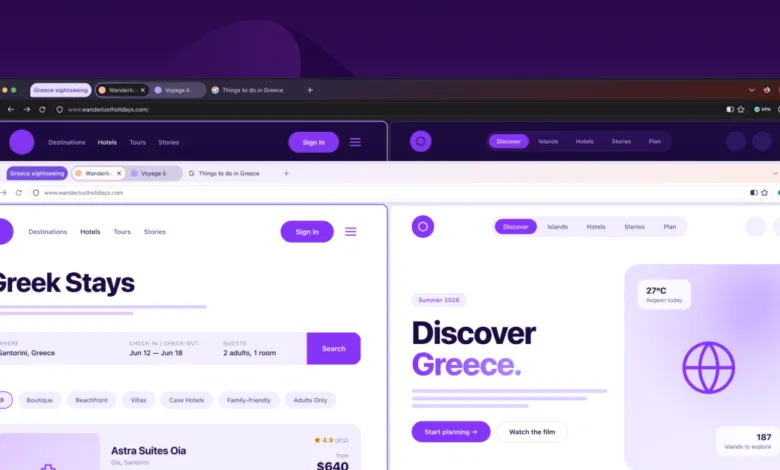
– Firefox’s “Project Nova” redesign introduces rounded UI elements, bubble-like tabs, a fire-inspired color palette, and updated icons for visual consistency across themes.
– The new Settings section will include a single switch to disable all present and future AI features, addressing privacy concerns.
– Mozilla stresses that AI features and models are not downloaded unless users choose to use them, and installed ones are easier to manage than Chrome’s 4GB download.
– Firefox 151, available now, adds Web Serial API support for direct device control via websites, plus PDF merging and new wallpapers.
– The redesign will restore compact mode, improve access to tab groups, split view, and vertical tabs, and offer customizable color themes with light/dark modes.
Firefox is undergoing a major visual transformation, headlined by a redesigned Settings menu that simplifies access to privacy controls and includes a single toggle to disable all current and future AI features. Mozilla has branded this initiative Project Nova, with a rollout expected later this year. The refresh introduces rounded UI elements across the browser, including bubble-like tabs, and a new fire-inspired color palette. Icons are also being updated for better consistency between light and dark themes.
Although the full redesign isn’t arriving until later, Mozilla has already shipped a notable new capability: Web Serial API support, available now in Firefox 151. This allows websites to communicate with hardware devices directly, such as controlling equipment or delivering firmware updates, without requiring separate native apps or installers. The same update also brings a refreshed Firefox Home page, new wallpapers, and the ability to merge multiple PDFs within the browser’s PDF viewer.
Mozilla emphasizes that AI models and features are not downloaded to your system unless you actively opt in, even without the global block enabled. For users who do install them, Firefox already provides clearer visibility into which models are present and how much disk space they consume, sidestepping the controversy around Google Chrome’s 4GB AI download.
On the productivity front, Project Nova will restore compact mode, which shrinks browser controls like forward and back buttons. It will also improve access to tab groups, split view, and vertical tabs. Customization options expand with new wallpapers and themes that apply across the entire browser window, supporting both light and dark modes similar to Chrome’s color themes. Mozilla’s blog post hints that it is also “exploring” controls for the shape of tabs and other UI elements, signaling further user-facing flexibility down the road.
(Source: The Verge)