DaVinci Resolve 21: Free Hollywood Color Grading for Photos
▼ Summary
– DaVinci Resolve 21 adds comprehensive still photo editing, including organization, color tools, and node-based workflows, to its free version.
– The update provides photographers with Hollywood-grade cinematic color grading tools previously reserved for video, like color wheels and scopes.
– It introduces a unique node-based editing system for photos, allowing for complex, non-destructive adjustments different from traditional layers.
– The software includes AI-powered tools for tasks like resolution enhancement, noise reduction, and blemish removal, alongside creative film looks.
– It supports RAW files from major camera brands and iPhones, offers tethered shooting for some cameras, and includes a Media Pool for organizing photos.
The professional color grading tools that define Hollywood’s cinematic look are now available for still photography. With the release of DaVinci Resolve 21, photographers can access the same powerful software used on major films, and its core photo editing features are included in the free version. Blackmagic Design announced this significant expansion during a livestream event, marking the software’s official entry into the still image arena. This move provides a unified platform for hybrid creators who work across both video and photo formats, streamlining their creative workflow.
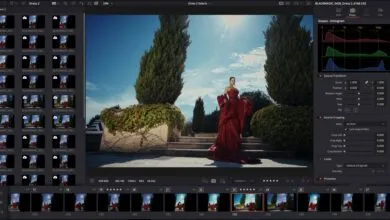
A new, dedicated Photo page within the application brings Hollywood-level color science to photographers. Users gain direct access to the legendary DaVinci Resolve color wheels, custom curves, and advanced qualifiers for precise adjustments. The software’s comprehensive Scopes, which provide detailed visualizations of color channels, hue, and saturation, are fully functional for photo editing. Photographers will also find familiar adjustment sliders for exposure, contrast, and white balance integrated into the interface.
A fundamental shift for many photographers will be the node-based workflow. Unlike the layer system common in applications like Photoshop, nodes operate in a flowchart style. This structure allows for building complex grades by adding nodes in series or parallel. A significant advantage is the ability to apply different corrections to distinct parts of an image simultaneously. Furthermore, shared nodes enable photographers to apply a consistent color look across an entire album of photos with a single adjustment.
The feature set extends beyond color. Photographers can utilize the Film Look Creator to apply authentic cinematic effects such as halation, bloom, grain, and vignetting. Tools like Relight FX for adding lighting in post, along with Magic Mask and Depth Maps for selective adjustments, are also supported for still images. The software’s AI-powered tools offer capabilities for increasing resolution, reducing noise, and removing distractions. These include specific features for AI blemish removal, skin smoothing, and diminishing dark circles.
In addition to its renowned grading tools, DaVinci Resolve 21 serves as a robust free photo culling and organization solution. The Media Pool supports star ratings, flags for favorites and rejects, and color labels to streamline the selection process. The software offers native support for RAW files from Canon, Fujifilm, Nikon, and Sony cameras, as well as Apple’s ProRAW format from the iPhone. For studio photographers, wired tethering is available for supported Sony and Canon cameras, allowing images to import directly into the software during a shoot.
This foray into photo editing arrives alongside numerous updates for video professionals, including AI-powered focal point adjustment and enhanced search tools. Crucially, the free version of DaVinci Resolve 21 remains a comprehensive offering, with the paid Studio version unlocking the most advanced features. The public beta is available for download now from Blackmagic Design’s website.
(Source: Digital Camera World)