Google Photos Adds New Video Editing Features
▼ Summary
– Google Photos has launched new features, including specialized templates and a redesigned video editor, to simplify video editing and highlight reel creation.
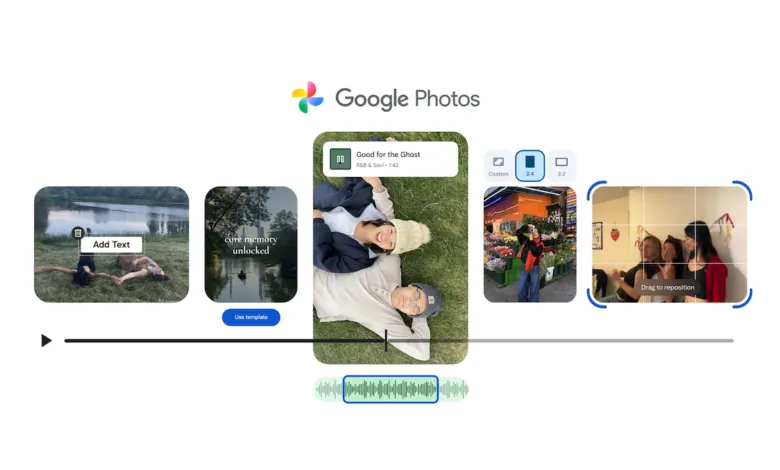
– The new templates, rolling out on Android, allow users to quickly generate professional-looking highlight reels with preset music and text by selecting photos and videos.
– The redesigned video editor, available on Android and iOS, features a universal timeline and adaptive canvas for a more user-friendly editing experience.
– Users can now explore the Photos music library on Android and iOS to find soundtracks and, on Android, add customizable text overlays to videos.
– The updated app makes creating highlight reels quicker, with a dedicated “Highlight Video” option in the Create tab for compiling clips from events.
Google Photos is rolling out a significant update that introduces a suite of new video editing tools, making it simpler than ever for users to craft polished highlight reels and edit their clips. The enhancements include specialized templates with preset music and text, a completely redesigned video editor, and expanded customization options. These features are designed to help anyone create professional-looking videos directly from their mobile device with minimal effort.
The newly introduced templates are currently available on Android. They provide a fast track to creating a dynamic highlight reel. Users simply pick a template, select their favorite photos and videos, and the app automatically syncs the visuals to the beat of the chosen music. This process eliminates the guesswork of timing and allows for a shareable video in just moments. The overall process for generating these highlight reels, collections of clips centered around an event like a vacation or birthday, has also been streamlined. You can find this option by navigating to the Create tab and selecting “Highlight Video.”
Accompanying the templates is a fully revamped video editor, now available on both Android and iOS platforms. This new editor aims for greater user-friendliness with two key components: a universal timeline and an adaptive canvas. The universal timeline lets you see all your video clips and other media in a single, linear view, making it easier to manage the sequence of your project. The adaptive canvas intelligently adjusts the editing interface based on what you’re working on, providing a more tailored experience. This redesigned editor becomes the default video editing tool on Android and supports adding music and text directly to individual video clips.
Further expanding creative possibilities, the update grants access to Google Photos’ integrated music library across both Android and iOS. This allows you to browse and select the perfect soundtrack to match the mood of your highlight video. For Android users, there’s even more control with the ability to add custom text overlays. This feature supports various new fonts, colors, and background styles, offering a deeper level of personalization for your video projects.
(Source: TechCrunch)