Samsung 990 Pro SSD Cooling Review: Low Temps, High Efficiency
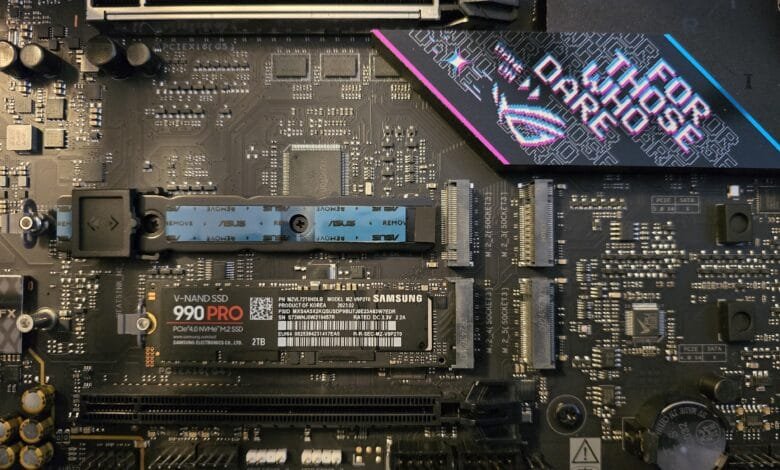
SSDs generate heat, and some require passive or active cooling to maintain optimal speeds. While previous tests focused on cooling solutions for high-temperature drives like TeamGroup’s Z540 PCIe 5 SSD, which uses Phison’s E26 controller and can reach scorching 125°C, this review shifts focus to Samsung’s 990 Pro. As one of the best-performing SSDs available, the 990 Pro operates at significantly lower temperatures, raising the question: how much cooling does it really need?
Test Bench Configuration
To evaluate cooling efficiency, a high-performance test system was assembled. The setup included:
– Arctic Liquid Freezer III 240 Pro: A top-tier AIO cooler to ensure minimal thermal interference from other components.
– Montech HS-02 Pro Case: Optimized for airflow with dual exhaust and three bottom fans in its default configuration.
– Asus ROG Strix B850-E Gaming Wifi Motherboard: Paired with an AMD Ryzen 9 9950X for maximum SSD performance during testing.
This configuration ensured accurate thermal measurements without external bottlenecks.
Why SSD Cooling Matters
Heat impacts SSD longevity. Thermal cycling—expansion and contraction of components during workloads—gradually wears down the controller and NAND, leading to eventual failure. Proper cooling minimizes these fluctuations, extending drive lifespan. While high-performance PCIe 5.0 SSDs like the Z540 demand robust cooling, the Samsung 990 Pro’s efficiency changes the equation.
Thermal Benchmarks: Passive Cooling Performance
A custom IOMeter script was used to simulate worst-case workloads, pushing the SSD controller to its limits. Unlike Phison E26-based drives, which throttle almost immediately without cooling, the 990 Pro sustained full speed without hitting its 70°C (158°F) maximum temperature—even without a heatsink.
Testing with Third-Party Heatsinks
– Akasa GeckoPro LX: A compact heatsink with a small fan (disabled during testing due to a faulty PWM header). Even passively, it reduced controller temperatures to 43°C (109°F), a 21°C drop compared to uncooled operation.
– Asus Motherboard Heatsink: Surprisingly, the basic built-in heatsink outperformed the Akasa, capping temperatures at 40°C. This marks a significant improvement over older motherboard heatsinks, which sometimes worsened thermals.
– Asus PCIe 5.0 Slot Heatsink: Designed for hotter drives, this larger heatsink delivered the best results, limiting temperatures to just 33°C—only 10°C above ambient.
Is Active Cooling Necessary?
With passive cooling already keeping the 990 Pro well below critical temperatures, active cooling solutions (like fan-equipped heatsinks) offer negligible benefits. At 33°C under load, the drive operates efficiently without extra airflow, making such cooling overkill for most users.
Practical Implications
– Desktop and Server Use: Basic heatsinks are more than sufficient for the 990 Pro, ensuring longevity without complex cooling setups.
– Laptop Upgrades: The drive’s low heat output makes it ideal for laptops, where cooling options are limited.
Addressing Common Misconceptions
Some readers initially mistook the 990 Pro for a PCIe 5.0 drive due to earlier phrasing in the article. Clarifications were made—the 990 Pro is a PCIe 4.0 SSD, while Samsung’s 9100 Pro occupies the Gen5 space.
NAND Temperature Considerations
While cooling the controller prevents throttling, NAND flash performs best between 40–60°C. Excessively cooling NAND can increase wear due to higher voltage requirements during writes. A balanced approach—using a heatspreader for stability without aggressive cooling—is ideal.
Final Thoughts
The Samsung 990 Pro redefines expectations for SSD thermals. Unlike power-hungry PCIe 5.0 drives, it delivers top-tier performance with minimal cooling demands. Whether in a high-end desktop or a compact laptop, users can expect reliable speeds and extended durability without elaborate cooling solutions.
For those prioritizing efficiency and longevity, the 990 Pro stands as a compelling choice—proof that cutting-edge performance doesn’t always require extreme thermal management.