CMF Clip Earbuds: Affordable Quality, Perfectly Balanced

▼ Summary
– CMF Clip Pro are open-ear clip earbuds priced at $99, often discounted to $79, offering a cheaper alternative to similar designs from Bose, Sony, and Shokz.
– Their main advantage is comfort, with a flexible band that avoids pinching and suits users who struggle with in-ear earbuds, though sound quality is inconsistent without a sealed fit.
– Sound features include a default bass boost, a three-band EQ in the Nothing X app, fixed spatial audio, and LDAC high-res support, but the EQ is unintuitive and high-res benefits are minimal.
– At high volumes, sound leaks to nearby people, and anti-leakage mode cuts higher frequencies, degrading quality; call quality is solid at normal speaking volumes but muffles soft-spoken users.
– The case has a volume dial that can be assigned as a button, but it lacks resistance and adjusts accidentally in pockets, leading the reviewer to disable it and rely on earbud buttons or phone controls.
Clip-style earbuds always involve trade-offs. That is simply part of the design and the physics behind it. They appeal to listeners who dislike the sensation of something lodged in the ear canal, yet that open fit comes at a cost to sound fidelity. The lack of a seal also means ambient noise flows in freely, so you often need to crank the volume to hear your music clearly, which can then create sound leakage for those around you. Premium options from Bose, Sony, and Shokz frequently run around $200. The CMF Clip Pro, however, come in at under $100, and while they still carry those inherent compromises, they manage them with surprising skill.
CMF operates as Nothing’s budget-focused sub-brand, and given its history of releasing earbuds in the $40 to $60 range, I anticipated something similar when the Clip Pro were announced. Instead, they launched at $99, matching the price of Nothing’s Ear 3A, which arrived just last month with a longer feature list but also more hiccups. Within days of release, though, the Clip Pro dropped to $79, and that feels like the right price point for what they deliver.
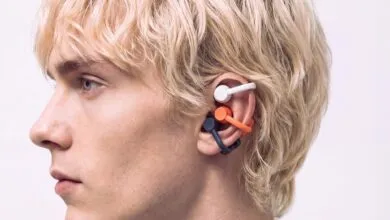
Rather than inserting into the ear canal, the Clip Pro position their speaker just outside it, with a flexible band wrapping around the ear to hold everything securely in place.
Comfort is where the Clip Pro truly shine. The soft band avoids any pressure around the helix, and I found no discomfort from the speaker orb or the battery and control capsule resting in and behind my ear. For anyone who struggles to fit traditional earbuds into their ear canals, a clip design like this is arguably the best option available.
That said, skipping the sealed fit does affect sound consistency, and I would not recommend the Clip Pro for any kind of critical listening, nor would I recommend any open-ear design for that purpose. Still, the tonal balance did not ruin my enjoyment of my usual playlists or the KCSN radio app. The default tuning includes a bass boost, which is essential without a proper seal, yet it does not tip the sound into overly heavy low-end territory, a trap other Nothing earbuds have fallen into.
The Nothing X app offers a three-band EQ for fine-tuning, though, as with other Nothing products, the controls can be counterintuitive. Boosting one slider does not always elevate that frequency range; instead, it can lower the others. For example, increasing bass actually reduces mids and highs. It takes patience and some trial and error to get the sound you want. The Clip Pro also support fixed spatial audio, which adds a sense of width to the music, though I preferred the sound without it. High-res audio via LDAC is supported as well, but on an open-ear design, the audible difference is negligible, especially with any background noise present.
While listening to the radio app, I noticed the DJ’s voice became hard to follow during talk segments when traffic noise was nearby. Turning up the volume helped, but it also risked leaking sound to people sitting close by, like fellow passengers on a bus or subway. The anti-leakage mode in the app cuts higher frequencies to reduce that issue, but it also degrades overall sound quality. Since leakage only happens at high volumes, the simplest fix is to keep the volume at reasonable levels.
There are several ways to adjust volume when needed. You can use your phone directly, press the buttons on the capsules behind each ear, or rotate the dial on the charging case, which is assignable in the app. That dial also functions as a button for play and pause, track skipping, or summoning your phone’s assistant.
The dial on the Clip Pro case offers volume control and button functionality.
One issue I encountered: the dial lacks enough resistance. While the case sat in my pocket, the volume occasionally shifted by a click or two on its own. I eventually disabled the dial altogether and relied on the earbud buttons, which work well despite a slight delay, or I simply reached for my phone instead of the case. With its functionality turned off, the dial becomes an oddly satisfying fidget toy.
Call quality on the Clip Pro is solid, and they do not suffer from the buggy behavior I saw with the Nothing Ear 3A, where voice compression swung wildly based on surrounding noise when I began speaking. The noise gate is still aggressive, filtering out ambient sound and occasionally clipping the tail end of a word, but when I spoke at a normal volume while walking down the street, my wife could understand me without difficulty. Quieter speakers might struggle, though. When I lowered my voice, I sounded muffled, and it took real effort for her to decipher what I was saying.
That call performance sums up the CMF Clip Pro experience, and the same applies to their audio. These earbuds do what they can within the limits of the technology. Combined with their comfort and price, they are an excellent choice when you want to avoid anything deep in your ears.
(Source: The Verge)