Chrome’s Android Home Icon Gets a New Look
▼ Summary
– Chrome 145 for Android is rolling out with a redesigned Home icon in the address bar.
– The new icon features a sharper design with a flush roof and a door, replacing the older curved-corner version.
– This updated Home icon style has already been available on the desktop version of Chrome.
– Users can remove the icon or customize the homepage via Settings to free up address bar space.
– The Home icon redesign is the primary user-facing change introduced in this Android update.
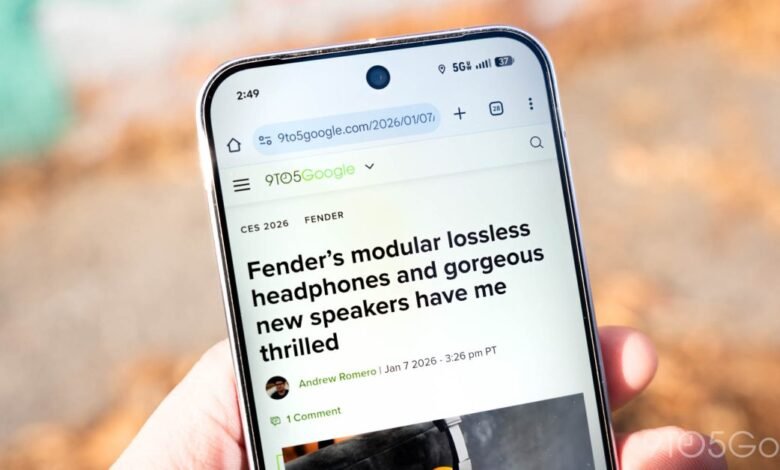
Google’s Chrome browser for Android is receiving a subtle yet noticeable visual update with the rollout of version 145. The most prominent user-facing change is a redesigned Home icon located within the address bar, bringing its appearance in line with the desktop version of the browser.
Positioned to the left of the Omnibox, the refreshed icon features a cleaner, sharper design. The updated house graphic has straighter, less rounded corners and a roof that sits flush with the sides. A small door has also been added to the icon’s design. While these changes are relatively minor and may require a close look to spot, they represent a shift towards a more geometric and less rounded aesthetic. This new icon style has been present on the desktop version of Chrome for several months.
Some users may find the previous iteration to have a more contemporary feel that better matched the surrounding toolbar icons. The visual comparison clearly shows the evolution from the older, softer design to the newer, more angular one.
It’s worth noting that this icon is optional. Users who prefer a slightly wider address bar, particularly when the Toolbar shortcut is enabled, can choose to remove it entirely. This can be done by navigating to Settings, then Homepage, and toggling the feature off. Alternatively, users can switch the homepage from the default New Tab Page to a specific custom web address.
On the desktop version, similar toolbar customizations are accessed by clicking “Customize Chrome” on the New Tab Page and then selecting the “Toolbar” section. Beyond this icon refresh, Chrome 145 for Android focuses primarily on under-the-hood improvements and bug fixes, making the updated Home button the most visible alteration for most people.
(Source: 9to5 Google)