Windows 11 February Update: 8 Features to Expect
▼ Summary
– Microsoft’s February 2026 Windows 11 update introduces the Cross-Device Resume feature, allowing users to resume Android apps like Spotify or Office from their phone directly on their PC’s taskbar.
– The update expands Windows Hello Enhanced Sign-in Security to support external fingerprint readers, enabling configuration from the system’s sign-in options settings.
– Smart App Control, a security feature that restricts apps, can now be toggled on or off without requiring a full operating system reinstallation.
– Performance improvements include faster File Explorer navigation for network locations and updates to Voice Access and Voice Typing for easier setup and command control.
– The update is initially available through the Windows Insider Program’s Release Preview Channel, with a recommendation to create a system backup before installation due to past update issues.
Microsoft is set to release a significant Windows 11 update in February 2026, bringing a host of new functionalities, performance tweaks, and essential security patches. This Patch Tuesday rollout will enhance the user experience across several key areas, from productivity to system management and accessibility.
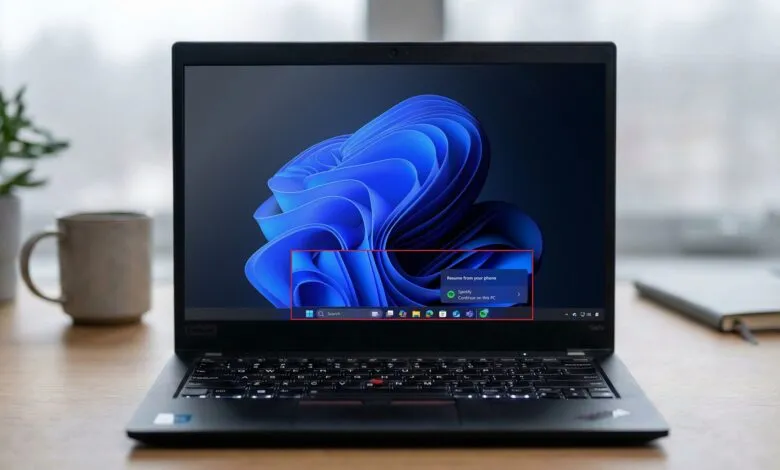
A major highlight is the expansion of Cross-Device Resume capabilities to Android phones. This feature allows you to seamlessly pick up activities from your mobile device directly on your Windows 11 PC via the Taskbar. You can resume music playback on Spotify, continue working in Microsoft Office applications like Word or Excel, or jump back into a web browsing session. Support extends to specific manufacturers, enabling users of Vivo phones to resume browsing sessions from the Vivo Browser. Additionally, if you own a phone from HONOR, OPPO, Samsung, Vivo, or Xiaomi, you can resume online files that were opened within the Microsoft Copilot app.
For musicians and audio professionals, the update delivers substantial upgrades to Windows MIDI Services. The improvements include enhanced support for both MIDI 1.0 and 2.0 protocols, featuring full WinMM and WinRT MIDI 1.0 support with built-in translation. New functionalities like shared MIDI ports across applications, custom port naming, loopback capabilities, and app-to-app MIDI communication are included. Microsoft has also addressed performance issues and resolved various bugs to create a smoother experience. The updated App SDK and Tool package for accessing these MIDI enhancements will be available as a separate download.
System information is getting a more prominent display within the Settings app. A new “Device info” card will appear on the Home page, providing a quick glance at your PC’s top technical specifications. This includes details on the processor, installed memory (RAM), graphics hardware, and storage capacity. The card conveniently includes a direct link to the full “About” page for more in-depth system information.
A welcome change arrives for Smart App Control, the security feature that restricts system execution to only trusted applications. Previously, if you enabled this feature after its 2025 introduction, you would need to perform a full operating system reinstallation to disable it. Starting with this February update, you can now toggle Smart App Control on or off directly without any reinstallation. This can be done by navigating to Windows Security, then App & Browser Control, and finally Smart App Control. It’s important to note that this change is being distributed gradually, so it may not appear on all devices immediately.
Windows Hello Enhanced Sign-in Security (ESS) is receiving broader hardware support. Until now, ESS only worked with a PC’s built-in biometric sensors. The new update allows you to connect and configure virtually any supported external Windows Hello ESS fingerprint reader. You can enable this by going to Settings, selecting Accounts, then Sign-in options, and turning on the “Enhanced sign-in security” option with your compatible external device.
While not a flashy new feature, a practical improvement to File Explorer aims to boost responsiveness. The update includes optimizations specifically designed to speed up navigation when browsing network locations, making file management across shared drives feel snappier.
Accessibility tools are also receiving attention. Voice Access is getting a new setup wizard to streamline the initial configuration process. This guided experience will assist users in downloading the necessary speech model for their chosen language, selecting a microphone, and getting started with voice commands more easily.
Finally, Voice Typing is gaining a new customization option. Users will now be able to set a wait time before a spoken command is executed. This setting, found in Voice Typing Settings under “Wait time before acting,” offers a range of options from instant execution to a very long delay, with a medium setting as the default.
This quality update is currently available for testing in the Release Preview Channel of the Windows Insider Program. Microsoft plans to release it to all users through the Stable Channel in the coming days. Once broadly available, you can download it by going to Settings > Windows Update, turning on the “Get the latest updates as soon as they’re available” toggle, and clicking “Check for updates.”
Given that Microsoft has encountered some quality issues with recent updates, it is a prudent step to create a system restore point before installing this February 2026 update. For added safety, consider performing a full system backup. This precaution is wise because some users experienced difficulties uninstalling quality updates after the January 2026 Security Update. While a repeat scenario is unlikely, taking these measures can provide valuable peace of mind.
(Source: Windows Central)