Android’s New Lockout Feature Hardens Device Security
▼ Summary
– Google has introduced new Android theft protection features, including a dedicated toggle for “Failed Authentication Lock” and stronger lockout delays after incorrect PIN/pattern attempts.
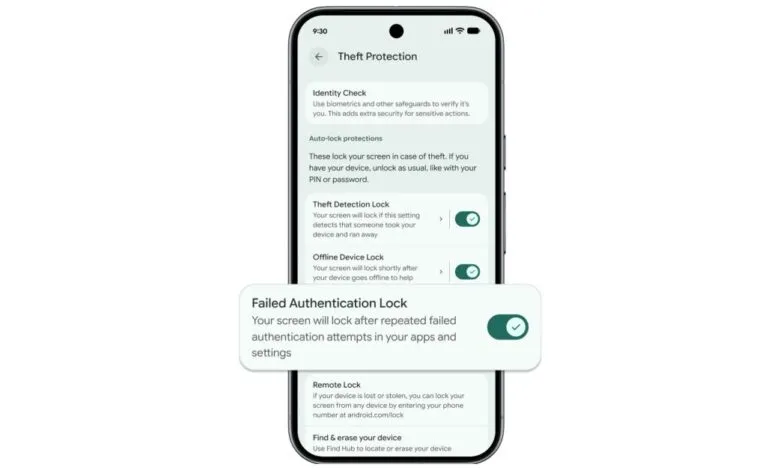
– The “Failed Authentication Lock” now has a dedicated on/off switch and locks the screen after repeated failed authentication attempts in apps and settings.
– Google has increased lockout times after failed screen lock attempts, drastically reducing the number of guesses a thief can make in a set time.
– On Android 16+, Identity Check now covers all apps using the Android Biometric Prompt, requiring biometrics for sensitive actions outside trusted locations.
– For new devices in Brazil, Theft Detection Lock and Remote Lock are now enabled by default, and android.com/lock allows setting a security question before remote locking.
Google has rolled out a significant update to its device theft protection for Android, introducing new features designed to make stolen phones far less useful to criminals. These enhancements focus on stronger authentication protocols and more robust recovery options, directly addressing common theft scenarios.
A key addition is the improved Failed Authentication Lock. This feature, which automatically secures your screen after multiple incorrect login attempts in apps and settings, now has its own dedicated on/off switch. Users can find this toggle alongside other security tools like Theft Detection Lock in their device settings. Furthermore, Google has increased the lockout time after failed PIN, pattern, or password attempts on the lock screen itself. This change dramatically slows down a thief’s ability to guess your code through brute force. Interestingly, the system has also been refined to not count identical incorrect entries toward the retry limit, preventing accidental lockouts from, say, a child repeatedly pressing the same button.
The practical impact of these timing changes is substantial. Google states that protection from brute force guessing is now roughly ten times stronger. To put it in perspective, an attacker with physical access to a Pixel device for fifteen minutes would now only get about seven guesses, compared to thirty-six under the old system, with delays between attempts escalating more quickly.
For devices running Android 16 and above, the Identity Check feature has been expanded. This tool, which requests biometric verification for sensitive actions outside of trusted locations like your home, now applies to all apps using the standard Android Biometric Prompt. This broader coverage includes crucial services like the Google Password Manager and popular third-party banking applications.
On the recovery side, Google has improved the remote locking process available at android.com/lock for devices on Android 10 and up. Users can now set an optional security question before a lost or stolen device is Remote Locked. This extra step helps ensure that only the legitimate owner can initiate a lock, adding a critical verification layer to the recovery process and preventing misuse.
Finally, in a move to bolster security from the start, Google is now enabling two powerful features by default for new Android devices activated in Brazil. Theft Detection Lock uses on-device artificial intelligence to analyze motion and context, potentially detecting a “snatch-and-run” theft and immediately locking the screen to protect personal data. Remote Lock allows an owner to secure their device from any web browser via android.com/lock, even if the feature wasn’t pre-enabled on the phone, providing a crucial last line of defense.
(Source: 9to5Google)