I Bought a Home NAS and It’s Already Paying Off
▼ Summary
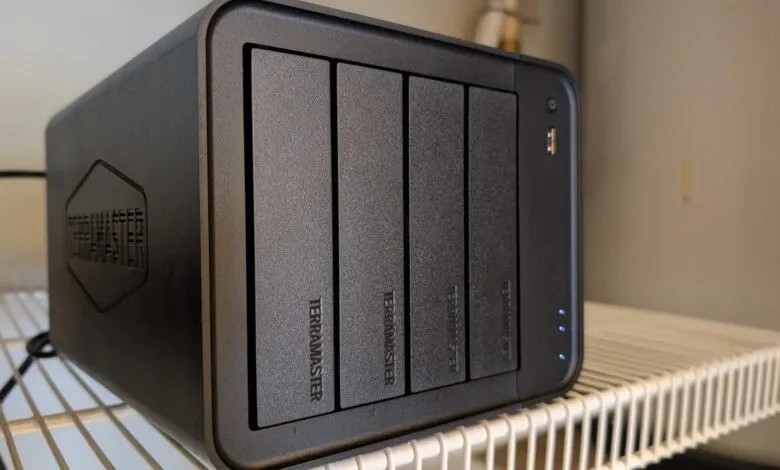
– The Terramaster F4-425 is a 4-bay NAS device available for $379, offering up to 120TB of storage but requiring users to purchase their own drives.
– It features a well-designed web interface and an app store, allowing it to function as a storage hub, multimedia center, and sync platform with cloud services.
– Setup is straightforward for basic network storage, involving installing drives, connecting to a LAN, and using a mobile app for initial configuration.
– While powerful, setting up its automated file sync feature requires some technical knowledge, as the desktop client lacks auto-discovery and the sync tool isn’t installed by default.
– The device is considered a great value, providing fast, reliable LAN-based storage for backups, file synchronization, and serving multiple users with its robust hardware specs.
Investing in a home Network Attached Storage (NAS) system can transform how you manage digital files, offering a centralized hub for data that is both secure and accessible. The Terramaster F4-425 4-Bay NAS stands out as a powerful and cost-effective solution, providing a robust platform for storage, backup, and media management right on your local network. For anyone tired of juggling cloud subscriptions or external drives, this device presents a compelling alternative that puts control back in your hands.
My own journey with data storage has involved numerous methods over the years, from network file systems like Samba and NFS to various third-party cloud services. The concept of a dedicated NAS device always appealed to me for its simplicity and independence. Essentially, a NAS is a specialized computer connected to your home or office network, designed primarily for file storage. While some models offer expanded functionalities, the core purpose is to centralize your documents, photos, and videos, freeing up space on your personal computers and mobile devices.
You certainly have the option to build a NAS yourself using a spare computer and a Linux distribution, which can be a budget-friendly project. However, purchasing a pre-built unit like the Terramaster F4-425 eliminates much of the technical legwork. This particular model accommodates up to four hard drives, supporting a massive potential capacity of 120 terabytes. It’s far more than a simple file cabinet; it can function as a private cloud, a multimedia server for your movies and music, and a synchronization hub that works with popular online services.
Getting the Terramaster up and running was straightforward, even for someone with a technical background. The process involves installing your own hard drives, a necessary extra purchase, connecting the unit to your router with the included Ethernet cable, and powering it on. The initial configuration is managed through a mobile app, which effortlessly discovers the device on your network and guides you through a user-friendly setup wizard. Within minutes, the system is ready for action.
Once configured, you access the NAS through a clean, web-based interface. From here, uploading or downloading files is intuitive. The interface also hosts an application store, where you can install tools for enhanced backup, photo management, containerized applications, and file synchronization. I immediately tested its capabilities by uploading a large collection of video files, some several gigabytes in size. The device handled the transfers seamlessly and quickly, instilling confidence that my data was not only secure but also readily available.
Where the experience becomes slightly more involved is in setting up automated file synchronization between the NAS and your computers. The Terramaster provides a Sync client for this purpose, but it requires a manual setup process. You must install the client on the NAS itself, then install a separate desktop application on your Windows, macOS, or Linux machine. Connecting the two involves entering the NAS’s IP address and your login credentials. While this isn’t overly complex, it does assume a basic comfort level with network concepts. For true ease of use, having the sync client pre-installed and incorporating an auto-discovery feature in the desktop app would be a significant improvement for less technical users.
Before configuring the sync tool, I connected to the NAS using the Samba protocol, which is excellent for manually transferring files directly from my computer’s file manager. This method provides direct access to shared folders on the device. For ongoing, hands-off synchronization, however, the dedicated Sync tool is the way to go. Once established, it reliably keeps selected folders updated between your computer and the NAS, creating a true “set it and forget it” workflow.
Priced at $379, the Terramaster F4-425 delivers exceptional value. It’s a compact, versatile device that serves as expanded storage, a comprehensive backup destination, and a private media server. Its performance is snappy, thanks to an Intel quad-core processor and 4GB of RAM, and it includes useful features like a 2.5 Gigabit Ethernet port for faster network speeds and support for popular media servers like Plex. For households or individuals generating large amounts of data, this NAS is a smart investment that consolidates digital life into one reliable, private location.
(Source: ZDNET)