Gemini Can Now Use Android Apps via ‘AppFunctions’
▼ Summary
– Google is introducing AppFunctions, an Android 16 feature that lets apps expose specific functions for AI agents like Gemini to execute locally on the device.
– AppFunctions enable cross-app workflows, allowing AI assistants to perform tasks like creating calendar events or managing shopping lists by calling functions from multiple apps.
– A second approach, a UI automation framework, is being developed to let AI agents perform generic tasks on any installed app without requiring developers to write new code.
– These features are designed with privacy and security as a core principle, operating on the device to handle user data locally.
– Google plans to expand these capabilities in Android 17 and is currently working with a small set of developers to build high-quality user experiences.
Google is taking a significant step forward in integrating its Gemini AI assistant with the Android ecosystem. The company is introducing new developer capabilities designed to bridge the gap between standard applications and intelligent, agentic assistants. This initiative, while still in its early beta stages, is being built with a foundational focus on user privacy and security, marking a potential paradigm shift for how we interact with our mobile devices.
The primary method for this integration is a feature called AppFunctions. This is an Android 16 platform feature, supported by a Jetpack library, that allows developers to expose specific functions within their apps. These functions can then be accessed and executed directly on the device by AI agents like Gemini. Think of it as providing a structured toolkit for AI assistants to use. Google compares this approach to the popular Model Context Protocol (MCP), but with a key difference: all processing happens locally on the Android phone, keeping data secure and operations fast.
Developers can define their app’s capabilities as tools for AI to utilize. For instance, in a task management app, a user could simply tell Gemini, “Remind me to pick up my package at work today at 5 PM.” The AI would identify the correct app, invoke the “create task” function, and automatically populate the title, time, and location fields. Similarly, for media, a request like “Create a new playlist with the top jazz albums from this year” would trigger a music app’s playlist creation function, using the context to generate content instantly.
More complex, cross-app workflows are also possible. A user could ask, “Find the noodle recipe from Lisa’s email and add the ingredients to my shopping list.” Here, Gemini would first use an email app’s search function to locate the recipe, extract the ingredient list, and then invoke a shopping list app’s function to populate the list, all through a single conversational command. Scheduling is streamlined as well; telling Gemini to “Add Mom’s birthday party to my calendar for next Monday at 6 PM” would have it parse the details and use the calendar app’s “create event” function automatically.
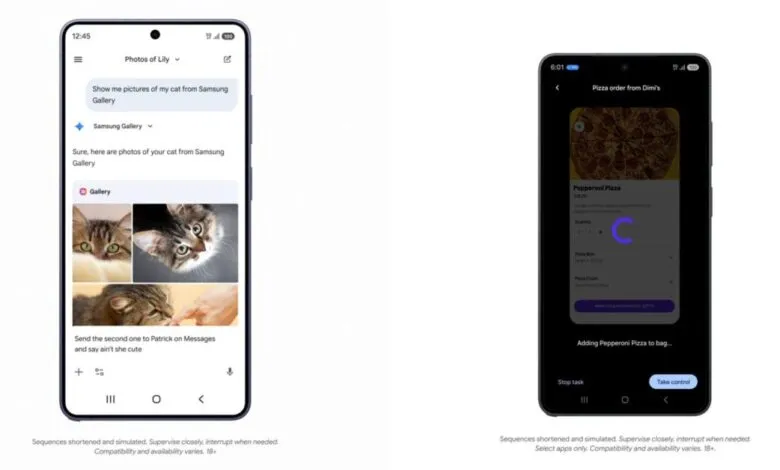
A practical example involves the Samsung Gallery app. Instead of manually searching through albums, a user can ask Gemini, “Show me pictures of my cat from Samsung Gallery.” The AI processes the query, triggers the appropriate gallery function, and presents the returned photos directly within the Gemini interface. This multimodal experience works via voice or text, and the photos can even be used in follow-up actions, like sending them in a message. Google notes that the Gemini app is already leveraging AppFunctions for integrations with Calendar, Notes, and Tasks in Google apps and on OEM devices.
For scenarios where a dedicated AppFunction integration doesn’t yet exist, Android is developing a secondary approach: a UI automation framework. This system allows AI agents to intelligently execute generic tasks within any installed app by automating user interface interactions. This provides a low-effort pathway for developers to enable agentic capabilities without writing new code, essentially letting the platform handle the technical heavy lifting.
Google has indicated that future versions of Android, starting with Android 17, will expand these capabilities to reach more users, developers, and device manufacturers. The company is currently collaborating with a select group of app developers to refine these high-quality user experiences as the ecosystem matures. More detailed information on how developers can implement both AppFunctions and UI automation is expected to be shared later this year.
(Source: 9to5Google)