Boox’s quirky page-turner remote impressed me
▼ Summary
– Boox’s Tappy is a two-button Bluetooth remote that turns pages on e-readers, with a retro typewriter-inspired design available in olive green or bright orange.
– The Tappy has three modes: Reading (page turns/volume), Multimedia (skip tracks), and Browsing (scroll webpages), switched by holding both buttons for five seconds.
– Pairing is easy on Boox devices with V4.2 firmware or later, but a quick start guide is needed; it reconnects automatically after initial setup.
– The Tappy works with other Android devices and iPhones/iPads for scrolling and media control, but lacks mode notifications on non-Boox hardware.
– At $29.99, the Tappy offers satisfying buttons and multi-device support, though it doesn’t work with Kobo or Kindle e-readers, and its default button labels (heart/coffee mug) are confusing.
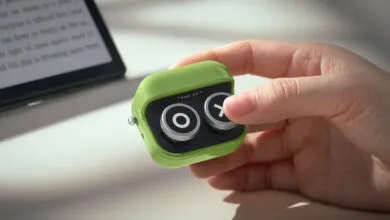
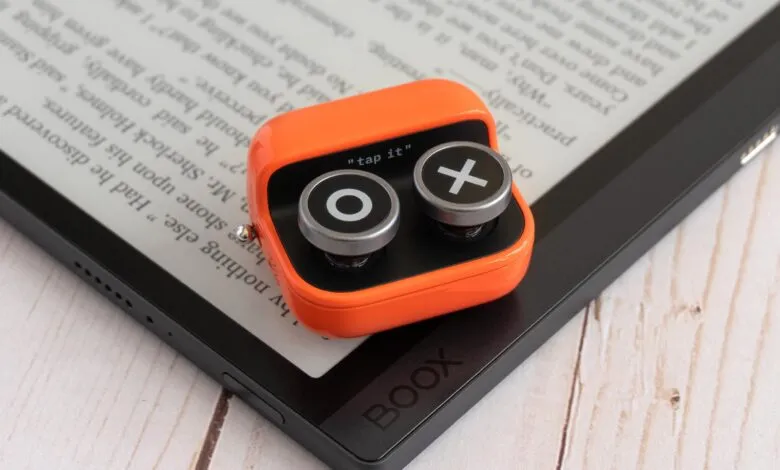
Boox has entered the wireless page-turner market with a device that stands out for its personality. The Boox Tappy launched shortly after the well-received Kobo Remote, but it takes a distinctly different design path. Rather than a sleek, ergonomic accessory, Boox delivers what feels like a tiny retro typewriter keyboard distilled down to just two buttons. It blends elements of a fidget toy, a macro pad, and a classic remote into a compact, glossy package available in olive green or bright orange.
The Tappy is small enough to hold discreetly, though it is not as comfortable in the hand as Kobo’s offering. Four rubber feet on the bottom keep it stable on a desk. The two round buttons offer about a quarter-inch of travel and provide a satisfying click. Out of the box, the buttons are labeled with a pixelated heart and a steaming coffee mug, a design choice that may leave some users puzzled. Fortunately, Boox includes alternative button caps marked with an X and an O. More customization, even a simple sticker sheet, would be welcome. Forward and back arrows or plus and minus symbols would be more intuitive.
Pairing the Tappy with a Boox device is straightforward, but do not lose the fold-out quick start guide. A sliding metal switch powers it on, and holding both buttons for two seconds puts it into pairing mode, indicated by a flashing blue LED. From there, connect via the Boox device’s Bluetooth settings. The remote reconnects automatically when powered on again.
The Tappy offers three modes. Reading mode turns pages forward and back, or controls volume outside a reading app. Multimedia mode skips tracks in music, video, podcast, or audiobook apps. Browsing mode lets you scroll up and down through long webpages or social media feeds. Switching modes requires holding both buttons for about five seconds, causing the LED to flash green. A notification appears on the Boox device, but it is not persistent and can be easily missed. A trio of labeled LEDs or a color-changing indicator would make mode identification much easier at a glance.
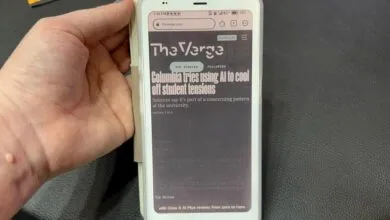
While the Tappy works best with Boox e-readers and tablets running firmware V4.2 or later, including the Boox Palma 2 Pro, it also functions with other Android devices, iPhones, and iPads, though with varying levels of support. The Kobo and Kindle Android apps work, but the iOS and iPadOS versions do not. However, the Tappy can scroll webpages, control music playback, and adjust volume on iPhones and Android phones.
The main challenge with non-Boox devices is the lack of pop-up notifications for mode changes. Without any LED indicators, the only way to know the current mode is to press the buttons and see what happens. If the volume changes, you are in Reading mode and two switches away from Browsing mode.
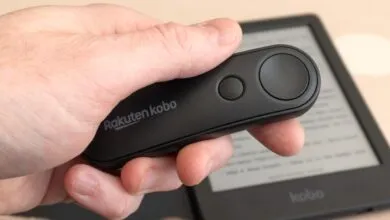
According to Good e-Reader’s testing, the Tappy works with e-readers from Pocketbook and BigMe. However, it did not work with Kobo or Kindle hardware during testing. This is unfortunate, as the Tappy’s satisfying buttons and multi-device functionality make it a compelling alternative to the Kobo Remote. Priced at $29.99, the same as the Kobo Remote, the Tappy has already replaced an Apple Watch for skipping tracks when streaming from an iPhone to a HomePod. Its buttons are occasionally pressed accidentally when in a pocket, but the satisfying feel and broader utility make it a worthy investment for anyone tired of reaching for their e-reader.
(Source: The Verge)