Essential iPhone Prep Steps Before Installing iOS 27
▼ Summary
– iOS 27 will be unveiled at WWDC 2026, with a Developer Beta available immediately after the keynote and a Public Beta in late June or early July.
– Before installing the beta, users should back up data, use a secondary device, and check app compatibility to avoid issues.
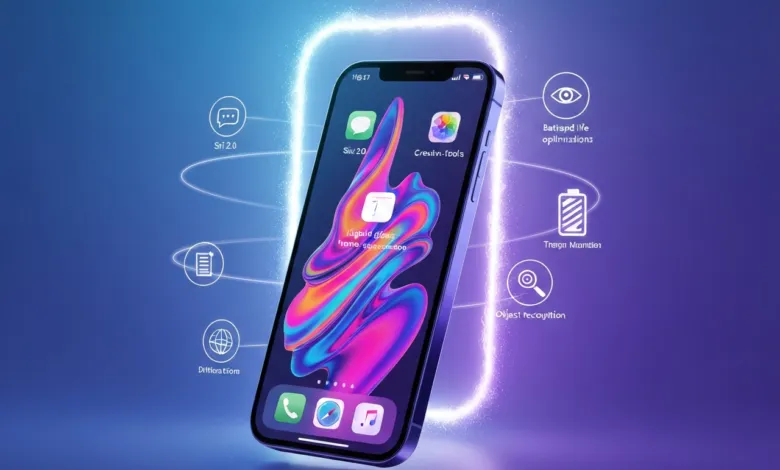
– New features include Siri 2.0 with contextual chat, liquid glass home screen effects, battery optimizations, and enhanced creative tools.
– Accessibility improvements include advanced object recognition in the Magnifier app and expanded Voice Control commands.
– Rumored unsupported devices for iOS 27 include the iPhone 11 series, iPhone SE (2nd gen), and several iPads and Intel-based Macs.
Apple is preparing to officially unveil iOS 27 during the Worldwide Developers Conference (WWDC) 2026, bringing significant upgrades to performance, artificial intelligence, and overall user experience. Whether you’re a developer eager to test new tools or a regular user curious about the latest features, knowing what to expect and how to prepare can help you get the most out of this major update. A detailed video from Zollotech breaks down everything you need to know ahead of today’s keynote.
When Can You Install iOS 27?
Apple follows a familiar release pattern, beginning with beta versions before the final public launch.
The Developer Beta becomes available immediately after the WWDC keynote. This version is restricted to registered developers with a paid Apple Developer Program subscription, offering early access to test and integrate new features.
The Public Beta typically arrives in late June or early July. This free version allows non-developers to try out the new operating system, providing a chance to experience iOS 27 firsthand while submitting feedback to Apple.
These staggered releases give you the flexibility to decide whether to jump into the beta program for early access or wait for the stable public release later in the year.
How to Prepare Your iPhone for the Beta
Installing beta software is exciting, but it requires careful planning to avoid potential headaches. Follow these steps to ensure a smooth experience:
Backup Your Data: Before installing the beta, create a full backup of your device using iCloud, iTunes, or Finder. This step protects your personal information in case of unexpected issues or data loss.
Use a Secondary Device: Beta versions are often unstable and may contain bugs or compatibility problems. To avoid disrupting your daily routine, consider installing the beta on a secondary device rather than your primary iPhone.
Check App Compatibility: Some third-party apps may not work correctly with the beta software. Verify that your essential apps are compatible or be prepared for potential limitations during the testing phase.
Taking these precautions allows you to explore iOS 27’s new features without compromising your device’s functionality or your personal data.
What’s New in iOS 27?
iOS 27 introduces a range of features designed to improve how you interact with your Apple devices. These updates focus on productivity, creativity, and overall user experience. Key highlights include:
Advanced AI: Siri 2.0 now features contextual understanding and a chat-based interface, making interactions more intuitive and conversational. This upgrade allows Siri to handle complex queries and provide more personalized assistance.
Customization Options: The introduction of liquid glass effects for the home screen offers a visually dynamic and personalized aesthetic, giving users more control over their device’s appearance.
Battery Life Enhancements: System optimizations ensure devices last longer between charges, addressing one of the most common user concerns.
Creative Tools: Updates to the camera app, image editing features, and grammar-checking tools provide users with enhanced capabilities for productivity and creativity.
Health App Enhancements: A new nutrition label scanning feature allows users to make informed dietary choices by scanning product labels for detailed nutritional information.
These features reflect Apple’s commitment to creating a seamless and efficient user experience while catering to diverse needs and preferences.
Accessibility Gets a Major Boost
Apple continues to prioritize inclusivity with significant accessibility improvements in iOS 27. Updates to tools like the Magnifier app and Voice Control enhance usability for individuals with disabilities. The Magnifier app now includes advanced object recognition, while Voice Control offers expanded commands for hands-free navigation. These enhancements ensure that Apple’s technology remains accessible to all users, reinforcing its commitment to inclusivity.
Will Your Device Support iOS 27?
As Apple introduces new software, some older devices may no longer be compatible. Rumored unsupported devices for iOS 27 include:
- iPhone 11 seriesAdditionally, certain Intel-based Macs from 2019–2020 and older Apple Watch models may also lose support. If you own one of these devices, consider upgrading to a newer model to ensure continued access to software updates and features.How to Contribute as a Beta TesterApple relies on feedback from beta testers to refine its software before the official release. By participating in the beta program, you can report bugs, suggest improvements, and help Apple deliver a polished final product. The Feedback app, included with beta versions, makes it easy to submit your observations and contribute to the development process. Your input plays a vital role in ensuring a smooth and reliable experience for all users.What About Hardware Announcements?While iOS 27 is the centerpiece of WWDC 2026, Apple may also reveal updates to its hardware lineup later in the year. Speculation suggests potential upgrades to devices such as the Apple TV and HomePod Mini 2. These announcements could further enhance the Apple ecosystem, offering users new ways to integrate their devices and elevate their overall experience.Preparing for the Future with iOS 27iOS 27 represents a significant step forward in Apple’s software evolution, offering a blend of advanced AI, enhanced customization, and improved accessibility. Whether you plan to explore the beta or wait for the official release, preparing your device and staying informed will ensure a seamless transition. Keep an eye on the WWDC 2026 keynote for official details and get ready to experience the next chapter in Apple’s innovation journey.Below are more guides on iOS 27 from our extensive range of articles.