Steam Deck Update Adds Screen-Off Downloads

▼ Summary
– Valve is testing a new low-power download mode for the Steam Deck that allows downloads to complete with the screen off before the device sleeps.
– The feature is currently available in the Steam Deck’s Beta and Preview channels and addresses user concerns about leaving the display on during downloads.
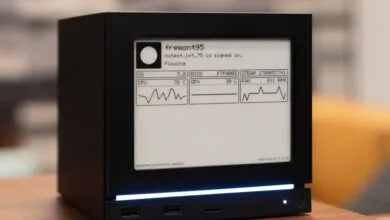
– When pressing the power button during a download, users can choose to continue downloading in low-power mode, which shows a status screen if the device is moved or a button is pressed.
– The low-power download mode is enabled by default when the Steam Deck is plugged in and can be optionally enabled for battery use in settings.
– If the battery drops below 20% while using this feature on battery power, the Steam Deck will enter full sleep mode to prevent power drain.
A new Steam Deck update introduces a highly anticipated feature that allows users to download games and updates with the screen turned off, addressing a long-standing request from the handheld gaming community. This functionality is currently available through the Beta and Preview channels, enabling the device to enter a low-power mode that continues downloads before the system goes to sleep. Many players have expressed frustration over needing to keep the display active during lengthy downloads, making this a welcome quality-of-life improvement.
Valve appears to have reconsidered its earlier stance on this feature. When questioned about the possibility two years ago during the Steam Deck OLED launch, the company indicated that the existing setup was sufficient. A hardware engineer previously highlighted concerns about power consumption during downloads and the risk of users accidentally storing a device that was still active and generating heat. The newly implemented download mode seems designed to mitigate these issues effectively.
Once the update is installed, pressing the power button during a download triggers a new dialog box. This prompt asks whether you wish to continue downloading with the screen off. Selecting “Continue” shifts the Steam Deck into its low-power state. If you press any button or move the device while in this mode, a status screen appears showing the download progress. From there, you can either fully wake the system or allow it to keep downloading with the display disabled.
By default, the feature activates automatically when the Steam Deck is connected to a power source. Users also have the option to enable it for battery-powered operation through the settings menu. However, if the battery level drops to 20 percent or lower, the system will transition into full sleep mode to preserve remaining power. This ensures that players can manage their downloads efficiently without unexpectedly draining their battery.
(Source: The Verge)