Edit Your Instagram Stories with New Meta AI Tools
▼ Summary
– Meta is introducing AI-powered editing tools to Instagram Stories that allow users to add, remove, or change elements in photos and videos using text prompts.
– These new features are accessible through the “Restyle” menu in Instagram Stories and include preset effects to alter outfits or apply styles like watercolor.
– When using Meta AI on Instagram, users agree to terms that permit Meta to analyze their media and facial features for content modification and generation.
– Meta is expanding its AI offerings to stay competitive, recently testing a “Write with Meta AI” prompt for comments and launching an AI-generated video feed called “Vibes.”
– To address parental concerns, Meta has added controls allowing parents to disable AI chats and monitor their teenagers’ interactions with the Meta AI chatbot.
Instagram users can now harness the power of artificial intelligence to transform their Stories directly within the app. Meta has integrated its advanced AI photo and video editing tools into Instagram Stories, letting people type simple text commands to add or remove objects, alter appearances, or completely reimagine their visual content. This move brings sophisticated editing capabilities right to your fingertips without needing separate apps or complex software.
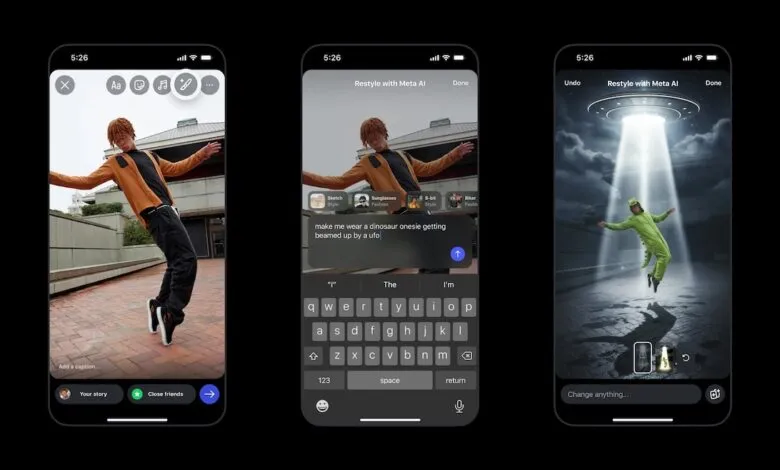
Previously, accessing Meta’s AI for image edits required interacting with the Meta AI chatbot. The latest update makes these features far more straightforward and user-friendly by embedding text-prompt functionality directly into the Stories creation workflow. You no longer need to navigate away from your editing screen to apply dramatic changes.
To get started, open Instagram Stories and tap the paintbrush icon. You’ll see a “Restyle” menu at the top of the screen. Inside, a prompt bar lets you describe exactly what you want to modify. You can instruct the AI to add something, remove an element, or change an aspect of your photo or video. For example, you might type “change my hair to pink,” “add a sparkling crown,” or “replace the sky with a sunset.”
Alongside custom text prompts, a selection of preset effects is available for quick styling. These let you instantly alter outfits, perhaps by adding sunglasses or a leather jacket, or apply artistic filters like a watercolor look to your images. Video creators can enhance their clips with animated overlays, such as falling snow or flickering flames, all with a single tap.
It’s essential to understand that using Meta AI tools means agreeing to the company’s AI Terms of Service. By uploading media, you permit Meta to analyze your photos, videos, and even facial characteristics. According to the terms, this analysis allows the AI to summarize image content, modify existing visuals, and generate entirely new content based on your uploads.
Meta’s ongoing rollout of AI enhancements is part of a broader strategy to stay competitive in the social media and technology sectors. Recently, the company tested a “Write with Meta AI” feature designed to help users craft engaging comments on posts. Last month also saw the launch of “Vibes,” an AI-generated video feed inside the Meta AI app, which appears to have significantly boosted user engagement. Data from analytics firm Similarweb indicates daily active users on iOS and Android surged to 2.7 million by mid-October, up sharply from roughly 775,000 just four weeks earlier.
In response to potential safety concerns, especially for younger users, Meta has introduced additional parental controls. These new settings allow parents to disable chats with AI characters and monitor the topics their teens discuss with the Meta AI chatbot, providing an extra layer of oversight for family accounts.
(Source: TechCrunch)