iOS 27 beta 2 brings Write with Siri, the next Apple Intelligence writing tool
▼ Summary
– iOS 27 beta 2 introduces Write with Siri, replacing the standalone Writing Tools feature from iOS 18.
– The keyboard prompts users to write with Siri, allowing natural language requests to generate, proofread, or rewrite text.
– The old Writing Tools panel with specific buttons like ‘Friendly’ and ‘Professional’ has been removed.
– Tapping the Write with Siri button expands an input field from the Dynamic Island for text descriptions, integrated with personal context.
– The feature can also be triggered by voice using Siri’s on-screen awareness, and is available on macOS Golden Gate and iPadOS 27.
With the release of iOS 27 beta 2, Apple has introduced a major evolution of its on-device text tools. The new Write with Siri feature replaces the standalone Writing Tools that debuted with the initial wave of Apple Intelligence in iOS 18.
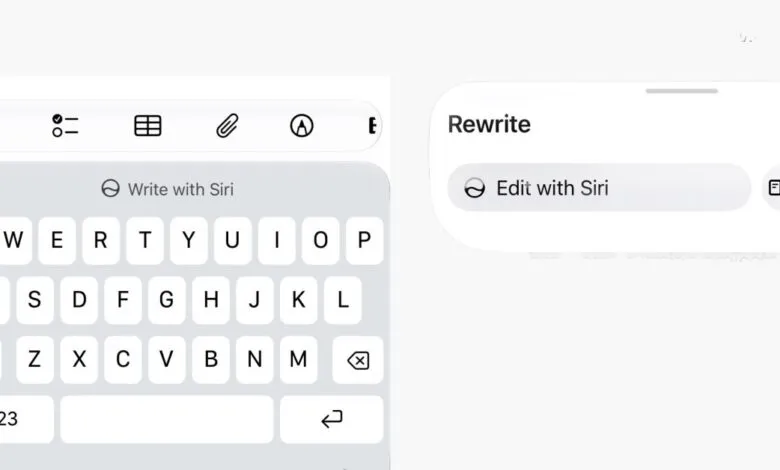
When you’re editing text, your keyboard now offers a prompt to write with Siri. Instead of tapping preset buttons like ‘Friendly’ or ‘Professional’, you can ask Siri in natural language to generate fresh content, proofread your work, or rewrite a document in a different tone. The old Writing Tools panel is gone, replaced by this more conversational system.
You can test this in Notes or any app that uses standard system text components. Before you start typing, a prominent Write with Siri action appears in the keyboard suggestions bar. If you begin typing, a smaller Siri button shows up next to the three predictive word suggestions.
Tap that button, and an input field expands from the Dynamic Island, asking you to describe what you want to do with the current text. Unlike its predecessor, this tool is tightly integrated with Siri’s broader capabilities. That means you can pull in personal context, like recent messages or calendar events, to guide your text generation.
If you ask Siri to rewrite a document that already contains text, it makes the changes and then presents a new panel at the bottom of the screen. This panel includes a before-and-after snapshot, quick undo buttons, and an option to Edit with Siri for follow-up revisions.
You don’t even need to touch the keyboard. Just speak your request, and the new on-screen awareness in Siri will recognize that you want to perform a text operation on the currently focused app.
This is one of the most noticeable shifts between iOS 27 developer beta 1 and beta 2. Keep in mind that a lot is still changing at this early stage in the beta cycle. Apple has confirmed that the first public beta will arrive in July, with the full release of iOS 27 expected in the fall, likely alongside the new iPhone lineup in September.
The Write with Siri features also extend to macOS Golden Gate and iPadOS 27, giving users across Apple’s ecosystem a more intelligent, voice-first way to work with text.
(Source: 9to5Mac)