ChatGPT’s Lockdown Mode blocks data theft and more
▼ Summary
– Lockdown mode is a ChatGPT setting that aims to prevent data theft from prompt injection attacks by limiting outbound network requests.
– The mode is now available to all ChatGPT users, including Free, Plus, Pro, and Business plans, after initially launching for enterprise and education subscribers.
– When enabled, Lockdown mode restricts live web browsing to cached content, blocks web image retrieval, and disables deep research and agent mode.
– The mode does not prevent actual prompt injection attacks, as hackers can still use malicious commands to access cached content or uploaded files.
– To enable Lockdown mode, users go to Settings, select Security, and turn on the switch under Advanced Security.
A new security feature from OpenAI, Lockdown Mode, is now rolling out to all ChatGPT users, aiming to shield sensitive data from theft via prompt injection attacks. While it introduces notable restrictions on live web access, the tradeoff is a fortified environment for handling confidential information.
Prompt injection remains a critical vulnerability for AI systems. Attackers can embed malicious commands within user prompts, potentially breaching chat sessions, accessing external files, and exfiltrating personal data. Lockdown Mode directly counters this by limiting outbound network requests, effectively cutting off pathways an attacker could exploit to siphon live information.
Initially launched in February for ChatGPT Enterprise, Edu, Healthcare, and Teacher subscribers, the feature is now available across all plans, including Free, Go, Plus, Pro, and Business. It is specifically tailored for individuals and organizations managing highly sensitive materials that require an extra layer of security.
However, it is important to understand what Lockdown Mode does not do. It does not prevent the prompt injection attack itself. A hacker could still inject malicious commands that interact with cached web content or uploaded files. The primary defense is restricting what ChatGPT can reach externally.
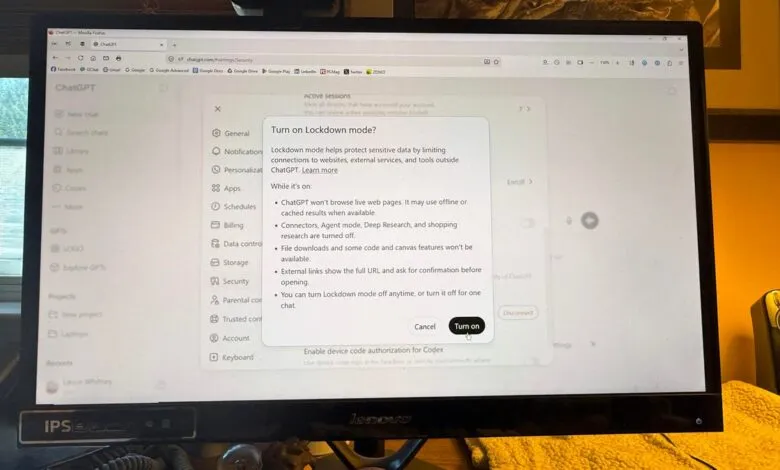
The mode comes with clear functional tradeoffs. When enabled, users lose the ability to perform live web browsing, as the AI is confined to cached content, which may be outdated or unavailable. It also cannot display images retrieved from the live web, though users can still upload their own images or ask for image generation. Other disabled features include deep research, agent mode, and Canvas networking for code that accesses your network. Additionally, ChatGPT cannot download files for analysis, though it can still process files you upload directly.
Despite these limitations, Lockdown Mode offers a compelling option for anyone working with sensitive or proprietary data. You simply need to weigh the convenience of live web access against the need for heightened security.
The feature is currently rolling out and may not appear in every account immediately. To enable it, sign in to ChatGPT, click your account name in the lower left, and select Settings. Navigate to Security, scroll to the Advanced Security section, and toggle on Lockdown Mode. A pop-up will detail the restrictions, and you can confirm by clicking Turn on.
(Source: ZDNet)