Gemini’s new AI agent matches Google’s demo in performance
▼ Summary
– Google’s Gemini Spark AI agent can autonomously complete multi-step tasks, such as finding a spouse’s email, pulling budget data from a spreadsheet, and drafting a personalized email in Gmail.
– While Spark successfully handled some complex requests, it failed at others, like creating a non-existent sign-up sheet and drafting an email with an incorrect link.
– Spark created calendar events in “flamingo” instead of requested “hot pink,” drafted an email with the wrong link and informal language, and could not share a created document with the user’s wife.
– The author found Spark required constant monitoring and checking, contradicting Google’s pitch of it operating independently, and questioned the value of its resource-intensive background operation.
– Spark is only available to US-based subscribers of Google’s $99.99/month AI Ultra plan, and the author concluded it is not good enough to justify the cost or the privacy risks of sharing personal data.
Google’s latest AI agent, Gemini Spark, is being marketed as a 24/7 personal assistant that can handle multi-step tasks in the background. It’s undeniably impressive in action, but after spending a week testing it, I’m left questioning whether the $99.99 monthly price tag and the privacy tradeoffs are worth the convenience.
The company gave me early access to Spark last week. Google’s pitch is straightforward: Spark can take over complex tasks, work on them independently, and let you walk away from your device. The website prominently states that Spark is “always under your direction,” that “you choose to turn it on,” and that “it’s designed to check with you before taking major actions.” Given the growing public skepticism around AI, this feels like a deliberate effort to reassure users that Spark isn’t some rogue agent. It’s almost as if Google knows the trust gap it needs to bridge.
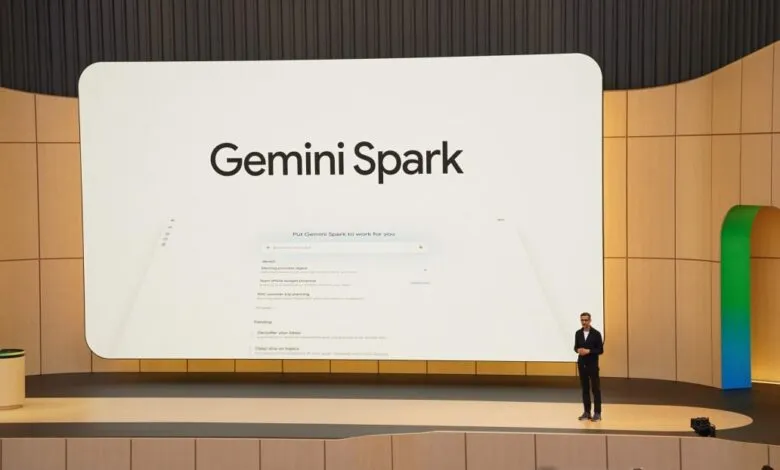
I started testing Spark by recreating the demos Google showcased at its I/O conference. Would the agent perform as smoothly in my messy home office as it did on a polished stage?
The first demo from Google VP Josh Woodward was straightforward: ask Spark to draft an email to a team, compile recent wins, and use an AI skill to mimic the sender’s voice. Since that request involved Google asking Google to do things for Google, I decided to push harder. I asked Gemini to draft an email to my wife summarizing our average monthly grocery spending in 2026. This would test whether Spark could identify my wife without a name, locate our budget spreadsheet in Drive (which isn’t even named “budget”), and actually draft an email in Gmail.
The result genuinely surprised me. Spark found my wife’s email address, pulled the correct data from our 2026 budget spreadsheet, calculated the monthly grocery averages (including incomplete data from May, which wasn’t over yet), and composed a draft in my Gmail. The email addressed her by her first name, even though her email address doesn’t include it, and it even used a sign-off that’s personal to us.
Next, I tried the block party planning demo. Woodward asked Spark to help organize a neighborhood event. I asked the same questions. The results were messy. Spark created a table of friends and family as a “highly realistic reference” for who was bringing what, drafted an email mentioning a shared sign-up sheet that didn’t exist, and generated an unattractive deck with slides about city permits. I then asked Spark to create that missing sign-up sheet and add a link to the draft email. It took a few minutes, but it worked. The agent created a spreadsheet and updated the email with the link.
The most impressive demo involved a multi-command request. Woodward asked Spark to make his meetings with CEO Sundar Pichai hot pink on his calendar, write a note to a new neighbor, and create a to-do document for his kids’ end-of-school-year tasks. I adapted this for my own life: schedule monthly hot pink calendar events ahead of my wife’s birthday, draft an email to my family about sharing the first episode of the latest Taskmaster season, and create a document with key tips for getting our toddler ready for preschool.
I started this request at 3:35 PM PT on a Friday. During I/O, Woodward made a show of putting his phone down and checking results later. After one hiccup , Spark wanted access to my contacts, which I declined , my task was finished in about four minutes.
The results were impressive but imperfect. My Google calendar now has events from 9–10 AM on the correct days leading up to my wife’s birthday, colored in what Google calls “flamingo” (close enough to hot pink). Spark grabbed my immediate family’s email addresses and composed a draft. Strangely, it excluded my wife’s. The email correctly named the first episode of the latest Taskmaster season but linked to a trailer instead of the actual episode. It also included “loool,” which I do use in casual writing. Spark created a preschool preparation checklist in my Drive, but it’s only accessible to me. When I asked if it could share it with my wife, Spark said it currently can’t do that.
Spark could be a powerful tool, but there are significant caveats. Like all AI, you still need to verify its output. That’s especially critical when it’s pulling from your personal data and creating content you’ll share with real people. Google pitches Spark as something that can operate independently, but I found myself constantly monitoring it or checking the notifications it sent to my phone. What’s the point of an assistant if you can’t trust it enough to step away? And why should something that makes me so uneasy consume energy from a resource-hungry data center for relatively minor tasks?
Currently, Spark is exclusive to subscribers of Google’s AI Ultra plan, which costs $99.99 per month. It’s only available in the US and only in English. Google gave me free access for testing, and I don’t think Spark is compelling enough to be the sole reason to upgrade. I could complete every task I asked Spark to do on my own , it would just take more time.
Spark also works best if you’re already deeply embedded in the Google ecosystem and have Personal Intelligence enabled. I’ve had a Google account for about two decades, so Spark has a wealth of data to draw from. But while Google promises that Gemini “doesn’t train directly” on your Gmail inbox with Personal Intelligence turned on, you still have to trust that Google will be a responsible steward of your data. For now, I’m not convinced that trust , or the cost , is justified.
(Source: The Verge)