How a $99 Cricut machine reignited my creativity
▼ Summary
– The Cricut Joy 2 is a $99 cutting and drawing machine that helped the author return to making stickers, cards, and bookmarks after struggles with caregiving and mental health.
– Setup took under 30 minutes, but the Design Space app’s onboarding is not beginner-friendly, with unclear instructions and buried tutorials.
– A free 30-day trial of Cricut Access ($9.99/month after) provides templates and guided projects that improved the user experience.
– Simple projects work best, but multicolor designs require cutting separate layers and manual assembly; larger projects need a more expensive model like the Cricut Explore 5.
– The “print then cut” feature allows printing full-color designs with a home printer, which the Joy 2 then precisely cuts out.
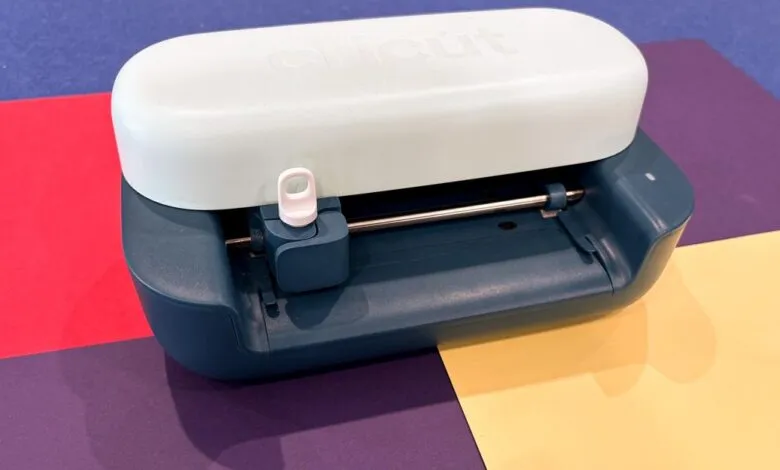
A $99 gadget promised to reignite my creative spark, and to my surprise, it actually delivered. For three weeks, I’ve been testing the Cricut Joy 2, a compact smart cutting and drawing machine that helped me rediscover the joy of making stickers, cards, bookmarks, and more. While I’ve always been wary of products claiming to boost creativity, this small device won me over.
The Cricut Joy 2 isn’t flawless, but its capabilities and app-based templates were exactly what I needed. Caregiving responsibilities, harsh self-criticism, and mental health struggles had made it hard to tinker and doodle like I used to. Yet this machine clicked with me. It offers quick wins when you’re in a creative mood, and I soon found myself making personalized stickers and bookmarks, eventually slipping back into a creative flow. I even painted the canvases underneath my designs.
I’ve been using the Cricut Joy 2 along with the Ultimate Plus Bundle, which normally retails for $229 and includes extras like smart vinyl, iron-on sheets, and a fine-point blade. Getting started was straightforward: I connected the machine, installed Cricut’s Design Space software on my laptop (it’s also available on iOS and Android), and ran my first test cut in under 30 minutes. Watching the machine slice through that first design actually made me clap with excitement.
That said, the app’s onboarding could use improvement. For something marketed as beginner-friendly, it’s not obvious what to do next or how to fully leverage the hardware. None of the tasks are difficult , figuring out mat placement or aligning materials , but they aren’t intuitive either, especially for newcomers. Early on, I tried to print something from scratch and failed, wasting materials and feeling discouraged.
The Design Space interface shares some blame. It buries helpful tutorials and project checklists at the bottom of the landing page, and instructions are mostly text-based, which feels odd given that Cricut has a wealth of clear, digestible YouTube tutorials that would fit perfectly in the app.
To Cricut’s credit, it offers a free 30-day trial of Cricut Access, which costs $9.99 per month after that. The subscription unlocks many templates, tips, and guided projects from Cricut and other users in the community library. It’s useful if you appreciate structure in your creative process. More importantly, it teaches you how to use the materials and tools included with the Joy 2. That’s when the real fun began. Projects came together faster, and I once again felt the satisfaction of watching a design go from screen to finished product in minutes.
The Cricut Joy 2 works best for simple projects, but it can handle more complex ones if you’re willing to step in. Multicolor designs, for example, must be cut in separate layers and assembled by hand, which takes time and focus. That’s not a flaw, just something to keep in mind before tackling ambitious projects.
For stickers or printed designs like iron-on transfers, Cricut’s print then cut feature is handy. You print a full-color design with your own inkjet or laser printer, then let the Joy 2 cut it precisely. The process is simple: Design Space adds cut lines around your uploaded design, you feed the printed sheet into the machine, and it scans and cuts. I was happy with the results.
Technically, the Joy 2 can handle larger projects like wall decals or full-shirt graphics, but it only cuts about 4 to 4.5 inches at a time. You could split a design into sections, cut each piece, and assemble them by hand. If you plan to make larger designs often, consider the $199 Cricut Explore 5. The $349 Cricut Maker 4, meanwhile, handles thicker materials like fabric or leather and can engrave, deboss, or perforate.
My idea of beginner-friendly onboarding differs from Cricut’s, but the Joy 2 is a fun, relatively inexpensive gadget that’s easy to recommend. I’m not about to reopen an Etsy store anytime soon, but for the first time in a while, I actually want to keep creating.
(Source: The Verge)