Yelp’s AI Assistant Now Books Restaurants in a Single Chat
▼ Summary
– Yelp’s updated AI assistant now allows users to ask questions and complete actions like ordering food or booking appointments directly within a chat interface.
– The assistant uses Yelp’s platform data, business details, and user reviews to ground its answers and minimize errors.
– It integrates with external services like DoorDash, Grubhub, and ZocDoc to facilitate actions, though users are redirected to those providers’ apps to complete transactions.
– The AI assistant is being prominently featured in a new central tab within the Yelp mobile app to encourage frequent use.
– Yelp is also adding features like visual menu scanning and AI-powered search for business photo galleries as part of broader app updates.
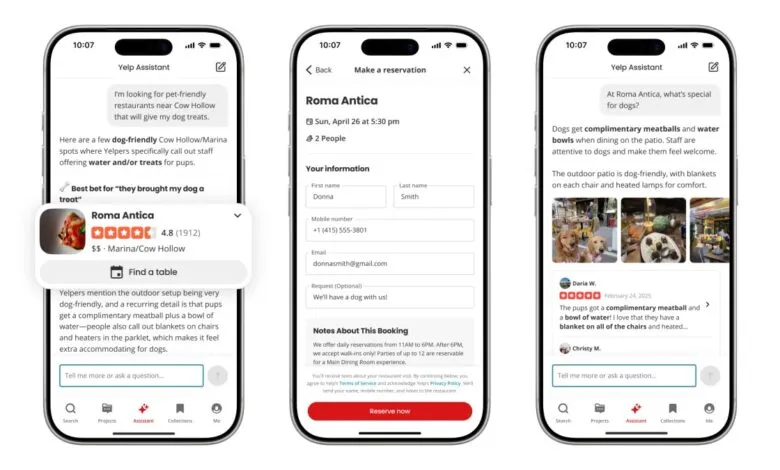
The digital landscape is shifting from simple search to seamless action, and Yelp’s latest evolution is a prime example. The platform has significantly upgraded its AI assistant, transforming it from a discovery tool into a powerful hub for completing tasks. Users can now ask questions, secure restaurant reservations, arrange food delivery, and book appointments with local service professionals, all within a single conversational chat interface. This move represents a strategic push to keep users engaged inside the Yelp app by fulfilling their entire need cycle, from inquiry to transaction.
Initially launched last year to help users find services, the assistant now leverages Yelp’s vast platform data to facilitate these actions. In a recent demonstration, a company executive showcased its versatility by planning a hike dog-friendly trails, finding takeout options along the route for delivery, getting weekend dinner recommendations with available booking times, and even sourcing painters for a home renovation, all without exiting the chat window. The goal is to fundamentally change how people perceive the service. “We want consumers to reconceive Yelp as a place where they can ask questions, get answers, and then complete the action,” explained Akhil Kuduvalli Ramesh, Yelp’s SVP of Product. He described the shift as moving from a review platform to an answers and action platform, indicating this direction is a core investment focus.
To ensure accuracy, the assistant’s knowledge is grounded in a business’s Yelp profile, its official website, and aggregated user reviews, minimizing the chance of incorrect information. The company has given the feature prime real estate by placing it in a new central tab on the app’s main navigation bar, increasing its visibility and likely usage. Available now on iOS and Android, the assistant works with a wide range of businesses, with a desktop version and broader business rollout planned for later this year.
A key component of this update is integration with external providers. While the assistant handles the query and discovery phase, completing an action typically redirects the user to a partner’s app or site. Current integrations allow for food ordering through DoorDash and Grubhub, booking beauty or fitness appointments via Vagaro, scheduling doctor visits with ZocDoc, and arranging car repairs through RepairPal. A Calendly integration is also available for other appointment-based businesses. This approach means the experience is not fully “agentic,” where the entire transaction happens inside the chat. Kuduvalli noted the current system relies on these redirections but suggested this “might not remain that way” in the future. Developing truly agentic pipelines presents challenges, however, such as automatically choosing a delivery service when a user doesn’t specify a preference.
Alongside the assistant, Yelp is introducing several app enhancements. Building on last year’s feature that let users scan a menu to see dish photos, the app now displays those images directly during the scanning process. Furthermore, users will be able to search a business’s media gallery using natural language queries instead of keywords. For business owners, Yelp is rolling out an AI-powered tagging feature that automatically groups before-and-after photos, reducing manual organization work.
(Source: TechCrunch)