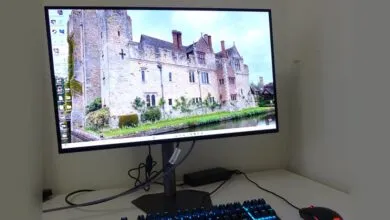
Gigabyte GO27Q24G Gaming Monitor Review

▼ Summary
– The Gigabyte GO27Q24G is a 27-inch 1440p OLED monitor that uses an older LG WOLED panel and costs $100 less than its newer counterpart.
– Its key compromise is lower brightness and slightly duller, dingier colors compared to monitors with the latest 4th Gen LG OLED panels.
– The monitor shares the same high-quality stand, minimalist design, and core connectivity as the more expensive model, but lacks a USB-A hub.
– It offers excellent gaming performance with a 240Hz refresh rate and fast pixel response, but its lower pixel density makes text and general computing less sharp.
– The reviewer concludes the $100 savings do not provide good value, as the older panel’s visual trade-offs often lead to an underwhelming experience.
The Gigabyte GO27Q24G presents a compelling proposition for gamers seeking an entry point into OLED monitor territory. It offers the core benefits of the technology, including perfect per-pixel lighting and extremely rapid pixel response, at a price point that undercuts many competitors. However, this affordability comes with a significant visual compromise, as it utilizes an older generation LG WOLED panel that falls short of the vibrancy offered by the latest displays.
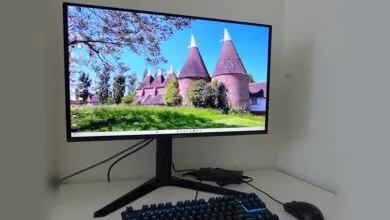
Priced at $100 less than its higher-specified sibling, the MO27Q28GR, this 27-inch monitor shares an identical minimalist design and robust metal stand. The connectivity is also largely the same, featuring two HDMI 2.1 ports, DisplayPort 1.4, and a USB-C port with 18W power delivery, useful for sharing the screen with a work laptop. The only notable omission is a two-port USB-A hub. Where the models diverge is under the hood. The GO27Q24G employs an older LG WOLED panel, resulting in lower brightness specifications: 275 nits full-screen versus 335 nits, and a peak HDR brightness of 1,300 nits compared to 1,500 nits on the newer panel. Its refresh rate is also slightly lower at 240 Hz versus 280 Hz, a difference most users will find negligible.
The real-world impact of these specifications is where the monitor’s value proposition becomes complicated. In side-by-side comparisons, the difference in peak brightness is less dramatic than the numbers suggest. The more significant issue is in overall image quality. The older panel consistently delivers a duller and dingier picture, with whites appearing less clean and a slight green tint in some scenarios. Colors lack the same punch and vibrancy, and certain grey tones appear noticeably darker. This is most apparent in bright, full-screen content or applications with large white windows, where the panel’s limitations are accentuated.
This is not to say the experience is poor. In its element, particularly in darker HDR gaming scenes with bright highlights like starfields or neon-lit environments, the monitor excels. The 0.03 ms response time and 240 Hz refresh rate combine for exceptional motion clarity with minimal blur, making it a very capable panel for fast-paced gaming. Gigabyte’s HyperNits technology also helps by optimizing the HDR 1300 mode to perform well across both bright and dark scenes, eliminating the need to manually switch presets.
However, several other drawbacks persist. The monitor’s handling of SDR content in HDR mode is poorly calibrated, forcing users to toggle Windows settings based on what they are viewing. Furthermore, the 1440p resolution on a 27-inch screen reveals the limitations of the WOLED panel’s RGWB subpixel structure. For general computing, text can appear slightly blocky and fonts lack crispness, a more pronounced issue than on a typical LCD at the same resolution.
Ultimately, the Gigabyte GO27Q24G occupies an awkward middle ground. It brings genuine OLED gaming benefits like incredible contrast and speed to a more accessible price. Yet, its consistently underwhelming visual performance in many common scenarios makes the $100 premium for the newer, brighter MO27Q28GR feel like a worthwhile investment. For a dedicated gaming rig where you can overlook its shortcomings in productivity, it represents a functional entry into OLED. For anyone seeking a more polished and consistently satisfying all-around display, the extra investment is strongly recommended.
(Source: PC Gamer)