iOS 27 beta 3 simplifies adjusting AirPods Adaptive mode
▼ Summary
– iOS 27 beta 3 introduces a new way to adjust AirPods’ Adaptive mode intensity directly from the audio mode picker.
– Adaptive mode blends Active Noise Cancellation and Transparency to control noise based on the environment, and users can customize how much noise is let in.
– Previously, adjusting Adaptive Audio intensity required navigating to Settings > Bluetooth > AirPods info, then using a slider.
– In the new interface, Adaptive mode displays dots on either side for selecting a stronger or lighter blend, but users cannot freely drag to choose an exact intensity.
– Since the feature is in beta, it may not appear in the public iOS 27 release or could change based on feedback.
Apple has introduced a more streamlined way for AirPods users to fine-tune their Adaptive Audio experience with the release of iOS 27 beta 3. The update brings a new Listening Mode setting that simplifies adjusting how much ambient noise your AirPods let through while in Adaptive mode, making on-the-fly customization faster than ever.
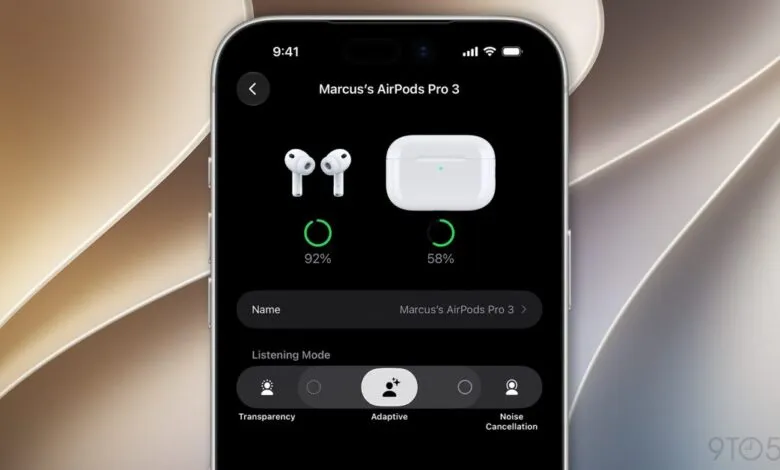
After a quiet beta 2 cycle, today’s release of iOS 27 beta 3 packs several notable additions and changes. One of the most practical, spotted by Aaron Perris on X, is a redesigned control for the AirPods’ Adaptive mode. A screenshot shared by Perris shows an Adaptive Audio slider now integrated directly into the audio mode picker.
For those unfamiliar with the feature, Apple describes Adaptive mode as a hybrid that blends Active Noise Cancellation and Transparency mode. It dynamically adjusts the noise level based on your surroundings, and users can customize it to allow more or less ambient sound. Previously, tweaking the intensity required navigating to Settings > Bluetooth, tapping the “i” next to your AirPods, and then finding the Adaptive Audio slider under Audio. There, you could slide it left or right to control how much outside noise enters.
With iOS 27 beta 3, the process is much more direct. When you open Settings and select your connected AirPods, you’ll still see the four standard Listening Mode options: Off, Transparency, Adaptive, and Noise Cancellation. Tapping any mode activates it immediately. But now, Adaptive mode displays a small dot on each side, letting you quickly choose a stronger or lighter blend of cancellation and transparency. You still can’t drag a slider to an exact position; instead, you tap either side to make the mode lighter or stronger, or leave it at the default.
Because this is a beta feature, there is no guarantee it will survive to the public release of iOS 27. Apple may alter or remove it based on developer feedback and upcoming public beta testing. Still, it is a welcome improvement for anyone who regularly adjusts their AirPods’ noise control.
If you are looking to upgrade your audio gear, it is worth checking out current AirPods deals on Amazon.
(Source: 9to5Mac)