Windows 11 April Update: 8 Key Improvements to Install Now
▼ Summary
– The April 2026 Security Update for Windows 11 modifies Smart App Control so it can be managed without reinstalling the operating system.
– Windows Narrator’s image description feature now works on non-AI devices by using Copilot instead of requiring a local AI model.
– The Settings app receives refinements including improved loading performance and updated hardware information displays.
– File Explorer gains Voice Typing for renaming files and fixes for visual bugs when opening new windows.
– Display support is improved with recognition for very high refresh rates and better power management for USB4 monitors.
Microsoft’s latest Windows 11 April 2026 Security Update is now available, bringing a collection of refinements, security enhancements, and new capabilities to versions 24H2 and 25H2. While not a major feature overhaul, this cumulative update delivers meaningful improvements across system security, accessibility, and core interface elements that collectively enhance the daily user experience.
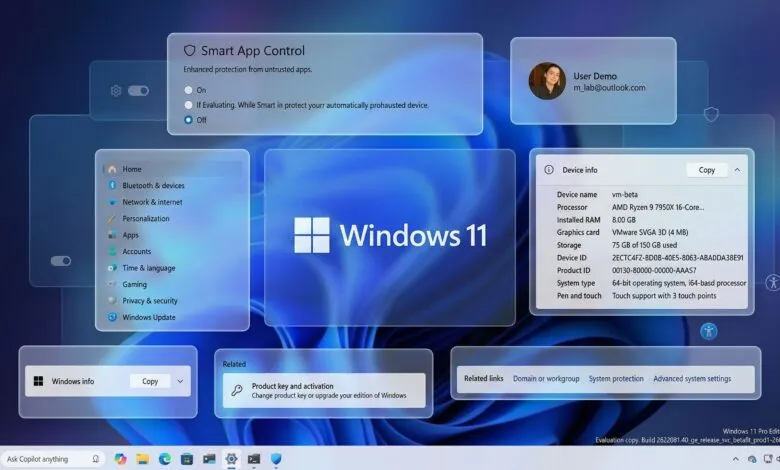
A significant change involves Smart App Control behavior. Previously, this security feature, which locks down a system to only run trusted applications, required a full OS reinstallation to enable or disable. With this update, users can now toggle Smart App Control directly within the Windows Security app under App & Browser Control, offering much greater flexibility.
Accessibility receives a boost with an expanded Windows Narrator image description feature. Originally limited to AI-powered Copilot+ PCs, the functionality now leverages the cloud-based Copilot service to generate descriptions for any focused image or the entire screen, making it available on a wider range of hardware. Users can activate it with keyboard shortcuts like Narrator key + Ctrl + D.
Several areas within the Settings app have been polished. The Home page sees subtle refinements to its Device info card and improved loading performance. The About page now usefully displays key hardware specifications like graphics and storage details in its top cards again, a welcome return of clear system information. In the Accounts section, an upgrade prompt for Microsoft 365 Family plans appears, which can be disabled by turning off suggested content. The pen settings page also gains a new option to configure a pen button to open the same app as the Copilot key.
File Explorer receives under-the-hood fixes and a helpful accessibility addition. A notable new feature allows users to employ Voice Typing to rename files. The update also resolves a visual glitch causing a white flash when opening new tabs or windows with This PC as the default, addresses element resizing flashes, and improves reliability when unlocking internet-downloaded files for preview.
For display and connectivity, the update adds support for new refresh rate recognition, allowing the system to properly identify monitors reporting 1000Hz or higher. When using a native USB4 monitor connection, the controller will now enter a lower power state during sleep to conserve battery. Improvements are also made to auto-rotation reliability after wake-up, HDR performance on certain displays, and the accuracy of physical size reporting via WMI APIs for monitors using DisplayID.
This release exemplifies Microsoft’s focus on incremental, quality-of-life enhancements. By smoothing out rough edges, tightening security defaults, and adding practical functionality, the update makes the operating system feel more cohesive and reliable. These steady refinements are crucial for building a stable and polished platform that works seamlessly in the background.
(Source: Windows Central)