Google Drive security upgrade now available to all users

▼ Summary
– Google Drive’s ransomware detection and file restoration feature is now rolling out to all users after a beta period.
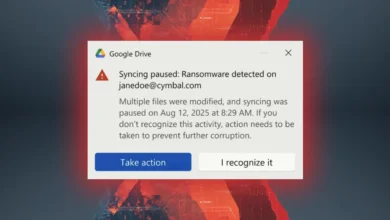
– The tool automatically pauses file syncing when ransomware is detected to prevent its spread across devices.
– It notifies users of infected files via bold warnings and emails to connected accounts if necessary.
– The feature includes the ability to restore files to a previous, uninfected version to recover data after an attack.
– These protections are enabled by default in Drive version 114+, but users can adjust or disable settings as needed.
For anyone who relies on cloud storage, Google Drive has become an indispensable tool for managing personal and professional data. The platform’s latest security upgrade, which moves its advanced ransomware detection and file restoration capabilities out of beta, is now available to all users. This represents a significant enhancement to the platform’s built-in defenses, offering automatic protection against one of the most pervasive digital threats.
Initially tested in a limited beta program last year, the feature leverages improved AI detection models that Google claims are now 14 times more effective at identifying infected files. When the system detects a potential ransomware attack, it immediately halts file synchronization. This automatic sync pause is a critical first step, designed to contain the threat and prevent it from propagating to other linked devices.
Users are then alerted through a prominent notification within Drive, and warning emails may be distributed to other connected accounts if the file has been shared. This multi-channel alert system ensures the issue is difficult to overlook. Beyond isolation, the tool provides a powerful recovery mechanism. It can restore files to a known-safe, previous version, effectively removing the infection and allowing users to retrieve their data without paying a ransom.
The feature is particularly valuable for organizational use, where a single compromised file could impact an entire team. Google has enabled these protections by default for all accounts, requiring Google Drive version 114 or later. For those who prefer to manage their own security posture, the settings menu offers controls to adjust the detection sensitivity or disable the feature entirely, providing flexibility for different workflows.
This rollout marks a proactive step in cloud security, integrating enterprise-grade threat response directly into a consumer and business staple. For the millions who depend on Drive, it adds a robust, automated layer of defense that works silently in the background, ready to act at the first sign of trouble.
(Source: Android Police)