Android 17 Could Let You Remap Game Controller Buttons
▼ Summary
– A new game controller remapping feature for Android 17 has been discovered in a Canary build, allowing users to customize button and stick inputs.
– The feature works by changing the internal key codes and axis values sent to games when a controller button is pressed.
– The current UI is generic and doesn’t reflect specific controller layouts, but it standardizes inputs so games work with various models.
– The author suggests improvements like controller-specific button labels and the ability to map inputs by pressing a physical button.
– This feature is part of Google’s broader gaming strategy and is important for its Android-on-PC ambitions, as robust controller support helps attract game developers.
A recent discovery within the latest Android Canary build points to a significant new feature for gamers: the ability to remap buttons on compatible Bluetooth controllers. This upcoming functionality, likely slated for Android 17, was uncovered in the system settings, revealing a dedicated menu for customizing both button presses and analog stick movements. For users who prefer specific control layouts or need accessibility adjustments, this native support could be a game-changer, eliminating the need for third-party apps.
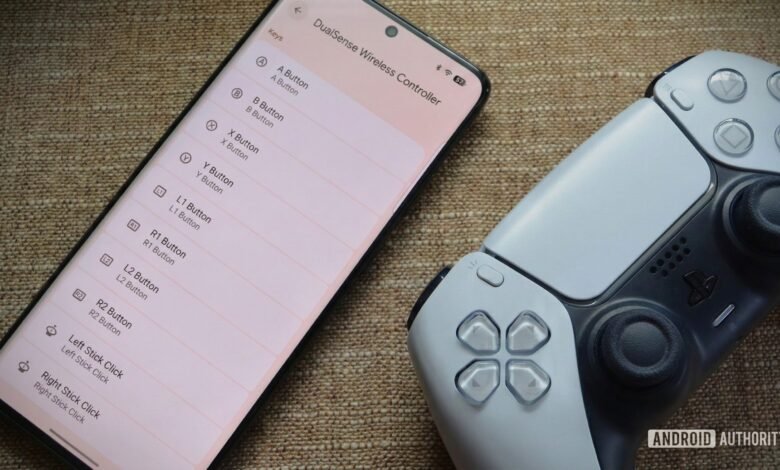
The feature was found hidden in the Bluetooth device details page within the Settings app. While not yet active by default, enabling it reveals a “Game Controller settings” menu. This interface is divided into two clear sections: “Keys” for buttons and “Axes” for directional inputs. The Keys list includes standard inputs like A, B, X, Y, and shoulder buttons, while the Axes section covers the D-pad and both analog sticks. Tapping any entry opens a dialog to reassign that input to a different function.
The technology behind this is straightforward. Android has long translated physical controller inputs into standardized internal codes that games recognize. This new system essentially intercepts that process, allowing users to change which code is sent when they press a button or move a stick. For example, you could make the physical ‘A’ button send the code for ‘B’ instead, effectively swapping their functions in any supported game.
Some may notice the menu uses generic Xbox-style button labels (A, B, X, Y) even when a PlayStation controller like the DualSense is connected. This is because the current interface is a work-in-progress and reflects Android’s internal standardization, where it maps PlayStation’s shapes (Circle, Square, etc.) to these universal codes. This backend consistency is what allows games to work with various controllers without needing custom profiles for each model.
There is room for improvement before the feature’s official launch. The interface should ideally display the actual button icons from the connected controller to prevent confusion. The remapping process itself could be more intuitive by letting users press a physical button to assign it, rather than selecting from a list. Furthermore, support for extra inputs like rear paddles on advanced controllers would make the tool much more powerful for enthusiasts.
Google has ample time to refine this addition, as Android 17 isn’t expected until next year. Robust controller support is a critical component of Google’s broader strategy, especially for expanding Android gaming to larger screens and PCs. As the company pushes for more desktop-like experiences, features that bridge the gap between mobile and traditional gaming platforms will be essential. Convincing developers to port their titles often hinges on reliable input methods beyond touchscreens, making this a strategic move for the ecosystem’s future.
(Source: Android Authority)