Google Pixel Watch Gains Always-On Media, Timer & Stopwatch
▼ Summary
– Google is rolling out improved always-on display (AOD) behavior for the Pixel Watch, starting with the Timer app.
– The new AOD mode for the Timer removes the circular countdown ring and replaces filled buttons with outlined ones to conserve resources.
– Similar AOD changes are applied to the Stopwatch, where the ring and markers disappear and buttons are hollowed out.
– This update is part of Google Clock version 6.11, which is not yet widely available to all users.
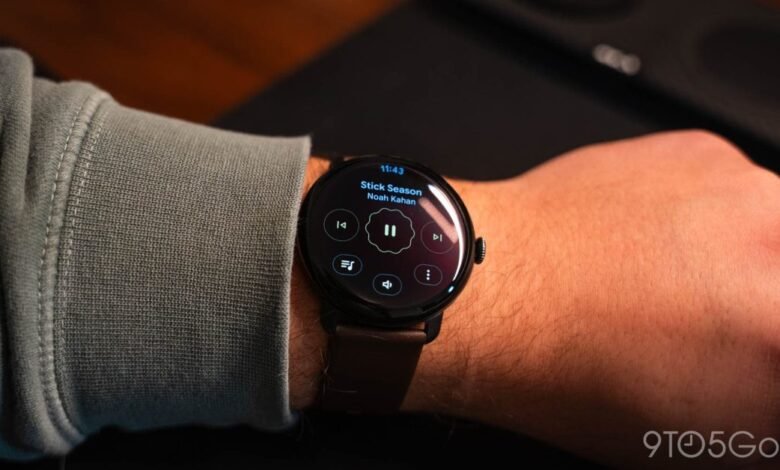
– Some users are also receiving always-on media controls with outlined buttons, joining existing AOD features in apps like Keep and Maps.
The latest update to the Google Pixel Watch introduces a more functional always-on display, enhancing user convenience for several core applications. This move aligns with Google’s broader commitment to improving the always-on experience within Wear OS 6, making key information persistently accessible without needing to wake the device fully. The changes are particularly focused on the Timer and Stopwatch apps, alongside new media controls, creating a more seamless interaction for users on the go.
In earlier versions, many Google applications would intentionally blur the screen after a brief period to save battery, overlaying a simple clock face in the center. This approach, while efficient, limited functionality. The new implementation allows the Timer app to remain fully operational in its always-on state. When the screen times out or you lower your wrist, the app stays active. The visual design is streamlined: the circular countdown ring vanishes, and action buttons for restart, end, and pause are presented as thin outlines instead of solid shapes. To further simplify the display, seconds are indicated by simple dashes.
A similar redesign applies to the Stopwatch. The interface removes the progress ring and the small markers that show time increments. The control buttons also adopt a hollow outline style, and the display of milliseconds is omitted in the always-on mode to prioritize clarity and power conservation. These updates are part of the Google Clock version 6.11, which is currently in a limited rollout and not yet available to all users.
In addition to these timekeeping tools, Google is expanding always-on functionality to media playback controls. As hinted previously, some Pixel Watch users are now seeing persistent media controls where the play, pause, and skip buttons switch to the same outlined aesthetic. Availability appears to be gradual; it has been observed on one device but not consistently across all hardware, such as the Pixel Watch 4. To potentially access this feature, users should ensure their Media Controls app is updated to the latest version via the Google Play Store.
These enhancements join the existing suite of always-on display features within Google’s ecosystem on the watch, including note viewing in Google Keep and turn-by-turn directions in Google Maps navigation. Together, they represent a focused effort to make the Pixel Watch’s standby screen more informative and interactive.
(Source: 9to5 Google)