Android 16 QPR2’s Sideloading UI Gets a Major Visual Upgrade
▼ Summary
– Google has redesigned the Android Package Installer with the Material 3 Expressive design language as part of the Android 16 QPR2 update.
– The new dialog centers the app name and icon and uses distinct Filled and Elevated button styles to clarify primary and secondary actions.
– This update requires a full OS update (Android 16 QPR2) and cannot be delivered via a Google Play System Update.
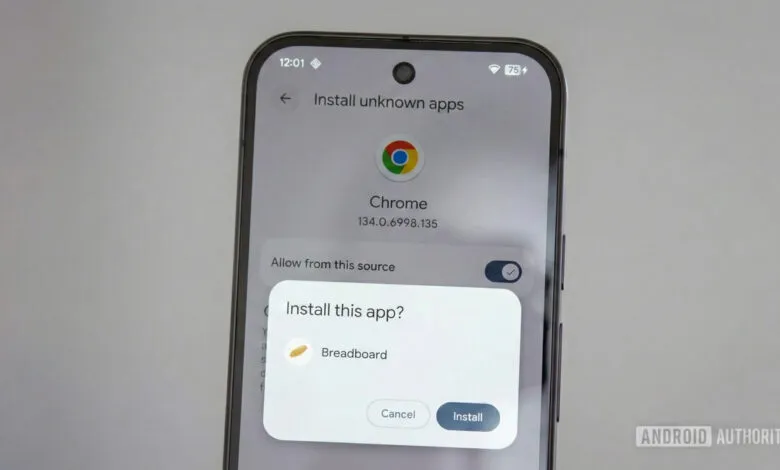
– The redesign shifts focus to the specific installation action, like “Install this app?”, by moving the app details from the top to the center.
– An oversight leaves the related permission-granting dialog for sideloading still using the old button style, not fully redesigned.
Google has rolled out a significant visual refresh for the Android Package Installer as part of the latest Android 16 QPR2 update, bringing the sideloading interface in line with the system-wide Material 3 Expressive design language. This change ensures a more cohesive and modern user experience across the operating system, though it requires the full OS update to take effect, as this component cannot be patched through Google Play System Updates.
The redesigned dialog window shifts the app’s name and icon from the top to the center of the screen, a layout adjustment that places greater emphasis on the action being performed, such as “Install this app?”, rather than the app’s branding. This subtle but meaningful change helps clarify the dialog’s purpose at a glance. The new button styling is a major usability improvement, employing distinct Filled Buttons for primary actions like “Install” and Elevated Buttons for secondary options like “Cancel,” creating a clearer visual hierarchy compared to the older text-only buttons.
Alongside these layout changes, the installation progress bar has been updated to the newer Material 3 Linear Progress Indicator, and the overall font size for dialog titles has increased, resulting in a slightly taller window. Interestingly, the separate system prompt that requests permission to allow app installations from unknown sources has not yet received the same full visual overhaul, still displaying the older button styles, which may be an oversight Google will address later.
This visual update to the sideloading process follows other recent system UI refreshes, like the redesigned permissions interface. However, because the Package Installer is a core system component rather than a modular one, it cannot be updated independently via the Play Store, explaining why these changes are exclusive to the new Android 16 quarterly release. The redesign marks another step in Google’s effort to create a unified and expressive design language throughout the Android ecosystem.
(Source: Android Authority)