Asus Falcata Review: An Ambitious Split Gaming Keyboard That Disappoints
▼ Summary
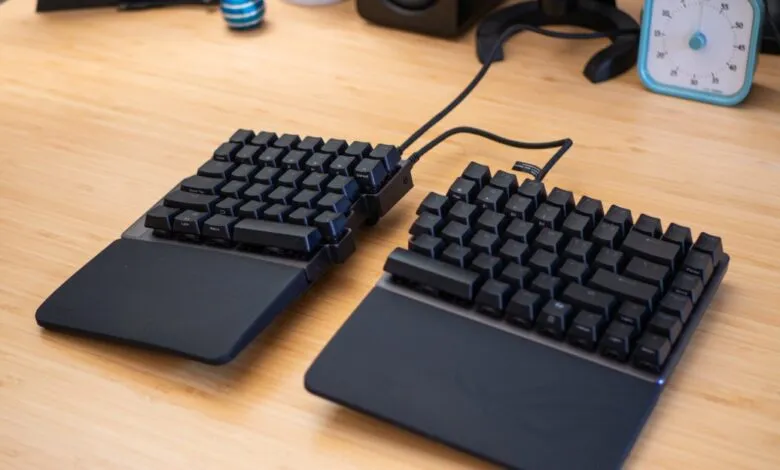
– The Asus ROG Falcata is a unique split ergonomic keyboard with Hall effect switches, priced at $419.99, but its limited tenting angles may not suit all ergonomic needs.
– It excels as a Hall effect board, offering extensive customization like adjustable actuation points for each key and features like rapid trigger and Speed Tap for gaming advantages.
– The keyboard’s ergonomic limitations include a maximum tenting angle of only 7 degrees and a short 10-inch separation between halves, which may not provide sufficient relief for some users.
– It includes versatile connectivity options, operating wired or wirelessly via Bluetooth or 2.4GHz, and supports advanced features like analog switches and macro customization through the browser-based Gear Link app.
– As an alternative, the Kinesis Freestyle Edge RGB Plus is recommended for better ergonomics at less than half the price, offering up to 15 degrees of tenting but lacking Hall effect features.
Finding a keyboard that combines the precision of Hall effect technology with the comfort of a split ergonomic design can feel like searching for a unicorn. The Asus ROG Falcata attempts to be that rare device, positioning itself as the ultimate solution for gamers seeking both performance and physical relief. However, with a premium price tag of $419.99, this ambitious keyboard delivers a mixed experience that may leave ergonomic enthusiasts wanting more.
The core appeal of any split keyboard lies in its ability to promote a healthier typing posture, and tenting is an integral feature for achieving this. By raising the inner edges of each keyboard half, your wrists and arms can rest in a more natural, neutral position. Unfortunately, the Falcata’s tenting capabilities are surprisingly limited, reaching a maximum of only seven degrees. For users accustomed to more aggressive angles, like the 15 degrees offered by competitors such as the Kinesis Freestyle Edge RGB, this feels like a significant compromise. When you’re investing over four hundred dollars, you expect a device that can adapt thoroughly to your body, not one with such a basic range of adjustment.
Another ergonomic shortcoming is the physical separation between the two keyboard halves. They can only be spaced a maximum of 10 inches apart due to the included USB-C link cable. For many users, this simply isn’t enough room to properly align their shoulders and arms comfortably. While you can technically use a longer third-party cable, that’s an extra step and expense that shouldn’t be necessary at this price point. The limited separation distance is a puzzling oversight for a product marketed on its ergonomic benefits.
Where the Falcata truly excels is in its performance as a Hall effect keyboard. The analog switches provide a level of customization that digital mechanical switches can’t match. You can fine-tune the actuation point of every single key with incredible precision, adjusting it by as little as a hundredth of a millimeter. This allows for lightning-fast inputs in games, where a shallow press can register a command almost instantly. The keyboard supports a high 8,000Hz polling rate in all modes except Bluetooth, and offers versatile connectivity through wired, 2.4GHz wireless, and Bluetooth options.
This high level of programmability does come with a slight learning curve for everyday typing. On default settings, it’s easy to accidentally hold a key down, resulting in repeated characters if your fingers rest too heavily. Thankfully, the customization options are extensive. Using Asus’s browser-based Gear Link software, you can adjust the sensitivity and dead zones for each key to eliminate these misfires. You can also configure macros and even use a feature called Dynamic Keystroke, which lets you assign up to four different commands to a single key based on how far you press it.
Gamer-centric features are a major part of the Falcata’s identity. It includes rapid trigger, which allows a key to reset for a new input the moment you start to release it, enabling faster repeated presses than traditional switches. It also boasts a feature called Speed Tap, which handles simultaneous opposing key presses (like A and D) by prioritizing the most recent input. It’s worth noting that some competitive games, like Counter-Strike 2, consider this an assist and prohibit its use. For other titles, it can provide a tangible in-game advantage.
Ultimately, the Asus ROG Falcata occupies a very specific niche. It makes the most sense for someone who is absolutely determined to have both Hall effect performance and a split ergonomic form factor in a single, sleek package. If your primary need is ergonomic relief, it’s crucial to try before you buy, as the restricted tenting might not be sufficient for your needs. For those who can live without Hall effect switches, alternatives like the Kinesis Freestyle Edge RGB Plus offer superior ergonomic adjustability, including a 15-degree tent, for less than half the price, albeit without the same high-tech features and wireless convenience.
(Source: The Verge)