Apple’s New Digital ID Now Accepted by TSA
▼ Summary
– Apple is launching Digital IDs that can be created and stored in Apple Wallet using a US passport for domestic travel at TSA checkpoints.
– The Digital ID can be presented at over 250 US airports using an iPhone or Apple Watch as an alternative to a REAL ID, but it is not valid for international travel.
– To create a Digital ID, users must scan their passport’s photo page and embedded chip, take a selfie, and complete facial movements for verification.
– The feature is encrypted, ensuring Apple cannot see when or what data is presented, and users do not need to unlock or hand over their device to display the ID.
– Apple has not specified which airports will accept Digital IDs, and the feature may expand to additional businesses and organizations in the future.
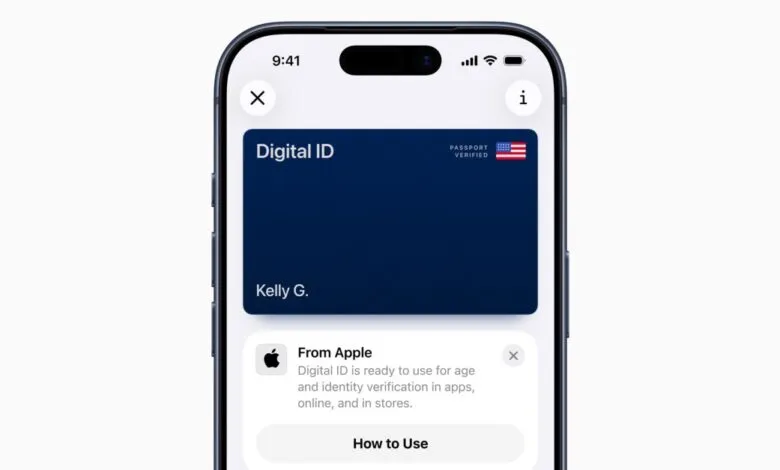
Travelers can now use their iPhone or Apple Watch to present a Digital ID at TSA checkpoints for domestic flights across more than 250 US airports. Apple has introduced this feature within its Wallet app, allowing users to generate and store a secure digital identification using their US passport. This development offers a convenient alternative for individuals whose states do not yet support digital driver’s licenses or who have not obtained a REAL ID.
While the Digital ID functions in place of a REAL ID during security screening, it does not replace a physical passport and cannot be used for international journeys or border crossings. Apple already supports storing driver’s licenses in Apple Wallet for residents of twelve states and Puerto Rico. The new Digital ID expands options for those without a state-issued digital ID. Originally unveiled at Apple’s Worldwide Developers Conference in June, the feature was initially slated for release with iOS 26 before experiencing a quiet postponement.
Setting up a Digital ID is straightforward. Open the Wallet app, tap the “plus” button in the upper right corner, and choose Digital ID. You will then be prompted to scan the photo page of your passport, as well as the embedded chip on the back, to verify the document’s authenticity. A selfie and a series of facial and head movements are also required to confirm your identity.
When it’s time to present your ID, simply double-click the side button or Home button on your iPhone to open Apple Wallet, select your Digital ID, and hold your device near the identity reader. The same process applies to Apple Watch.
Apple emphasizes that all data is encrypted, ensuring the company cannot access information about when or where you use your Digital ID, nor the specific details you present. You also won’t need to unlock your device, display your screen, or hand it over to a TSA officer, a security best practice that also applies to digital driver’s licenses.
The specific airports adopting this technology have not yet been fully disclosed. Apple has also indicated that in the future, users will be able to present their Digital ID at other participating businesses and organizations.
(Source: The Verge)