The Espresso Pro: Your Ultimate Remote Work Revolution
▼ Summary
– The Espresso Pro 15.6-inch portable monitor has transformed the author’s remote work by providing a dual-screen setup in compact spaces like a van.
– It features a 4K LCD touchscreen, is lightweight at 800g, and connects via a single USB-C cable to Mac, PC, Android, and iPhone devices.
– The monitor includes a versatile Stand+ mount and supports pass-through charging, but its touchscreen is not very useful with macOS.
– At $699, it is expensive and has limitations like no portrait mode with phones and lower speaker volume, though it excels as a dedicated display.
– Despite the high cost, the author finds it indispensable for remote work, offering a distraction-free, purpose-built solution that enhances productivity.
For professionals embracing the digital nomad lifestyle, finding tools that enhance productivity without sacrificing portability is essential. The Espresso Pro 15.6-inch portable monitor has fundamentally changed how I approach remote work, especially from compact environments like my van. Unlike many gadgets offering minor upgrades, this device delivers a genuine dual-screen experience wherever I go, bridging the gap between my mobile setup and the expansive desktop monitors I use at home.
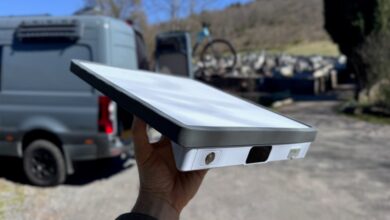
Weighing just 800 grams and measuring a slim 360 x 225 x 9 millimeters, the Espresso Pro feels incredibly lightweight for its generous screen size. Its aluminum casing has a slight flex when pressed, yet it has endured accidental drops, tipping over, and rough travel on gravel roads without any visible damage. A larger 17-inch version is also available for those wanting even more screen real estate.
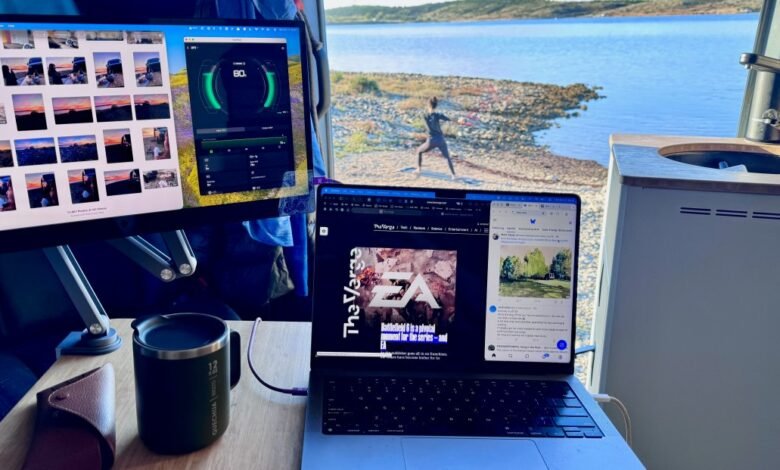
Connecting via a single USB-C cable simplifies setup dramatically, instantly extending my MacBook Pro’s display into a vibrant 4K LCD touchscreen capable of showing over a billion colors. Working from my van’s compact “office,” I now edit photos on the Espresso Pro while drafting articles on my laptop, a workflow that closely mirrors my dual-monitor home office. At night, I easily switch the input to my iPhone 15 Pro, transforming the display into a personal cinema for streaming movies in bed.
Power consumption is reasonable for a portable display. At full 550-nit brightness, it draws about 13 watts, dropping to roughly 9 watts at 300 nits. While this does reduce my laptop’s battery life by nearly half, cutting a typical 8–10 hour day down to around 5 hours, the monitor’s dual USB-C ports support pass-through charging. By running a second cable from a wall charger to the Espresso Pro, I can keep both the display and my MacBook powered throughout the workday.
Included with the monitor is the clever Stand+ mount, which attaches magnetically and elevates the screen neatly above an open laptop. It folds down compactly for travel, but since my van’s interior sees constant movement from two people and a dog, I needed a more secure mounting solution. I modified a magnetic iPad stand from Kuxiu by attaching Espresso’s VESA adapter, creating a stable, multi-angle mount that stays firmly in place even while driving.
The touchscreen functionality proved less useful in my macOS workflow, often registering unintended inputs when adjusting the display. I didn’t test Espresso’s optional Pen accessory, which might improve precision. For Mac and Windows users, the optional EspressoFlow app provides helpful window management features, though it isn’t necessary for basic operation.
Using the monitor with my iPhone revealed a few limitations. The iPhone 15 Pro requires a separate power connection via the second USB-C port to drive the display, and portrait mode isn’t supported, making it less ideal for vertical video platforms like TikTok or Instagram. The downward-firing speakers could be louder for shared viewing, and some streaming apps like DAZN blocked content when connected to the external display. Adjusting settings like brightness and volume also felt cumbersome, often requiring repeated swipes to register changes.
Priced at $699, the Espresso Pro isn’t an impulse purchase. For slightly more, you could opt for a new iPad Air, which offers greater versatility through apps like Sidecar. Alternatively, Espresso offers a more affordable 1080p 15.6-inch display for just $299. Still, there’s value in a dedicated, high-performance portable monitor that excels at its primary function without the distractions of a full tablet OS.
After several weeks of use, the Espresso Pro has become indispensable to my remote work routine. Its ability to provide a crisp, reliable second screen anywhere I travel has not only boosted my productivity but has also become a coveted tool between my wife and me each morning. For anyone regularly working outside a traditional office, this portable monitor delivers a transformative upgrade to both efficiency and flexibility.
(Source: The Verge)