Asus ROG Strix 27″ 500Hz OLED Monitor Review: Speed Meets Color

▼ Summary
– The Asus ROG Strix XG27AQDPG is a 27-inch OLED gaming monitor with a 500 Hz refresh rate and 2560×1440 QHD resolution, delivering exceptional gaming performance and stunning visuals.
– It features infinite contrast, Quantum Dot enhanced color covering over 108% of DCI-P3 gamut, and HDR10 support, providing superior image quality and brightness over 500 nits.
– Gaming is enhanced by Adaptive-Sync, ELMB blur reduction, and OLED anti-flicker, ensuring smooth motion without stutter, tearing, or blur.
– The monitor includes extensive panel care options like pixel cleaning, an orbiter, and logo dimming, along with a user proximity sensor to protect the OLED screen.
– Priced at $900, it offers premium features such as a high-quality stand, USB ports, and a headphone jack, but lacks internal speakers.
The Asus ROG Strix XG27AQDPG stands out as a premium 27-inch gaming monitor that masterfully blends an exceptionally high 500Hz refresh rate with the visual brilliance of QD-OLED technology. It delivers a breathtaking picture characterized by infinite contrast and a wide color gamut enhanced by Quantum Dot, making it a formidable choice for gamers who refuse to compromise on either speed or image quality.
For years, LCD panels have dominated the high refresh rate arena, with the fastest models reaching up to 540Hz, albeit typically at a lower FHD resolution. OLED technology represents a newer challenger, yet it has quickly demonstrated superiority in nearly every visual aspect. While OLED monitors often carry a higher price tag, the performance gap is substantial. If you believe LCDs still hold an advantage in raw speed, the ROG Strix XG27AQDPG is here to change your mind. This model is a 27-inch QHD (2560×1440) panel boasting a native 500Hz refresh rate, HDR10 support, Quantum Dot color, and Adaptive-Sync, proving that you don’t have to sacrifice screen size or resolution for unparalleled motion clarity.
While LCD monitors maintain a price advantage, the XG27AQDPG is positioned more as a high-performance luxury rather than an unattainable exotic. Priced around $900, it offers a comprehensive feature set with no apparent compromises. The 500Hz capability is native to the panel, not an overclocked result. A substantial heatsink provides ample cooling through passive airflow, eliminating the need for noisy internal fans. Asus has also included robust panel protection features, including a pixel cleaner, a pixel orbiter, and multiple dimming options to prevent image retention from static elements like taskbars and logos. A user proximity sensor can automatically blank the screen when you step away from your desk.
Gaming performance is elevated not just by the blistering refresh rate but also by the combination of Adaptive-Sync and ELMB (Extreme Low Motion Blur) sync. Asus incorporates OLED anti-flicker technology to prevent visual artifacts during rapid refresh rate changes. The resulting motion is incredibly fluid, with perfect motion resolution and a complete absence of stutter, screen tearing, or blur.
The visual experience is, expectedly, stunning. OLED’s infinite black levels create a depth and richness that LCDs cannot match. The XG27AQDPG also manages to be slightly brighter than many competitors, achieving peak brightness levels over 500 nits for both SDR and HDR content. A dedicated Uniform Brightness mode provides a consistent luminance level around 320 nits, ideal for switching between productivity tasks and gaming without distracting brightness shifts.
Quantum Dot technology delivers an exceptionally wide color gamut, with this monitor covering over 108% of the DCI-P3 color space. An sRGB mode is available for color-critical work requiring that standard. Out-of-the-box color accuracy is excellent, and users have access to Asus’s comprehensive suite of calibration tools, which can be managed through the on-screen display (OSD) or the convenient DisplayWidget Center desktop application. HDR10 content is supported, leveraging the monitor’s high peak brightness and multiple adjustable picture modes.
An extensive set of gaming aids is built-in, including various aiming points, a sniper mode, a timer, a stopwatch, a frame rate counter, and display alignment marks. The thin bezels facilitate seamless multi-monitor setups. The monitor is well-equipped with USB ports, a 3.5mm headphone jack, and is supported by a high-quality, fully adjustable stand.
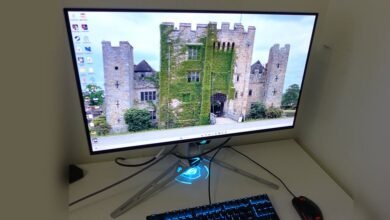
The monitor’s design is business-like from the front, with minimal bezels framing the glossy screen. Its light rejection is adequate but not exceptional, so positioning it away from direct sunlight or bright lamps is advisable. A small, illuminated ROG logo sits at the bottom center of the bezel. The rear of the monitor features more extensive LED lighting, including a large ROG logo composed of an array of small lights.
The panel assembly has a total depth of about 2.6 inches due to an integrated component bulge. It attaches to a premium stand that offers 4.3 inches of height adjustment, 45 degrees of swivel, 5 to 25 degrees of tilt, and the ability to pivot into a 90-degree portrait orientation. All movements feel solid and precise. A quarter-inch threaded socket on top of the stand allows for mounting a webcam or light.
Connectivity is comprehensive, featuring one DisplayPort 1.4 (with Display Stream Compression), two HDMI 2.1 ports, a USB 3.2 hub (one upstream, two downstream), and a 3.5mm headphone jack. The intuitive OSD is controlled by a multi-directional joystick on the back of the monitor, which is embossed with the phrase “For Those Who Dare.”
The OSD layout is consistent with other recent ROG monitors, organized into eight submenus packed with gaming and image calibration features. The Gaming menu is front and center, where you can toggle between Variable Refresh Rate (VRR) and ELMB Sync. At frame rates exceeding 200 fps, the motion is so smooth that ELMB becomes superfluous.
Nine GameVisual picture modes are available, with Racing set as the default, a mode that requires virtually no calibration. Users can fine-tune the image with single-point white balance, gamma presets, and six-axis saturation sliders. The color gamut can be set to sRGB, DCI-P3, or the monitor’s native wide gamut, which exceeds 108% of DCI-P3. For the most control, it’s recommended to use the Racing mode and simply select the desired color space, rather than locking into the more restrictive sRGB Calibration mode.
The Image menu houses separate luminance controls for SDR and HDR. The HDR Setting offers four modes, one of which can be made adjustable for fine-tuning brightness and contrast. The DisplayHDR 500 True Black mode is highly recommended for its accurate luminance tracking. All HDR modes fully utilize the monitor’s expansive color gamut.
A significant portion of the OSD is dedicated to panel care. Options include three different screen dimming functions, logo-specific dimming for corners, and status bar dimming. A pixel cleaning utility can be run manually, and a pixel orbiter can be enabled to subtly shift the image periodically. The proximity sensor can also be configured to dim the screen when no one is detected.
The Aura RGB lighting system on the back supports multiple color effects and can be synchronized with on-screen content via the DisplayWidget Center app once a USB connection is established. The OSD joystick’s directional presses are user-programmable for quick access to various functions, and two memory slots are available for saving custom settings.
A critical setting to adjust during initial setup is the Power Setting. The default Power Saving Mode restricts brightness and disables several image controls. For full performance and access to all features, selecting Performance Mode is essential, though it increases power draw to around 40 watts at a 200-nit brightness level.
While the XG27AQDPG is impressively accurate in its out-of-the-box Racing mode, minor improvements can be made with slight adjustments to the RGB gain settings. To experience the monitor’s full color potential in both SDR and HDR, the wide gamut option in the Color Space menu should be selected. If an sRGB color space is needed, it is better to select it from this menu than to use the dedicated sRGB Cal mode, which limits adjustment options.
In practical use, the monitor’s specifications translate into an exceptional gaming experience. In fast-paced titles, the combination of high frame rates and the monitor’s rapid response makes input lag imperceptible, with every mouse movement translating to instantaneous on-screen action. The fluidity of motion during quick turns and rapid maneuvers is unparalleled. When the action slows down, the superb color reproduction and infinite contrast make game worlds look rich and immersive. The 27-inch QHD resolution provides a sharp image with excellent pixel density, and the high refresh rate ensures that gameplay remains buttery smooth.
The monitor’s design is both stylish and functional. The bezels virtually disappear during use, and the stand offers excellent ergonomic adjustments. The cooling solution effectively isolates the OLED panel from internal heat-generating components. The wealth of built-in panel protection features provides peace of mind for long-term ownership, backed by a three-year warranty from Asus.
For productivity, the monitor is equally capable. The high pixel density and exceptional contrast make text appear crisp and clear, reducing eye strain during long work sessions. In creative applications like Photoshop, the accurate and vibrant colors are a significant asset, and switching between color gamuts is a quick and simple process via the OSD.
The Asus ROG Strix XG27AQDPG emerges as an ideal all-around display for serious work, competitive gaming, and media consumption. The lack of built-in speakers is a minor concession, easily addressed by using the provided headphone jack. The image quality is spectacular, and the gaming performance is in a class of its own, with perfectly smooth motion and instantaneous control response. It is a premium investment, but one that delivers a best-in-class experience without regret.
(Source: Tom’s Hardware)