iOS 26.1 Beta 4 Lets You Reduce Liquid Glass Transparency
▼ Summary
– iOS 26.1 beta 4 introduces a new option to choose between a transparent “Clear” or more opaque “Tinted” Liquid Glass design.
– The setting is available in Display & Brightness on iPhone/iPad and in Appearance on Mac, applying to both Apple and third-party apps.
– Apple added this feature in response to user feedback during beta testing to allow personalization of interface opaqueness.
– The change is a binary choice with no slider, and on iPhone/iPad it specifically increases Lock Screen notification opacity when tinted.
– This update reverses some previous beta changes and is currently available to developers, with a public beta expected soon.
Apple’s latest iOS 26.1 beta 4 introduces a much-requested feature allowing users to reduce the transparency of the Liquid Glass design, offering greater customization for those who prefer a more solid interface appearance. This new setting is also rolling out simultaneously for iPadOS and macOS, ensuring a consistent experience across Apple’s device ecosystem.
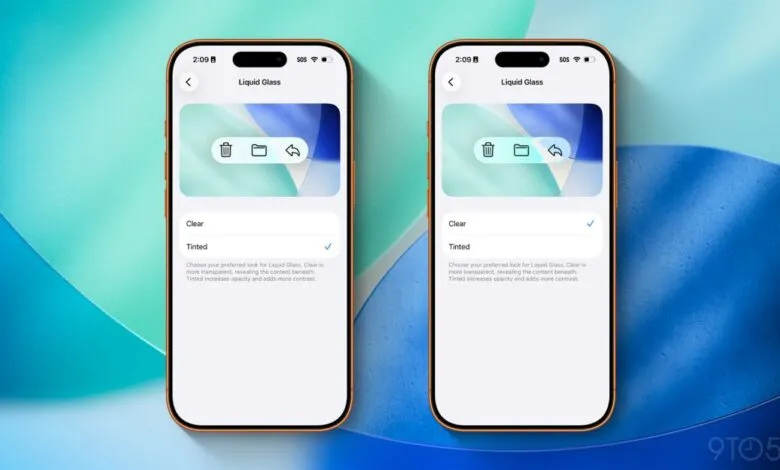
For anyone not completely sold on the translucent aesthetic that debuted with iOS 26, this update provides a welcome alternative. You can now select a “Tinted” option that makes the Liquid Glass elements more opaque and adds extra contrast, a direct response to user feedback collected during the earlier beta phases.
Locating the new setting is straightforward. On your iPhone or iPad, open the Settings app and go to Display & Brightness. Mac users will find it within the Appearance section of System Settings. A new menu labeled Liquid Glass will present you with two distinct choices: “Clear” and “Tinted.” Apple describes the “Clear” option as maintaining transparency to show underlying content, while the “Tinted” alternative increases opacity for a bolder look.
This is a simple on/off style choice without any adjustable sliders. You either stick with the original, highly transparent Liquid Glass or switch to the new tinted version. When activated, the tinted design affects Liquid Glass elements system-wide, including within Apple’s own applications. On iPhones and iPads, it specifically makes notifications on the Lock Screen less see-through.
The preference also extends to third-party applications that have incorporated the Liquid Glass design language. If a user selects the tinted look, those apps will automatically adopt the more opaque styling as well.
This new personalization option stems directly from user input. Throughout the iOS 26 beta testing period, many people expressed a desire for more control over the interface’s translucency. Apple has now delivered that control, providing another way for individuals to tailor the look of their devices to their personal taste.
The feature is currently available in the fourth beta versions of iOS 26.1, iPadOS 26.1, and macOS 26.1, which are now accessible to registered developers. A public beta release is anticipated to follow shortly.
The Liquid Glass design itself has seen significant adjustments since its introduction. The third beta of iOS 26.1, for instance, experimented with a much more opaque interface before Apple reverted to a clearer look for the final public release of iOS 26. This new setting appears to be the company’s solution for pleasing both sides of the visual preference debate.
(Source: 9to5Mac)