October 2025 Patch Tuesday: Final Windows 10 Updates
▼ Summary
– Microsoft released patches for 172 Windows security vulnerabilities, including two actively exploited zero-day flaws.
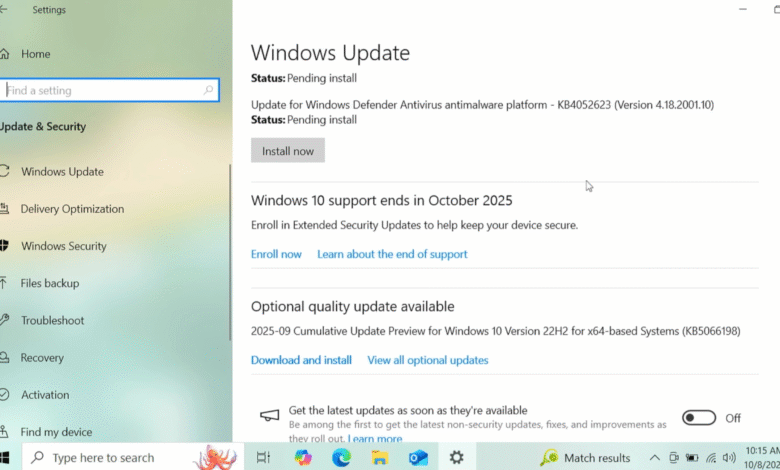
– This is the final month of security updates for Windows 10, with Extended Security Updates available for $30/year.
– A critical remote code execution vulnerability (CVE-2025-59287) exists in WSUS with a 9.8/10 threat score but no current exploitation.
– Multiple Microsoft products reach end-of-life today including Exchange Server 2016/2019 and Skype for Business 2016.
– Windows 10 users can migrate to Linux Mint as an alternative, which offers a familiar interface and LibreOffice compatibility.
Microsoft has rolled out its October 2025 Patch Tuesday, delivering crucial security fixes for Windows and marking the final scheduled update release for Windows 10. This update bundle addresses a significant 172 security vulnerabilities, with at least two already under active attack by malicious actors. For those continuing to operate Windows 10 machines without a clear path to Windows 11, exploring alternative security strategies becomes essential.
One of the actively exploited flaws, identified as CVE-2025-24990, involved a third-party Agere Modem driver that had been included with Windows for many years. In response to the active exploitation, Microsoft has taken the definitive step of removing this vulnerable driver entirely from the operating system.
The second zero-day vulnerability, CVE-2025-59230, is an elevation of privilege issue found within the Windows Remote Access Connection Manager, or RasMan. This component is responsible for handling remote network connections, including VPNs and dial-up services. According to Satnam Narang, a senior staff research engineer at Tenable, while RasMan has been patched frequently over the past few years, this instance marks the first time it has been exploited in the wild as a zero-day threat.
Microsoft Office users should pay particular attention to two other vulnerabilities, CVE-2025-59227 and CVE-2025-59234. These are remote code execution bugs that leverage the “Preview Pane” feature. The danger here is that a user does not need to open a malicious file directly; simply previewing a specially crafted email containing a harmful Office document is enough to trigger the exploit.
In related Microsoft Office news, the company recently implemented a change where Word now automatically saves documents to OneDrive by default. Users who prefer not to store all their files on Microsoft’s cloud can adjust this setting within Word’s options menu.
Another critical vulnerability highlighted by security experts is CVE-2025-59287, a remote code execution flaw in the Windows Server Update Service (WSUS). This is the very service that manages the download and deployment of security patches for Windows Server environments. Although not currently under active attack, it carries a high threat score of 9.8 out of 10 and is flagged as “exploitation more likely.” Kev Breen, Senior Director of Threat Research at Immersive, warns that an unauthenticated attacker with network access could exploit this flaw to execute code. Because WSUS is a trusted system service with high-level file system access, a successful attack could grant an attacker significant control over the operating system and potentially evade some endpoint detection systems.
Beyond Windows 10, several other Microsoft products are also reaching their end-of-life on this Patch Tuesday, including Exchange Server 2016 and 2019, Skype for Business 2016, Windows 11 IoT Enterprise Version 22H2, and Outlook 2016.
For Windows 10 users facing the end of regular security updates, several paths remain available. One immediate option is enrolling in Microsoft’s Extended Security Updates (ESU) program, which provides an additional year of critical security patches. The cost is approximately $30 for users without a Microsoft account, and it appears to be free for those who register their PC with a Microsoft account. It is important to understand that the ESU program delivers security updates only; it does not include new features, non-security fixes, or technical support from Microsoft.
![Image: A person considering options on a laptop screen showing Windows 10 and Linux logos.]
Another viable route is migrating to a Linux distribution. Websites like endof10.org offer extensive guidance and do-it-yourself installation instructions for users considering this switch. For individuals new to Linux, Linux Mint is often recommended due to its user-friendly interface that feels familiar to Windows users. It operates efficiently on most computers made in the last ten years, requiring a 64-bit processor and a minimum of 2GB of RAM, though 4GB is preferable for smoother performance. Linux Mint and similar distributions come pre-loaded with LibreOffice, a robust, open-source office suite capable of opening, editing, and saving files in Microsoft Office formats.
Trying out Linux before fully committing is straightforward. You can download a distribution and create a bootable USB drive. By restarting your computer with the USB drive connected and selecting the option to boot from the external drive, you can run a “live” version of the operating system. This allows you to test drive Linux without making any permanent changes to your computer’s hard drive. Any modifications or issues encountered during a live session are wiped clean upon reboot, returning the system to its original state.
If you encounter any problems while installing this month’s security patches, sharing your experience in the comments can be helpful for others navigating the same process.
(Source: Krebson Security)