Silksong Now on Android: Seamlessly Continue Your PC Progress
▼ Summary
– GameHub 5.0 allows users to easily install and run Steam games like Hollow Knight: Silksong on Android phones by automating setup and syncing saves.
– The app automatically configures graphics drivers and components, saving users from manual setup required by rival emulators.
– Performance is playable on flagship phones like the Galaxy S25, especially with a USB-C gamepad and cooler, maintaining over 100fps in demanding scenes.
– GameHub relies on community-built tools like Wine and Proton but presents them as a proprietary solution called GameFusion.
– While promising, GameHub 5.0 has stability issues, breaking some previously working games, so users may want to wait for updates.
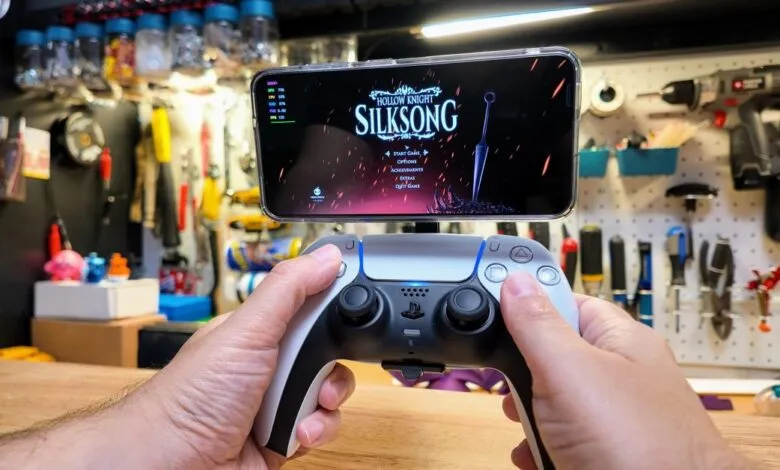
The ability to play Hollow Knight: Silksong on Android devices represents a significant leap forward for mobile gaming, allowing players to seamlessly continue their progress from the PC version. While the game itself hasn’t received an official smartphone release, new emulation technology makes it possible to run the Steam edition on high-performance phones like the Samsung Galaxy S25.
A standout tool in this space is GameHub, an application developed by the Chinese accessory maker GameSir. Its recently launched 5.0 version introduces two major improvements that set it apart from competitors. First, it automatically handles all the technical setup, graphics drivers, translation layers, and other components, that previously required hours of manual configuration. Second, and just as impressively, it can download your saved games directly from Steam, letting you pick up right where you left off on your computer.
There’s one catch, though: as of mid-September, the app doesn’t yet support uploading saves back to Steam. GameSir is actively working on implementing two-way sync, but for now, progress made on your phone stays there.
Performance is another critical factor. On a standard Galaxy S25, the game runs smoothly, especially when paired with a capable controller like the GameSir X3 Pro, which includes an integrated cooling system. Without active cooling, thermal throttling can cause noticeable stutters, making fast-paced sections feel less responsive. Framerate can vary widely, anywhere from 50 to 120 fps, depending on settings and hardware.
Not every phone handles the load equally well. Older models, such as the Pixel 9 with a Tensor G4 chip, struggle to maintain consistent performance without additional cooling. Some devices may also experience issues with cutscenes or other visual elements, so your experience will vary based on your hardware.
While some enthusiasts have turned to Nintendo Switch emulators for better performance in Silksong, those methods often involve less straightforward setup and potential complications with save file transfers. GameHub’s integration with Steam offers a more legitimate and user-friendly path, downloading purchased games and cloud saves directly.
It’s worth noting that GameHub relies on community-built tools like Wine and Proton, though it presents itself as a proprietary solution. As with any emerging technology, there may be stability issues. Some users report that the latest update broke compatibility with previously working titles, so it might be wise to wait until the software matures.
Even so, the prospect of playing full-fledged PC games on Android is no longer a distant dream. As phone hardware continues to improve, and emulation software becomes more refined, we can expect more titles to join the mobile roster. For now, Silksong serves as an exciting proof of concept, one that’s already delighting players who want to take their adventure on the go.
(Source: The Verge)