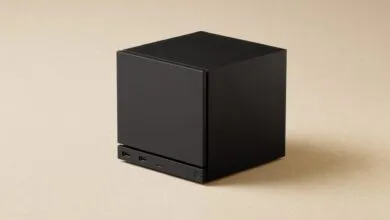
My Steam Machine Gets a Second RAM Stick, Fixing Valve’s Oversight
▼ Summary
– The Steam Machine shipped with a single 16GB DDR5 SODIMM stick instead of two 8GB sticks due to supply chain restrictions, which hampers CPU-bound tasks but minimally impacts most games.
– Upgrading RAM requires matching the exact specs of the existing SK Hynix stick (DDR5-5600, CL46) to avoid instability, and a matching stick cost the author $225 plus tax.
– Accessing the RAM involves extensive disassembly—removing the shell, fan, power supply, and four delicate ribbon cables—making it harder than a typical PC upgrade.
– In testing, adding a second RAM stick provided noticeable stability improvements in CPU-bound games like Baldur’s Gate 3 and in productivity tasks, but less impact on GPU-heavy titles.
– The upgrade is currently expensive and complicated due to high RAM prices, though Valve indicated future builds might switch to a dual-stick configuration if market conditions change.
Valve’s Steam Machine launched under less-than-ideal circumstances, not just because of inflated storage and RAM pricing, but also due to a fundamental configuration compromise. The system relies on DDR5 SODIMM memory, the same kind used in laptops, but supply chain constraints forced Valve to ship the machine with a single 16GB stick rather than the optimal dual-channel setup of two 8GB sticks. No serious PC builder would ship a single memory module when two would provide significantly better performance in CPU-bound tasks. While the impact on most games is minimal, the single-channel configuration creates a measurable bottleneck in certain scenarios. In a rational market, upgrading to 32GB or 64GB in an ideal dual-channel configuration would be cheap and straightforward. But we don’t live in that world, and so I shelled out a painful amount for a single matching stick of RAM to test just how difficult the installation is and what real-world difference it makes.
Valve has acknowledged that the single stick isn’t ideal, but they maintain it won’t affect the majority of games. For the most part, that’s accurate. GPU performance and VRAM capacity are the primary drivers for gaming, and single-channel memory mostly hampers CPU-heavy workloads. However, titles like Baldur’s Gate 3 and productivity software, file compression, and other CPU-bound tasks see a noticeable performance uplift from dual-channel memory or simply more RAM in general.
Shipping a single high-capacity stick does have theoretical advantages. If a user wants to upgrade to 32GB, adding one 16GB stick is simpler than replacing two 8GB sticks. The complication arises when trying to match the existing RAM. It’s not enough to throw any DDR5 laptop stick of the same capacity into the motherboard; you need identical specs and speed. Mismatched RAM can cause instability or prevent the system from booting entirely. In a sane world with cheap, plentiful RAM, this wouldn’t be an issue,you’d just buy a matched pair. But the current reality is what it is, and early Steam Machine adopters are still figuring out the upgrade path.
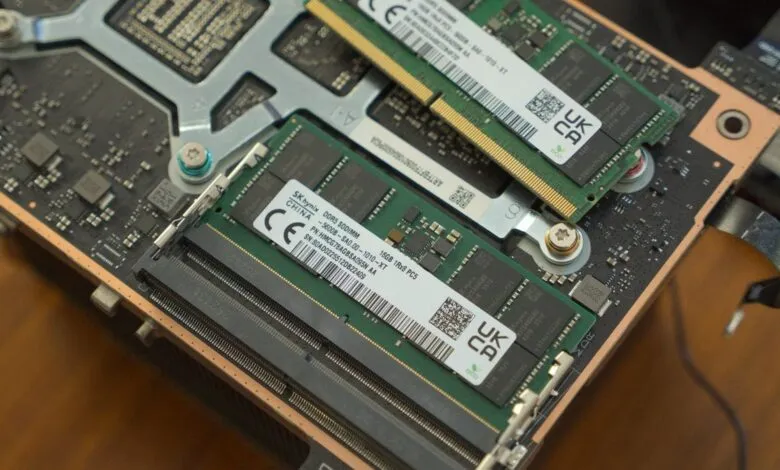
Lacking the budget for trial and error, I opted to match the existing RAM as closely as possible. That meant either finding a stick with the same specs from another vendor or buying the exact same SK Hynix module. The former is riskier, though I’ve since seen reports of people trying it with Crucial memory. The Steam Machine’s RAM is non-ECC, DDR5-5600 with a CAS latency of CL46. I chose the safer route and ordered the identical SK Hynix DDR5 SODIMM (model HMCG78AGBSA095 AA). This upgrade cost me $225 plus tax,a sum that would have been trivial a year ago.
The Steam Machine is an engineering marvel, but its compact design makes servicing the RAM a serious undertaking. Unlike a standard PC where you pop the side panel and snap in new sticks, the Steam Machine requires near-complete disassembly. The hard drive is accessible via a breakout board on the bottom, but the RAM is buried deeper. Mercifully, you don’t need to remove the board from the cooler and reapply thermal paste, but you do have to take out both the fan and the power supply. It’s best to think of this not as a PC upgrade but as repairing an intricate stationary handheld.
To access the RAM, you must remove the fan, disconnect four ribbon cables, and unplug the antennas. The layout is fairly intuitive, but it’s harder than a standard PC upgrade. Valve’s design philosophy shines through in the modularity: the shell comes off easily with two screws on the back, four screw-off feet, and a few on the rear fan. The front and rear I/O are separate breakout boards attached with ribbon cables that are lightly glued down. Those ribbon cables are delicate and prone to tearing, so caution is essential. Fortunately, Valve used high-quality snap-in connectors, and the glue is minimal. You’ll need to remove metal protectors holding the connectors, but if you’re methodical and follow a guide, it’s manageable.
The most frustrating part is a single screw connecting the fan that’s awkward to reach, requiring a longer screwdriver. Once the fan is out, disconnect everything attached to the PSU (including fan power and antenna), ensure all ribbon cables are clear, and unscrew the four long screws securing the power supply. Then you’re in. Installing the SODIMM RAM takes seconds, and reassembly is the reverse of disassembly.
Thankfully, everything worked without instability. I did some minor benchmarking, though it wasn’t a controlled comparison. Gamers Nexus conducted far more comprehensive tests, reporting significant uplifts in Baldur’s Gate 3 and compression tasks. In my own testing, Act 3 of Baldur’s Gate 3 ran much more stable with the second channel. Unexpectedly, Zero Parades showed notable improvement with dual-channel RAM, though I’d need to rerun a direct comparison. Other games like Cyberpunk and RE9 saw some gains, but nothing dramatic.
In normal times, upgrading the Steam Machine’s RAM would be unnecessary but cheap if desired. Before 2026, you didn’t hesitate to max out your RAM because it was one of the cheapest components. Unfortunately, Valve’s forced configuration leaves performance on the table in specific instances, and the upgrade path is thorny. Valve told Gamers Nexus that “it is possible that this might change in future builds,” but current units all ship with 1x16GB. If RAM prices ever recover, upgrading might become a no-brainer.
For now, the process is more complicated than it should be. You might not notice a difference, the installation is tricky, and the upgrade could blow a $245 hole in your wallet. From every angle, this is sub-optimal. All we can do is hope for a very different world in the future.
(Source: Aftermath.site)