Xbox Insiders Get 4 New Console Features Starting Today
▼ Summary
– Four new Xbox console features are rolling out to select Alpha and Alpha-Skip-Ahead Insider program members starting May 29, with a public release expected in June or July.
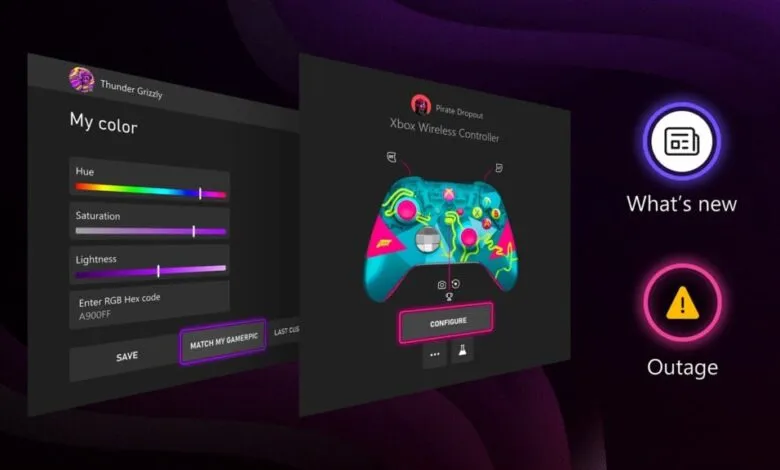
– A new customization option lets users enter a specific hex color code or match a color from their gamerpic, with a preview function.
– Release notes are now accessible from the Home screen’s top navigation, with improved detail on new features, changes, and bug fixes.
– The Xbox Accessories App now shows a visual of the selected controller to help users confirm the correct device when remapping or adjusting settings.
– A new indicator provides transparency when the Xbox network is experiencing an issue, improving user awareness of service outages.
Starting today, Xbox Insiders in the Alpha and Alpha-Skip-Ahead rings are gaining access to four new console features. The rollout began on May 29th and will gradually expand to more members before a wider public release, likely arriving sometime in June or July.
While none of these updates are groundbreaking, they collectively deliver meaningful quality-of-life improvements. Two features stand out: the update release notes now accessible from the Home screen, and the new Xbox service status indicators designed to offer far greater transparency when the Xbox network experiences outages.
Here’s a closer look at each new addition, and we’d love to hear your take in the comments.
1. Expanded Color Customization Options
Responding directly to player feedback, Microsoft is giving you more control over your console’s appearance. You can now enter a specific hex color code for precise customization or use the new “match my gamerpic” feature to pull a color straight from your profile image. Before finalizing your selection, a live preview shows how the color carries across the console interface, making it easier to see the full effect.
2. Quicker Access to Release Notes
After your console updates, the latest release notes are now just a click away from Home’s top navigation. This makes it simple to see what’s new and explore features as they arrive. The notes themselves have also been improved, now including more detail about new features, changes, and major bug fixes.
3. Xbox Accessories App Now Displays Your Controller
Whether you’re using a supported standard or special edition Xbox Wireless Controller, or an Xbox Elite Wireless Controller Series 2, the app now shows you exactly which controller is selected. This is especially useful when remapping buttons or fine-tuning settings, eliminating guesswork and ensuring you’re adjusting the right device.
4. Service Status Indicator for Network Issues
A new indicator will alert you when the Xbox network is experiencing an issue. This feature provides much-needed transparency, letting you know immediately if a problem is on Microsoft’s end rather than your own setup, saving you time troubleshooting a connection that’s actually fine.
(Source: Pure Xbox)