Reusable Digital Polaroids Cover Fridges with Memories
▼ Summary
– The VidaBay Snap is a magnetic digital photo frame that uses NFC and color E Ink to display images without needing a battery charge.
– Updating the Snap’s image takes 25–30 seconds, with the E Ink screen using multiple color pigments that refresh slower than standard e-paper.
– The Snap’s screen only displays black, white, red, and yellow, limiting color accuracy but creating a lo-fi Polaroid-like aesthetic.
– NFC transfers require the smartphone to be held very close, often necessitating removal of the phone’s protective case.
– At $35.99 (discounted to $29.99), the Snap never needs charging, making it a budget-friendly alternative to instant film for fridge decoration.
There’s something heartwarming about opening a friend’s fridge and finding it plastered with Polaroids. Each snapshot tells a story, offering a visual timeline of recent trips, parties, and everyday joys. But the reality of lugging around a bulky instant camera and shelling out for pricey film that may or may not turn out? Less charming. That’s why I’ve become completely obsessed with these magnetic digital Polaroids from a small company called VidaBay. They mimic the look of classic instant photos but use NFC technology and color E Ink screens so you can swap images as often as you like, without ever needing to charge a battery.
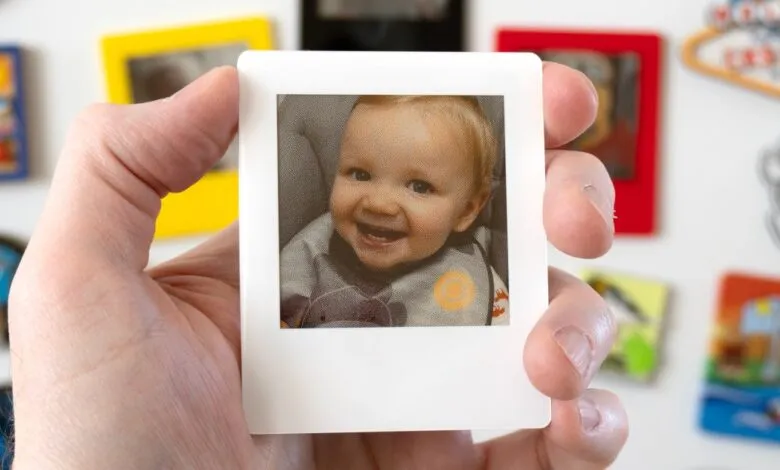
The VidaBay NFC E-Paper Fridge Magnet, also called the Snap, is roughly 4mm thick and 2.5 inches in size. It reminds me of Xteink’s tiny X3 e-reader, but with no buttons, ports, or connectors. Think of it as a miniature version of the Aura Ink digital photo frame, designed to stick right on your refrigerator.
The Snap relies on the same NFC chip that lets your phone act as a credit card. Through a companion mobile app, you transfer images wirelessly by aligning your smartphone’s NFC antenna with the one hidden in the lower left corner of the Snap. Changing the photo takes about 25 to 30 seconds. The actual image transfer is a quick 10-second process, but the rest of the time is spent refreshing the Snap’s E Ink screen. Unlike devices like the Kindle Colorsoft, which use a black-and-white e-paper screen with a color filter for near-instant refreshes, the Snap uses e-paper with multiple color pigments. This takes longer but produces richer results.
The device comes with a removable screen protector printed with an alignment guide for the iPhone. If you’re using an Android phone, you’ll have to locate your device’s NFC antenna yourself. The process is straightforward once you get the hang of it, but it can take a few tries. Out of the box, the plastic screen protector includes a guide for perfect positioning, but it only works for iPhones. Android users are left to figure out their NFC chip location through trial and error. Also, the Snap and your phone need to be held extremely close for the NFC pairing to work , closer than most phone cases allow. My iPhone 16 Pro inside a leather Nomad case wouldn’t work, and even the thin silicone case on my OnePlus 12 was too thick for successful transfers. You’ll likely need to remove your phone’s case every time.
One of the biggest advantages of E Ink displays is that, like an Etch A Sketch or Magna Doodle, once an image appears, it stays on screen without any additional power. That’s why e-readers have such incredible battery life. The Snap features a 2.5-inch E Ink screen that uses color technology similar to larger, more vibrant E Ink posters. However, it’s actually a repurposed Spectra 3100 screen, originally developed by E Ink for retail electronic shelf labels.
The Spectra 3100 screen can only display black, red, yellow, and white. This significantly limits color accuracy. It’s a big tradeoff, but not necessarily a dealbreaker. The VidaBay mobile app lets you crop, zoom, rotate, add filters, and adjust brightness, contrast, and color saturation. Because the transfer takes up to 30 seconds, the app generates a preview of how the image will look on the Snap’s four-color screen. These previews aren’t perfectly accurate, but they give a good sense of how blues and greens will be adapted.
After using the Snap for a couple of weeks, I’ve learned which images work well and which don’t. Bright photos with high contrast and color palettes leaning toward reds and yellows look great. Blue and green areas become completely desaturated rather than disappearing, and the results are surprisingly pleasant. The limitations of the Spectra 3100 screen actually create a lo-fi aesthetic that echoes the charm of classic Polaroid photos.
The Snap has no screen lighting, so it looks best in a spot with plenty of ambient light. It also has a non-removable plastic cover over the E Ink panel for protection, but this creates noticeable glare and reflections. Removing that cover in future versions would definitely improve viewing angles and image quality.
At $35.99 each (currently discounted to $29.99), the VidaBay Snap is almost an impulse buy. When I first covered it earlier this year, I was skeptical about using repurposed grocery store price tag screens for displaying memories. But the price, combined with the fact that the Snap never needs charging, more than makes up for its color limitations. Instant photos might still be cheaper per shot, but the Snap is a fantastic alternative if you don’t want to keep buying film. Either way, your fridge is a blank canvas waiting for memories.
(Source: The Verge)