Windows 11’s Missing Feature: A Modern Task Scheduler App
▼ Summary
– FluentTaskScheduler is a free, open-source, modern interface that acts as a wrapper for Windows’ built-in but dated Task Scheduler, offering a cleaner design and streamlined experience.
– It provides a centralized dashboard for improved task monitoring, featuring a live activity stream, search, and batch operations that address the original tool’s limited visibility.
– The tool supports the same comprehensive triggers and advanced automation controls as the native scheduler, including repetition patterns and reliability options, but with a cleaner configuration workflow.
– A standout feature is its centralized PowerShell Script Library, which allows for storing reusable scripts separately from task configurations to reduce duplication and simplify maintenance.
– While promising, the tool has usability shortcomings, such as an unclear process for adding scripts and creating tasks, and it is an unsupported third-party application used at the user’s own risk.
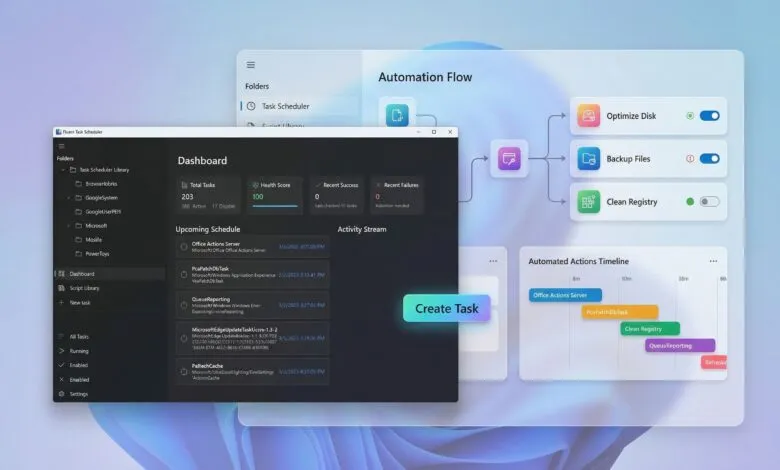
While Windows 11 offers a powerful automation engine through its built-in Task Scheduler, the tool itself feels like a relic from a bygone era. Its clunky, dated interface stands in stark contrast to the modern design language of the operating system, creating a significant barrier for users who want to automate tasks without navigating a complex legacy console. FluentTaskScheduler emerges as a compelling third-party solution, offering a sleek, modern interface that wraps around the reliable Windows scheduling engine, providing enhanced visibility and control without sacrificing the underlying power.
This free, open-source application acts as a modern dashboard for the existing Task Scheduler. Developed independently using WinUI 3 and .NET 8, it delivers a clean Fluent Design interface while utilizing the same robust backend API that Windows has relied on for years. The result is a familiar core functionality presented in a way that feels native to Windows 11.
A primary advantage is the centralized monitoring dashboard. The classic tool buries task history and status behind multiple menus, but FluentTaskScheduler brings this information front and center. Users get a live activity stream, comprehensive history logs, and powerful search tools all in one view, transforming task management from a chore into a streamlined process.
Configuring automation remains comprehensive. The application supports the full range of triggers available in the native scheduler, including time-based schedules, system events like logon or startup, and custom event IDs. Advanced options for delays, expiration dates, and automatic stop conditions are also present, all configured through a more intuitive wizard. It’s worth noting that the process for creating a new task isn’t entirely seamless, you must first select a destination folder, and the inability to create new folders can hinder organization for power users.
For advanced automation, the tool incorporates professional-grade controls. You can set tasks to repeat at intervals, configure automatic restarts on failure, and manage how multiple instances behave, such as allowing parallel runs or queuing new triggers. A standout feature is the centralized PowerShell script library. This allows users to store and manage reusable scripts separately from task configurations, promoting cleaner, more maintainable automation by reducing code duplication across multiple scheduled jobs. During evaluation, the method for adding new scripts to this library was not immediately apparent, indicating an area where the user experience could be polished.
Integration with Windows 11 is thoughtful. The app supports system tray minimization, toast notifications for task outcomes, and startup execution. It also provides granular control over execution context, allowing tasks to run with highest privileges, as SYSTEM, or under a specific user account with adjustable priority levels.
Beyond the graphical interface, FluentTaskScheduler offers a full command-line interface for scripting and headless management. From a command prompt, users can list tasks, run, enable, or disable them, and even export history to a CSV file, all using simple commands. Keyboard shortcuts within the app, like Ctrl+N for a new task or F5 to refresh, further streamline the workflow.
Available as a portable executable from GitHub, the tool requires no installation and runs with a double-click. It’s crucial to remember this is an unsupported third-party application, so users should proceed at their own discretion.
FluentTaskScheduler represents a promising vision for what a modern system utility should be. It successfully addresses the glaring design inconsistency of the old Task Scheduler, wrapping proven reliability in an interface that matches contemporary Windows aesthetics. However, its experience isn’t fully polished; quirks in task creation and an unclear script library workflow show it’s still a work in progress. With further refinement to improve usability and complete these features, it could become an indispensable tool for anyone looking to harness the full power of Windows automation without the outdated interface.
(Source: Windows Central)