8GB RAM on a Mac in 2026: Is It Enough?
▼ Summary
– For many Mac and Chromebook users performing everyday tasks, 8GB of RAM remains sufficient due to efficient memory management by macOS and ChromeOS.
– Windows 11 laptops increasingly treat 16GB of RAM as the new baseline, as the operating system and modern applications consume more memory.
– The adequacy of 8GB of RAM depends heavily on the user’s specific workload, such as basic browsing versus professional creative software or heavy multitasking.
– For future-proofing a laptop purchase, many experts recommend 16GB of RAM to ensure longevity and performance over several years.
– A user’s platform choice is critical, as 8GB often feels more constrained on Windows but can be ample for light-to-moderate use on Macs and Chromebooks.
The question of whether 8GB of RAM is sufficient for a modern laptop depends entirely on your specific workflow and chosen platform. While many new Windows machines now treat 16GB as a standard starting point, Apple’s macOS and Google’s ChromeOS are engineered to use memory more efficiently, making 8GB a viable option for a significant number of users. For everyday computing, this amount of memory can still deliver a smooth and responsive experience without breaking the bank.
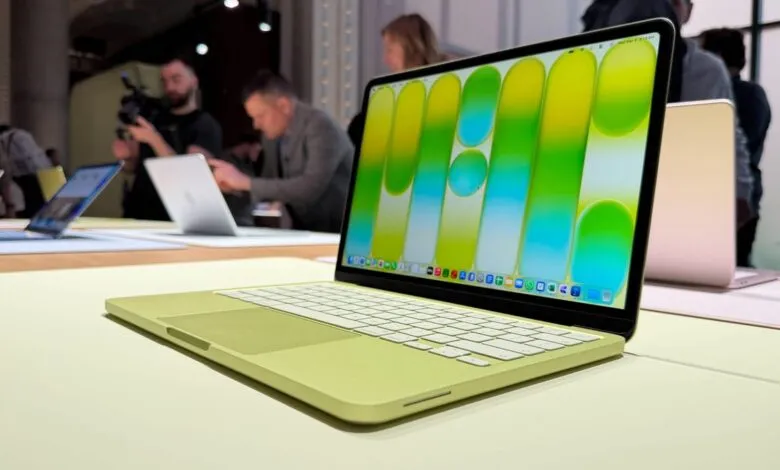
My own daily driver is a 2022 MacBook Air equipped with an M2 chip, 8GB of RAM, and 256GB of storage. It handles my professional workload without complaint. A typical day involves writing, conducting research across numerous browser tabs, light photo editing, and testing various applications, including AI tools. With multiple apps like Chrome, Slack, Canva, and Messages running simultaneously, the system remains snappy and the battery easily lasts a full workday. This firsthand experience suggests that for many, 8GB on a modern Mac is far from obsolete.
However, online discussions often reveal strong opinions against this configuration, with many insisting 8GB is inadequate. Who is correct? The truth is that both perspectives can be valid, as the answer hinges on what you actually do with your computer.
Evaluating 8GB for Mac Users
For macOS, 8GB of RAM remains functional for common tasks thanks to sophisticated memory management. The operating system employs techniques like memory compression and intelligent swapping to SSD storage, allowing it to keep more applications active than the physical RAM might suggest. This is a key reason a Mac with 8GB can often feel more responsive than a Windows PC with the same specification.
If your activities are centered on web browsing, document creation, communication, video calls, and light creative work, 8GB will perform admirably. You may encounter limitations only when pushing the system with heavier demands. Professional-grade software like Adobe Photoshop, running virtual machines, or extreme multitasking can exhaust available RAM. When this happens, the system relies more on slower SSD swapping, which can lead to occasional performance hiccups. You can monitor this using the Activity Monitor app, which provides a detailed look at memory pressure, compression, and swap usage.
A common consideration is future-proofing. Many technology experts now advocate for 16GB as a safer baseline for a new laptop purchase, especially if you plan to keep the device for several years. If you anticipate your needs growing or simply want the peace of mind that comes with extra headroom, opting for more memory is a prudent choice.
My personal approach has evolved. Earlier in my career, I consistently purchased maxed-out MacBook Pros, convinced I needed the ultimate power. I later realized, through using corporate-issued MacBook Air models, that a more modest configuration was perfectly capable. Today, with a more budget-conscious mindset, I use devices until they are no longer serviceable and buy only what I genuinely require. For my current needs, 8GB is plenty.
A Quick Look at Windows and Chromebooks
The story changes when we look at other platforms. On Windows 11, 8GB often feels restrictive. The operating system and its background services consume a substantial amount of memory before you even launch your primary applications. While 4GB is the official minimum, the consensus among experts is that 16GB is the practical starting point for a comfortable Windows experience, particularly with the rise of AI-enhanced PCs. Fortunately, finding budget Windows laptops with 16GB of RAM has become increasingly common.
For Chromebooks, the equation is different. ChromeOS is designed around web applications and manages memory aggressively by suspending inactive tabs. While 4GB can suffice for very basic use, 8GB is the recommended sweet spot for most users. It comfortably handles multitasking across Workspace apps, email, streaming, and browsing with multiple tabs. Google’s Chromebook Plus standard even mandates 8GB as a baseline for its higher-performance tier.
Making the Right Choice for You
To simplify the decision, consider your primary use cases:
8GB is sufficient for basic tasks (email, documents, streaming), general web browsing, and light creative work like simple image editing in Canva. It’s also an ideal fit for students and anyone on a strict budget.Ultimately, purchasing an 8GB laptop in 2026 is a reasonable decision for a specific user. For Mac and Chromebook users focused on light to moderate computing, it remains a perfectly capable configuration. However, for Windows users or anyone whose work involves demanding multitasking and creative applications, aligning with the industry shift toward 16GB as the new baseline is the wiser path to ensure a seamless and future-ready experience.
(Source: ZDNET)