Pixel Launcher Search Bar Loses M3 Redesign in Android 16 QPR3
▼ Summary
– The Android 16 QPR3 March update removed the redesigned Material 3 Expressive search bar from the Pixel Launcher homescreen.
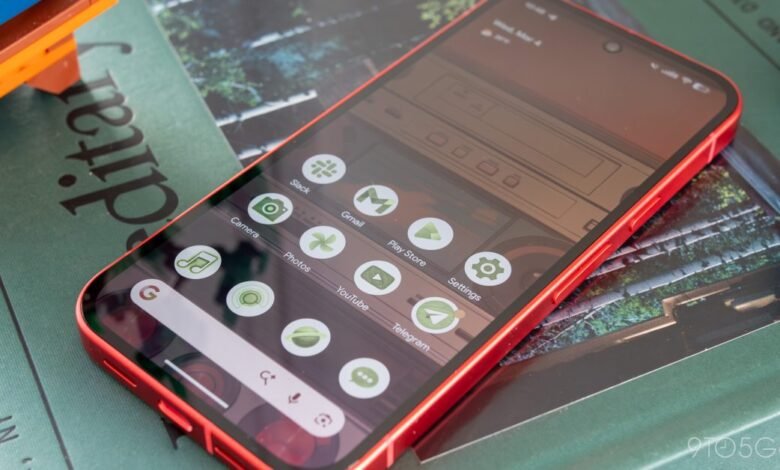
– The new layout reverts to an older, cluttered design where all icons are in a single container, unlike the previous separated pill design.
– A functional benefit is the ability to long-press the bar to customize the AI Mode shortcut with various options or disable it entirely.
– This change aligns the Pixel Launcher search bar with the Google app’s widget, indicating the Google app now owns this interface element.
– The design change, which first appeared in Android 17 Beta 1, is now live in Android 16 QPR3 and appears to be permanent.
The latest Android 16 QPR3 update for Pixel devices has introduced a notable design shift, rolling back the modern Material 3 Expressive search bar on the homescreen to a previous, more cluttered layout. This change follows the earlier transition where the Pixel Launcher’s native search functionality was replaced by the Google app, signaling a deeper integration of Google’s services at the expense of Pixel’s distinct design language.
Last year, users welcomed a cleaner search bar design that embraced Material 3 principles. The interface featured a cohesive pill-shaped container for the ‘G’ logo, microphone, and Lens icon, with a separate circular button for the AI Mode shortcut on the right. This layout provided clear visual separation and a lighter aesthetic. The new update in QPR3 eliminates that thoughtful design, reverting to an older style where all elements are crammed into a single bar. Now, the AI Mode icon sits directly to the left of the microphone, creating a side-by-side lineup of three icons that many find visually busy and less intuitive. The loss of the dedicated pill container is a significant step backward in user interface clarity.
A practical upside to this redesign is an enhancement in customization. Long-pressing the search bar now allows users to tailor the AI Mode shortcut directly. The available options have expanded to include Live, Translate (text), Song Search, Weather, Translate (camera), Sports, Dictionary, Homework, Finance, Saved, and News. As before, users retain the choice to disable the shortcut completely. This functionality brings the Pixel Launcher’s search bar in line with the Google app’s own Search widget, which had previously received the now-removed Material 3 update.
This design regression, coupled with the prior shift from Pixel Launcher search to the Google app, underscores a strategic move. The bar at the bottom of the screen is increasingly becoming a direct extension of the Google app, mirroring the experience found on many other Android phones. The focus appears to be on enhancing AI Mode integration and feature uniformity across Google’s ecosystem, even if it means sacrificing the cohesive design identity that previously distinguished Pixel software.
This altered search bar first appeared briefly in an early Android 17 beta before being temporarily reverted. Its return and stable release in Android 16 QPR3 strongly suggests this is not a test but a permanent change. For Pixel users who valued the clean, modern interface, the update represents a functional trade-off, offering more customization at the cost of a polished visual design.
(Source: 9to5Google)