Google’s Quick Share Now Works Like AirDrop on Pixel 9
▼ Summary
– Google is expanding its Quick Share feature with AirDrop compatibility to the Pixel 9 series, including the Pro, Pro XL, and Pro Fold models.
– To share files from Android to Apple devices, the Apple user must set AirDrop to “Everyone for 10 minutes” and accept the incoming transfer.
– The feature is rolling out in phases over the coming weeks and requires Pixel 9 users to install a Quick Share Extension update via Settings.
– Google implemented this direct, peer-to-peer connection to ensure security and privacy, with no data routed through servers or logged.
– The initial rollout excludes the Pixel 9a, though Google later updated its announcement to include the Pixel 9 Pro Fold.
Google’s Quick Share feature is now expanding its cross-platform capabilities, bringing a seamless file-sharing experience similar to Apple’s AirDrop to the latest Pixel 9 series. This update allows users to send files directly from their Pixel 9, 9 Pro, 9 Pro XL, or 9 Pro Fold devices to iPhones, iPads, and Mac computers. The functionality is rolling out in phases and should be fully available in the coming weeks.
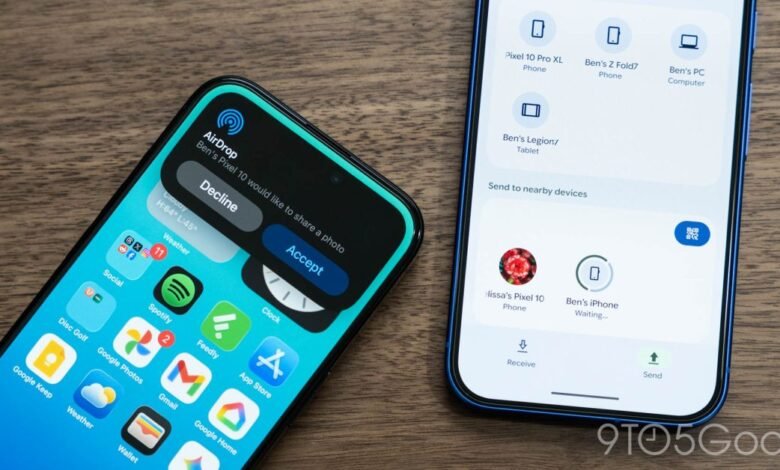
To use this feature, the process is straightforward. The person receiving the file on their Apple device needs to open their AirDrop settings and temporarily set the receiving option to “Everyone for 10 minutes.” On the Android side, you simply open Quick Share as usual. Your nearby Apple device should appear in the list of available targets. Once you select it, the recipient just needs to accept the incoming transfer on their screen.
Getting started requires a quick update on your Pixel. You’ll need to install the Quick Share Extension. To do this, open the Settings app, search for ‘System services,’ and then scroll to the ‘Available Updates’ section. Here, you will find the Quick Share Extension; just tap it and select ‘Update.’
A key advantage of this system is its direct, peer-to-peer connection. Google developed this integration independently, with a strong focus on security. Because the transfer happens directly between devices, your data is never uploaded to or routed through an intermediary server. This design means shared content is not logged, and no additional personal data is exchanged during the process.
Google has also expressed openness to working with Apple to refine the experience further. Ideally, future collaboration could enable a “Contacts Only” mode within AirDrop, which would make the sharing process even more intuitive and secure by limiting visibility to people in your address book.
It’s important to note that this initial rollout does not include the Pixel 9a model. The feature is specifically for the higher-end Pixel 9 series devices, including the Pixel 9 Pro Fold.
(Source: 9to5 Google)