Asus Zenbook Duo (2026) Review: Is the Dual-Screen Premium Worth It?
▼ Summary
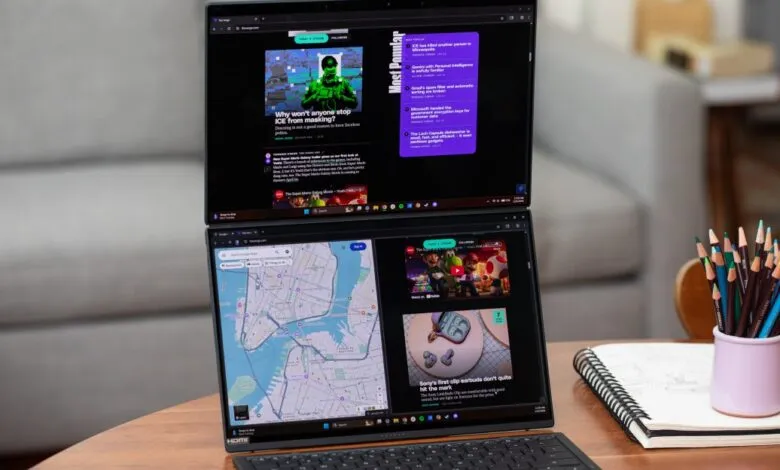
– The 2026 Asus Zenbook Duo is a dual-screen laptop featuring two 14-inch OLED displays connected by a redesigned hinge that brings them closer together for a more seamless look.
– It is powered by a new Intel Panther Lake CPU, offers strong performance and multitasking capability, and has a large 99Wh battery providing over 14 hours of life in tests.
– The laptop transforms quickly into dual-screen mode using a detachable keyboard with a built-in kickstand, but it is relatively heavy and thick for a 14-inch device.
– While the dual-screen setup is highly versatile and productive, it has minor drawbacks like blocked ports in vertical orientation and some clunky software for screen management.
– The reviewed configuration costs $2,299.99, which is $500 more than the previous generation, but the device is presented as a powerful and efficient recommendation for a dual-screen laptop.
For anyone seeking a serious productivity boost, the single most effective upgrade is adding a second screen. The Asus Zenbook Duo (2026) makes that portable reality with its refined dual-screen design, delivering a powerful and versatile computing experience that feels genuinely futuristic. This latest iteration features twin 14-inch OLED displays connected by a new hinge that positions them closer together on a single plane, creating a far more seamless visual workspace than earlier models. While the form factor might seem unusual initially, the utility of having a complete twin-monitor setup anywhere you go is undeniable. Beyond the impressive screens, this model introduces a textured Ceraluminum finish, a substantially larger battery, and the crucial addition of a new Intel Panther Lake CPU. This combination of streamlined design, all-day endurance, and robust performance makes the Duo a compelling dual-screen machine for a wide audience.
Our review unit, expected to launch in early 2026, is configured with an Intel Core Ultra X9 388H processor, 32GB of RAM, and 1TB of storage, priced at $2,299.99. This represents a $500 increase over the previous generation with comparable specifications. The performance delivered by the Panther Lake chip is exceptional, providing both power and efficiency. It handles intensive multitasking with ease, accelerates content creation in Adobe applications, and manages gaming quite well at 1080p or 1200p resolutions. Notably, it maintains near-full performance even when running on battery power, a rare feat for Windows laptops.
Battery life is a standout achievement. The massive 99Wh battery lasted over 14 hours in our standardized test. In practical daily use, I consistently worked through an eight or nine-hour day with both screens at high brightness and still had power to spare. One particularly demanding six-hour session in dual-screen mode, with both panels at 80% brightness and multiple Chrome tabs and applications running across two virtual desktops, only drained the battery from 100% to 24%. Using it as a standard clamshell laptop with just one screen active extends that endurance even further.
Transforming the Duo from a conventional laptop into its dual-screen powerhouse is remarkably quick. You simply detach the keyboard deck from its magnetic pogo pins and deploy the integrated kickstand. The keyboard itself offers a pleasantly tactile typing experience with 1.7mm of key travel, and the accompanying mechanical trackpad is responsive. When detached, the keyboard operates via Bluetooth for up to 11.6 hours with its backlight on, though I found it easy to keep charged by periodically reattaching it to the main unit.
Compared to its closest rival, the Lenovo Yoga Book 9i, the Zenbook Duo is more travel-friendly. It features a built-in kickstand rather than a separate folio case, and its keyboard includes a trackpad. You can also close the laptop lid with the keyboard stored inside, resulting in a tidier package for your bag. The Zenbook also wins on connectivity, offering a better variety of ports including a USB-A port and a full-size HDMI 2.1 connection. The trade-offs are that the Duo doesn’t fold back into a tablet mode, and it is somewhat hefty at 3.65 pounds and nearly an inch thick at the hinge.
The experience of having abundant, integrated screen real estate is transformative. It allows for effortless app tiling, simplifies working on two documents side-by-side, and in a vertical orientation, provides a more flattering, eye-level webcam angle. However, this innovative design does introduce some minor friction. Using the laptop in its vertical orientation blocks some ports and can muffle half of the six speakers, affecting audio balance. Windows also requires a quick settings adjustment to designate the correct main display when oriented on its side, ensuring the taskbar stays in the proper corner.
Asus includes its ScreenXpert software to help manage the dual-screen environment, which is useful for launching app groups across both displays. Still, the interface can feel clunky, and the multi-finger touch gestures for summoning virtual controls are not particularly intuitive.
Despite these small quirks, the Zenbook Duo’s usefulness and versatility are overwhelmingly positive. It’s a uniquely capable device backed by strong performance and excellent battery life. Asus has refined this concept into an easy recommendation for those wanting to maximize productivity on the go. The company plans to release a more affordable version with a previous-generation Arrow Lake chip later in the year, alongside a new dual-screen gaming laptop, the Zephyrus Duo. While dual-screen laptops remain a niche category, the Zenbook Duo demonstrates they deserve a much broader appeal.
(Source: The Verge)