Ditch Dual Monitors: Try This Budget-Friendly Setup
▼ Summary
– Dual monitors increase desktop space but consume significant desk space and require multiple video ports.
– Using two monitors can lead to color inconsistencies between screens unless they are professionally calibrated.
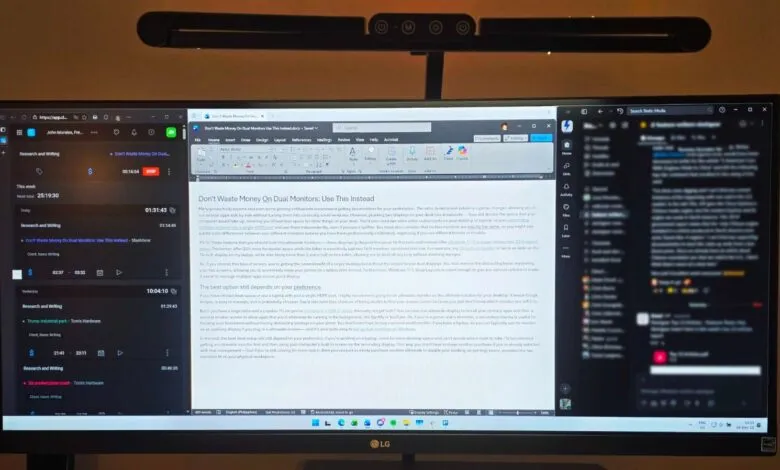
– Ultrawide monitors offer wider aspect ratios, providing more horizontal space without needing two separate displays.
– An ultrawide monitor eliminates the distracting bezel found between dual monitors, creating a seamless viewing experience.
– Operating systems like Windows 11 include features such as Snap Layouts to help manage multiple applications on a single large screen.
For those seeking a significant boost in desktop real estate without the clutter and complexity of a dual-monitor arrangement, ultrawide monitors present a compelling and often more budget-friendly alternative. Traditional dual setups, while popular, introduce several practical challenges that can hinder a streamlined workspace. They consume a considerable amount of desk space, demand multiple video outputs from your computer, and can suffer from visual inconsistencies like color mismatches and the intrusive physical bezel between the two screens.
The core advantage of an ultrawide display lies in its expansive, unified screen. By adopting aspect ratios like 21:9 or the exceptionally wide 32:9, these monitors deliver a seamless canvas that eliminates the central divider. This means you can view multiple application windows side-by-side without the visual interruption, creating a more immersive experience for both work and entertainment. The seamless, bezel-free viewing area is a major productivity and gaming advantage, allowing for smoother multitasking and a more engaging widescreen format for movies and games.
From a technical standpoint, moving to a single ultrawide simplifies your setup. You only need one video cable and one compatible port on your PC or laptop, reducing cable clutter and compatibility headaches. There’s also no need to worry about calibrating two separate panels to achieve uniform color and brightness; what you see is consistent across the entire display. Modern operating systems are well-equipped to handle these large screens. Features like Windows 11 Snap Layouts make organizing multiple apps on one giant screen intuitive and efficient, offering preset window arrangements that maximize the available space.
Ultimately, an ultrawide monitor consolidates the benefits of a multi-screen workstation into a single, elegant solution. It provides the coveted screen real estate for enhanced productivity, offers a superior, uninterrupted viewing experience for media, and does so while often freeing up desk space and simplifying your technical setup. For many users, this represents a smarter, cleaner upgrade path than managing two separate displays.
(Source: SLASHGEAR)