Hands On: RayNeo Air 4 Pro XR Glasses Work With Switch 2
▼ Summary
– The RayNeo Air 4 Pro AR glasses feature dual 1080p screens with 120Hz refresh rates and four Bang & Olufsen speakers, designed to provide a large-screen experience.
– They connect via USB-C to devices supporting video output, but require a separate RayNeo JoyDock for use with the Switch 2; the included bracket only worked with the original Switch.
– Compared to Viture Beast XR glasses, the RayNeo glasses have a more limited 47-degree field of vision, fixed image display (no floating option), and slightly weaker audio.
– Despite lacking some features, the image is bright, sharp, and detailed, and the glasses cost about half the price of Viture’s offering.
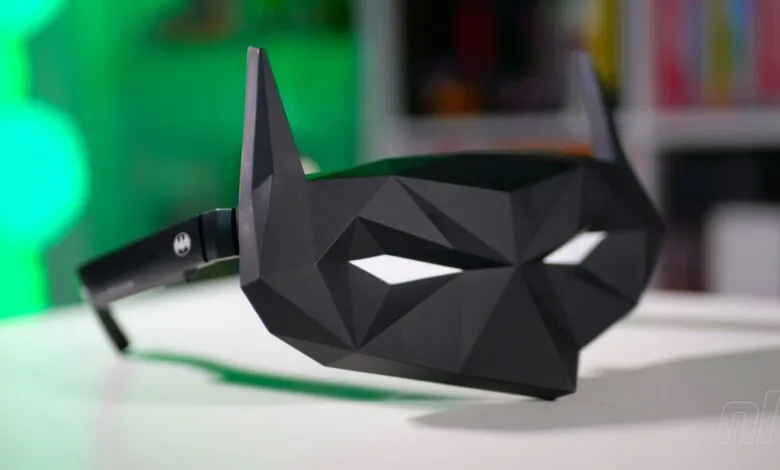
– Special Batman-themed “Justice” and “Chaos” SKUs include a plastic eye shade mask and display stand, though the mask’s novelty may wear off for some users.
The recent boom in lightweight, high-resolution displays has flooded the market with so-called AR glasses that promise a cinematic experience without the need for a massive television. We’ve already gone hands-on with the Viture XR glasses and the pricier Viture Beast XR glasses, the latter costing more than a Switch 2 console. Now, the RayNeo Air 4 Pro enters the fray as a more budget-friendly alternative that still delivers on the core promise.
At first glance, the RayNeo Air 4 Pro look like oversized sunglasses. Slip them on, however, and your field of view is transformed by what feels like a large-format screen. This effect is achieved through two 1080p displays running at a 120Hz refresh rate, with the added flair of four Bang & Olufsen speakers embedded in the arms. The connection is straightforward: a USB-C cable links the glasses to any device that supports video over USB-C.
For this hands-on test, the focus was on Switch 2 gaming, and like the Viture Beast XR glasses, a separate dock is required to unlock this functionality. The RayNeo JoyDock is undeniably sleeker and more visually appealing than Viture’s offering. However, there is a notable hiccup: the included attachment I received only works with the original Switch, not the Switch 2. This forced me to lay the JoyDock and console flat on the sofa, which is less convenient than the Viture setup. (RayNeo does offer a Switch 2 bracket, but I was unable to test it.)
Picture quality is a strong point for the RayNeo Air 4 Pro. The image is sharp, detailed, and bright, making Switch 2 games look fantastic. That said, I missed the deep customization options found on the Viture Beast XR glasses. With the RayNeo, the display is fixed, whereas Viture allows you to toggle between a floating and a fixed screen. The field of view is also more restricted here at 47 degrees, compared to Viture’s 58 degrees. Audio performance is slightly weaker, though the bundled “Air Tunnel” silicone attachments help direct sound into your ears, albeit with some fiddling.
The HDR10 support is a feature the Switch 2 naturally supports, but I struggled to notice a significant difference with it enabled. Even without HDR, the image remains punchy and vibrant. Considering these glasses cost roughly half the price of the Viture ones, this level of performance is quite impressive.
The RayNeo Air 4 Pro does have one unique trick up its sleeve: the ability to “be” Batman. The glasses are available in special Justice and Chaos SKUs that come in Batman-themed packaging with the logo on the arms. The real draw is the plastic eye shade that ships with the glasses, offering a Batman or Joker option, plus a stand for display. While the novelty is amusing, I doubt I would use the mask attachment regularly, though I can see its appeal for certain fans.
Ultimately, the RayNeo Air 4 Pro glasses fill a solid niche. They are not as feature-rich or impressive as the Viture Beast XR glasses, but they cost about half the price. For anyone who lacks constant access to a big-screen TV, these glasses deliver a large-screen experience in any environment, making them a compelling and more affordable option.
(Source: Nintendo Life)