Samsung’s 2026 Ecosystem: Is It Worth Going All-In?
▼ Summary
– A cohesive Samsung ecosystem provides exclusive, time-saving features that enhance the user experience when multiple devices are paired together.
– Pairing a Galaxy Watch with a Samsung phone unlocks key features like alarm syncing and health monitoring tools (blood pressure, ECG, sleep apnea detection) that are unavailable with other Android phones.
– Galaxy tablets gain functionality like call continuity, clipboard syncing, and the “use phone as toolbar” feature for Samsung Notes when used with a Samsung phone.
– Galaxy Buds offer higher fidelity audio via the Samsung Seamless Codec and enable smart device switching for audio when connected within the Samsung ecosystem.
– Galaxy Book laptops integrate deeply with other Samsung devices through features like Multi Control for cross-device control and specialized file-sharing options like Storage Share and Quick Share.
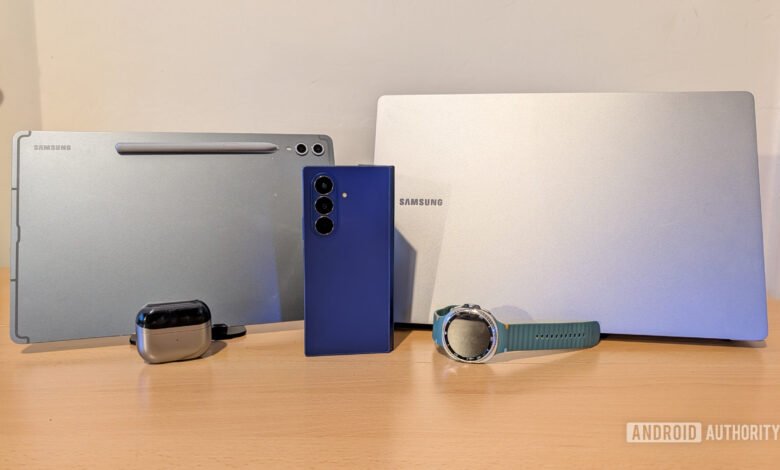
In today’s connected world, the true value of technology often lies in how well devices work together. Samsung has built a comprehensive ecosystem where its phones, watches, tablets, earbuds, and laptops integrate in ways that can genuinely simplify daily tasks. This seamless interaction isn’t just a marketing concept; it translates into tangible benefits that save time and reduce frustration. For anyone considering multiple Samsung products, understanding these interconnected advantages is key to deciding if committing to a single brand is the right choice.
Wearables like the Galaxy Watch unlock their full potential primarily when paired with a Samsung phone. While the watch functions with any Android device, exclusive features become unavailable otherwise. The loss of alarm syncing after Google’s 2025 update to its Clock app is a prime example, removing the convenience of managing alarms directly from your wrist. More significantly, three advanced health monitoring features, blood pressure, ECG, and sleep apnea detection, are entirely restricted to the Samsung phone pairing. For some users, these are critical tools. Personal experience underscores their importance; a Galaxy Watch’s detection of plummeting blood oxygen levels was instrumental in diagnosing a severe case of obstructive sleep apnea.
The experience with a Galaxy tablet is dramatically enhanced within the Samsung ecosystem. Features like call continuity allow you to answer or switch an ongoing phone call seamlessly to the tablet’s speakers and microphone. Universal clipboard syncing is another daily time-saver, letting you copy a two-factor authentication code on your phone and instantly paste it on your tablet. A particularly clever integration is the “use phone as toolbar” function in Samsung Notes. This sends all the drawing tool controls to your phone’s screen, decluttering the tablet display for a cleaner sketching or note-taking canvas.
For photography enthusiasts, the Expert RAW app gains powerful functionality. With a simple toggle, you can set photos taken on your phone to auto-sync to a connected Samsung tablet or PC via Quick Share. This automatic transfer is perfect for those who prefer editing on a larger screen with tools like Adobe Lightroom and the S Pen, eliminating manual file shuffling.
Galaxy Buds also see a notable upgrade in performance when connected to Samsung hardware. The proprietary Samsung Seamless Codec (SSC) delivers higher fidelity audio compared to standard codecs used with other devices. Perhaps more impactful is intelligent device switching. The earbuds can automatically pause music from your phone and switch to audio playing on your tablet or laptop, creating a fluid, interruption-free listening experience across your devices.
The integration with Galaxy Book laptops might be the ecosystem’s most compelling aspect. Features like Samsung Multi Control allow you to operate your phone or tablet directly from the laptop’s keyboard and mouse, making it easy to drag and drop files or reply to messages without touching the mobile device. For file management, Storage Share makes your phone’s storage appear in Windows File Explorer, while Quick Share lets you send files to the laptop from anywhere in your home.
Audio performance with Galaxy Buds on a Galaxy Book is also superior. Unlike the latency and connection issues often experienced with non-Samsung Windows PCs, the laptop supports the SSC codec for better sound and sync, making it viable even for gaming or video watching. A centralized “Nearby Devices” hub on the taskbar simplifies managing all connected Samsung gear.
Pre-installed Samsung apps on the laptop add further cohesion. Samsung Pass offers a secure, syncing password manager across all devices, while Samsung Notes ensures your annotations and PDF markups are instantly available everywhere, working more seamlessly than the version downloaded from the Microsoft Store.
So, is investing in the full Samsung ecosystem worthwhile? The evidence suggests it can be. The features unlocked by pairing Samsung devices are not mere gimmicks; they are practical, daily enhancements that streamline work and personal use. From health monitoring and creative workflows to file management and audio control, the synergy is real. If you already own one or two Samsung products and are shopping for another, the deepened integration presents a strong argument for staying within the brand. The collective experience is greater than the sum of its individual parts, offering a level of convenience that standalone devices simply cannot match.
(Source: Android Authority)